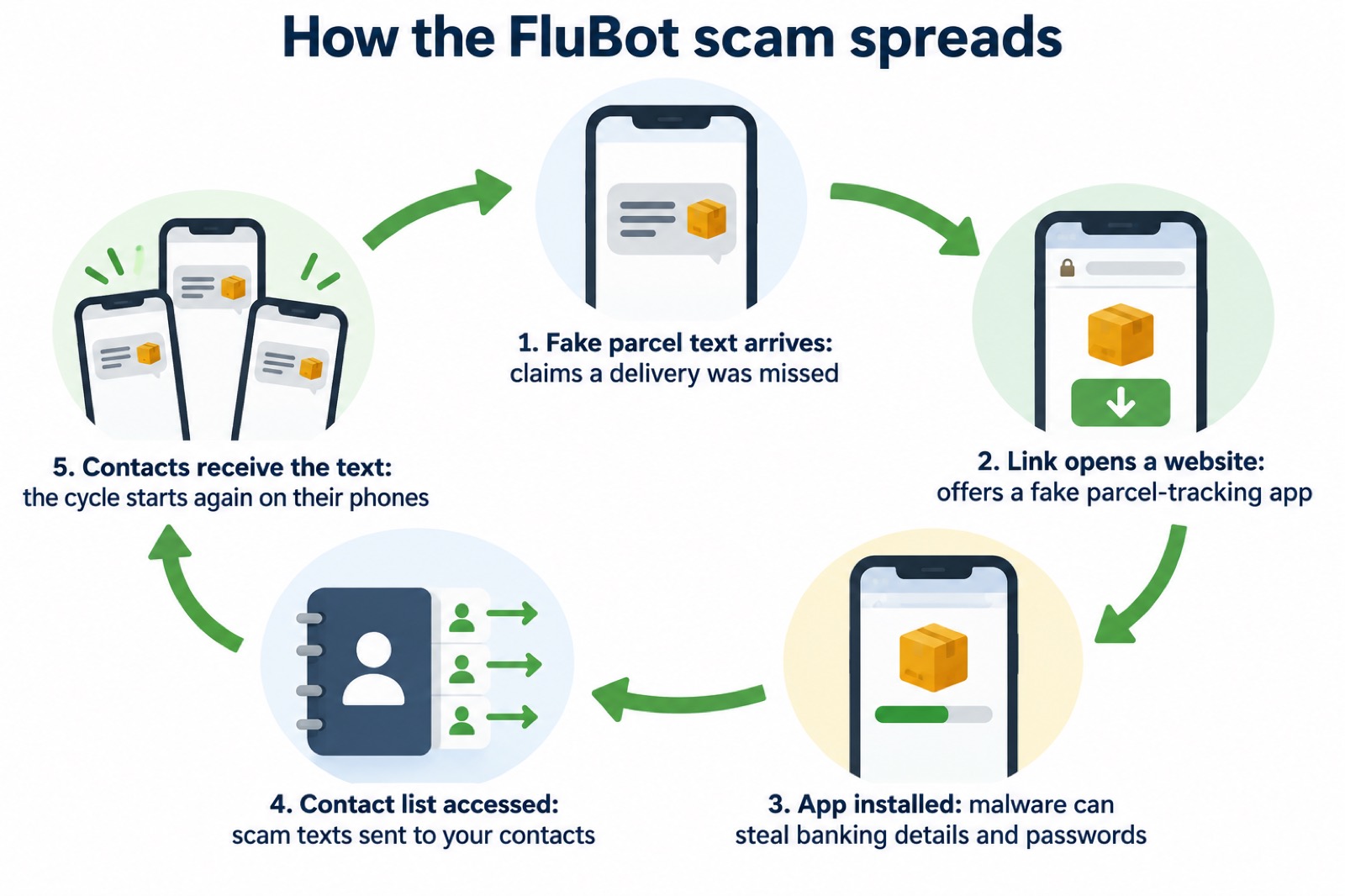
A text arrives saying you missed a parcel delivery and need to install an app to rearrange it. The app is malware. The National Cyber Security Centre (NCSC) warned in April 2021 that cyber criminals were tricking UK citizens into downloading malware this way, through links to fake "official" delivery and parcel-tracking apps, and named the most notorious of these malware strains FluBot1. If installed, it can steal your banking details, passwords and other sensitive information, and it sends more scam texts to your contacts from your own phone1.
What you do next depends on how far you got. If you only received the text, forward it to 7726 and delete it3. If you clicked the link but did not enter details or install anything, the NCSC says it is unlikely you need to take further action4. If you installed the app, do not log into any accounts, contact your bank immediately, and factory reset the phone as soon as you can1.
What a FluBot text looks like
The scam works because the message looks ordinary. You are told a parcel could not be delivered, or that a delivery fee is owed, and you are invited to tap a link to rearrange the delivery or track the parcel. The link does not go to a delivery company. The NCSC explains that the purpose of a scam text is to get you to click a link that takes you to a website criminals use to download viruses or steal passwords and personal information6. In this case the website offers an app that claims to be an official parcel-tracking tool.
The NCSC's guidance on the missed parcel scam covers texts that pose as well-known delivery and retail brands, including DHL, Amazon, Asda and Argos, or generic "your parcel" references1. Mobile network O2's own security guidance, updated in February 2025 and again in June 2026, likewise states that the FluBot scam affects Android devices and arrives as texts posing as well-known delivery and retail brands. If you have an Apple device, the NCSC states it won't be affected, and you can just delete the message3.
Two things make these texts effective. First, timing: the NCSC notes this type of scam is even more prevalent around the festive period, because many of us will be expecting deliveries2. Second, the criminals often know something about you. The NCSC warns that after a data breach, criminals use stolen information within scam emails and text messages so that they appear legitimate, and may pretend to be from an organisation that has suffered a recent breach7. A text that arrives when you are genuinely expecting a parcel feels plausible, and that is the whole trick.
Signs the NCSC and Ofcom point to across scam messages include links or attachments that cannot be trusted, and messages urging you to act immediately or within a limited timeframe8. Our page on phishing covers how to spot these messages across email, text and calls.
You got the text but did not click: report it and delete it
If a suspicious parcel text arrives and you have not tapped anything, the steps are simple. The NCSC's advice is: do not click the link in the message, do not install any apps if prompted, forward the message to 7726, then delete the message2.
7726 is a free spam-reporting service provided by phone operators1. Most phone providers are part of a scheme that lets customers report suspicious texts for free by forwarding them to 7726, so your provider can investigate the origin and block or ban the sender if it is malicious6. Reporting is not just housekeeping: the NCSC says it reduces the amount of scam texts you receive, makes you a harder target for scammers, and protects others from cyber crime online10. A community risk register published in 2025 confirms that most UK mobile customers can use the number, whichever network they are on11.
If you would rather report in another way, you can take a screenshot or picture of the scam text, add it to the main content of an email and send it to the NCSC's reporting address6. Our page on how to report a scam text walks through this in more detail.
Clicked the link but did not install anything: your phone is not infected
Many people tap the link before their caution kicks in. The NCSC's position is reassuring here: if you have not entered any personal information, downloaded any files, or installed software, it is unlikely you need to take further action4. Clicking alone does not install FluBot. The malware arrives when you go further and install the app the website offers.
That comes with two conditions. First, do not enter any details on the website the link opened. Ofcom's guidance on scam texts makes the same point from the other side: scam texts often include links or attachments which cannot be trusted, so do not click on them, and if you have clicked, enter nothing8. Second, stay alert afterwards. The NCSC advises keeping an eye on emails and notifications on your accounts to check for any suspicious activity4.
If you entered details on the website but installed nothing, treat it as a phishing incident rather than a malware one: follow the steps on our page about what to do after clicking a phishing link.
You installed the app: what FluBot can do
This is the serious case. The NCSC is plain about the consequences: if installed, this malware can steal your banking details, passwords and other sensitive information1. It is a banking trojan, meaning it watches what you do on your phone and captures the credentials you type, including into banking apps and websites.
The second effect spreads the scam further. The malware will also attempt to access your contact list and send scam SMS messages to those numbers, helping the malware spread1. So the fake parcel text your mother or neighbour received may have come from your phone, sent without your knowledge. This is why reporting matters even after the event: your contacts are now targets.
Because the malware may steal details as you type them, the NCSC's instruction is firm: do not log into any accounts on the infected phone1. Not your bank, not your email, not anything. Every login you attempt on the infected device hands the criminal another set of credentials. Instead, as soon as you can, perform a factory reset on the device1.
One further warning from the NCSC: a phone call telling you your device is infected and offering to clear it up is itself a common scam, with the caller often claiming to be from a trusted company such as Microsoft or your internet service provider12. If someone calls you about FluBot, hang up. No legitimate service will cold-call you about malware on your phone.
Contact your bank urgently if you use online banking
If you installed the app and you use online banking, treat your banking credentials as compromised and act before anything else. The NCSC's advice for anyone who has shared banking details with a scammer is to contact your bank immediately and let it know; if you use online banking, you can cancel your cards online4. Suffolk County Council's winter safety advice gives the same instruction for anyone who has lost money or given a scammer their financial details: contact your bank immediately13.
How you contact the bank matters as much as when. Use the bank's official website or phone number, never the contact details in a message you were sent5. The NCSC's online shopping guidance is explicit: do not use the contact details provided, or click on any links you are sent5. A scammer who has your details may follow up with a fake call or text pretending to be your bank, so verify independently.
Then check for damage. The NCSC advises keeping a look-out for unauthorised purchases and checking your bank accounts for any unusual transactions14. If you have lost money, tell your bank and report it as a crime to Report Fraud for England, Wales and Northern Ireland, or to Police Scotland if you are in Scotland15. Our pages on what to do if you lost money to a scam and on checking whether a bank message is genuine cover both steps.
Remove the malware with Google Play Protect or Huawei's scanner
After the bank call, deal with the infection. On Android devices, the NCSC says to make sure Google's Play Protect service is enabled; some Huawei devices provide a similar tool to scan devices for viruses1. Play Protect is Google's built-in scanning service, and on Huawei phones without Google services, Huawei's own scanner does the same job.
Run a full scan and let it clean up what it finds. The NCSC's general advice when you think a device has been compromised is to open your antivirus software if you have it, run a full scan, and allow the software to clean up any problems it finds4. The same principle applies to Play Protect on a phone.
Be realistic about what a scan can achieve. The NCSC notes that on phones and tablets, antivirus products do not work in the same way as they do on PCs and laptops, and the safest solution is a factory reset16. A scan is worth running, and it may clear the infection, but if the scan does not resolve the problem, or if the NCSC's own guidance for your situation points straight to a reset, do not keep trying to clean the phone by hand. Our page on antivirus for phones and tablets explains the difference in more detail.
Factory reset when the scan does not work
The factory reset is the NCSC's recommended fix for an infected phone, and it is more drastic than a scan. On most phones you can perform a factory reset by accessing the Settings; the NCSC advises referring to the device manufacturer's website for specific details, and notes it may be referred to as "Erase all content"1. The reset returns the phone to its original state and removes the malware along with everything else.
Do not log into any accounts on the phone before you reset it, as the malware may steal those details1. This bears repeating because it is the instinct that catches people out: the moment you think "let me just check my email first", you hand over another password. Use a different device if you need to check anything while you decide.
The reset erases your photos, messages, apps and settings. That is the price of removing the malware with certainty, and the NCSC's guidance is unambiguous that it is the safest solution for phones and tablets16. Our page on whether to factory reset an infected phone goes through the decision, and the same principle applies when preparing a device to pass on: the NCSC advises a factory reset before selling or giving a device to someone else, to remove all your personal data18.
Never restore a backup made after the app was installed
The backup rule is where people undo all the good work of a reset. The NCSC's guidance is direct: it is important that you do not back up your data before you perform a factory reset, as the backup will also contain the malware1. A backup taken after the app was installed carries the infection with it, so restoring it puts FluBot straight back on the clean phone.
The same principle appears across the NCSC's recovery guidance. Before you restore from a backup, confirm that it is free from any malware19. A backup from before the infection, or one you can verify is clean, is safe to restore. Anything created after you installed the app is not.
This is also why backups belong before the emergency, not during it. The NCSC advises regularly creating a backup copy of your important files, such as photos, documents and other files that cannot be replaced20. If you have backups you can recover, you cannot be blackmailed over them, and a factory reset becomes an inconvenience rather than a loss. Our pages on backing up files and photos at home and how often to back up set out the options, including cloud backup versus an external drive.
Protecting your phone from the next fake parcel text
FluBot was disrupted, but the technique it used has not gone away, and the NCSC's advice remains the standing defence. The core habits are simple and cost nothing:
- Do not install apps from links in texts. The NCSC's first instruction is not to click the link and not to install any apps if prompted1. Genuine delivery firms do not distribute their apps this way.
- Keep Google Play Protect enabled on Android devices; on some Huawei devices, use Huawei's own virus-scanning tool1.
- Report suspicious texts to 7726. Reporting reduces the scam texts you receive, makes you a harder target, and protects others10.
- Verify independently. If you have any doubts about a message, contact the organisation directly using details from its official website, not the numbers or address in the message21.
- Back up what you cannot replace, so that a future infection costs you a reset rather than your photos20.
The NCSC also warns that criminals trick you into revealing passwords by creating fake phishing emails and SMS messages that link to scam websites22, so the same caution applies to any unexpected message, not just parcel texts. Scam messages after a data breach often use official-sounding language about resetting passwords, receiving compensation, scanning devices or missed deliveries, and urge you to act immediately9. Urgency is the tell. Our home online security checklist and page on protecting accounts with passwords and 2-step verification pull these habits together.
A related scam: sextortion emails that quote your password
People targeted by one scam often receive others, and the NCSC treats sextortion as part of the same phishing family. A sextortion scam is when a criminal attempts to blackmail someone, usually by email, claiming to have login details or a video of the victim visiting an adult website, and threatening to disclose this unless the victim pays a ransom, often in Bitcoin23. It is an example of a phishing attack, where victims receive emails that try to trick them into doing the wrong thing23.
These emails are made more credible by plausible technical details about how the supposed video was captured, and sometimes include one of your real passwords24. The NCSC's advice is not to worry if the message includes your password, as it is probably from an old breach of personal data, but to change that account password immediately, and anywhere else you use the same password25. Criminals send millions of these emails in the hope that someone will pay23.
The response is the same discipline as the parcel texts: do not engage with the criminal, forward the email to the NCSC's Suspicious Email Reporting Service at report@phishing.gov.uk, and then delete it23. Do not pay. Our page on sextortion emails that quote your password covers this in full, and whether to pay a ransom addresses the payment question directly.
Where to get help
For this scam, help is close at hand and free. Forward suspicious texts to 7726, a free service run by the phone operators3. Forward suspicious emails to the NCSC's reporting address23. If you have lost money, tell your bank and report it as a crime to Report Fraud in England, Wales and Northern Ireland, or Police Scotland in Scotland15. If money has left your account, the NCSC also advises reporting to your bank or credit card provider directly, using official contact details only12.
The NCSC's guidance on recovering from an infected device and from a hacked account walks through each step in order14, and our wider section on cyber attacks and major IT failures covers the scenarios around them, from malware on a phone or computer to what to do if an account is hacked.
Sources (25)
- Scam 'missed parcel' SMS messages: advice on avoiding malware, National Cyber Security Centre, 2021-04-23
- Scam 'missed parcel' SMS messages, National Cyber Security Centre, 2021-04-23
- Report suspicious emails, websites and phishing, GOV.UK, 2026-10-29
- Phishing: what to do and how to report it, National Cyber Security Centre, 2026
- Shopping online: responding to fraud, National Cyber Security Centre, 2026
- Report a scam text message, National Cyber Security Centre, 2021-11-26
- Data breaches - protecting yourself from the impact of data breaches, National Cyber Security Centre (NCSC)
- Coronavirus scam calls and texts, Ofcom, 2022-03-31
- Data breaches: guidance for individuals and families, National Cyber Security Centre, 2021-01-28
- Phishing scams collection, National Cyber Security Centre, 2021-11-26
- Community Risk Register, West Yorkshire Prepared, 2025
- Hacked device: action to take, National Cyber Security Centre, 2021-08-09
- Winter Matters: seasonal safety advice, Suffolk County Council, 2026-10-29
- Recovering a hacked account, National Cyber Security Centre, 2022-08-24
- What to do if you've fallen for a phishing scam, National Cyber Security Centre, 2022-09-05
- Infected devices: how to recover, National Cyber Security Centre, 2026
- Infected devices: guidance for citizens, National Cyber Security Centre, 2026
- Smart devices in the home, National Cyber Security Centre, 2019-02-15
- Ransomware attack: what to do, National Cyber Security Centre, 2026
- Ransomware guidance for home users and small businesses, National Cyber Security Centre, 2017-05-16
- Phishing scams: how to spot and report them, National Cyber Security Centre, 2022-09-05
- Using passwords to protect your devices and data, National Cyber Security Centre, 2026
- Sextortion scams infographic, National Cyber Security Centre, 2026
- Sextortion emails: how to protect yourself, National Cyber Security Centre, 2018-11-01
- Sextortion: what to do if you receive a scam email, National Cyber Security Centre, 2026
 Accounts to Protect With 2-Step
 After Fixing an Infected Device
 Home Online Security Checklist
 Antivirus Software
 Backing Up Files and Photos
 Council Online Services Down
 Your Details in a Data Breach
 Hacked Online Accounts
 How Services Respond
 Malware Signs and Removal
 National Cyber Security Centre
 NHS Services During an IT Outage
 Keeping Key Records Offline
 Shopping Online Safely
 Paying for Essentials