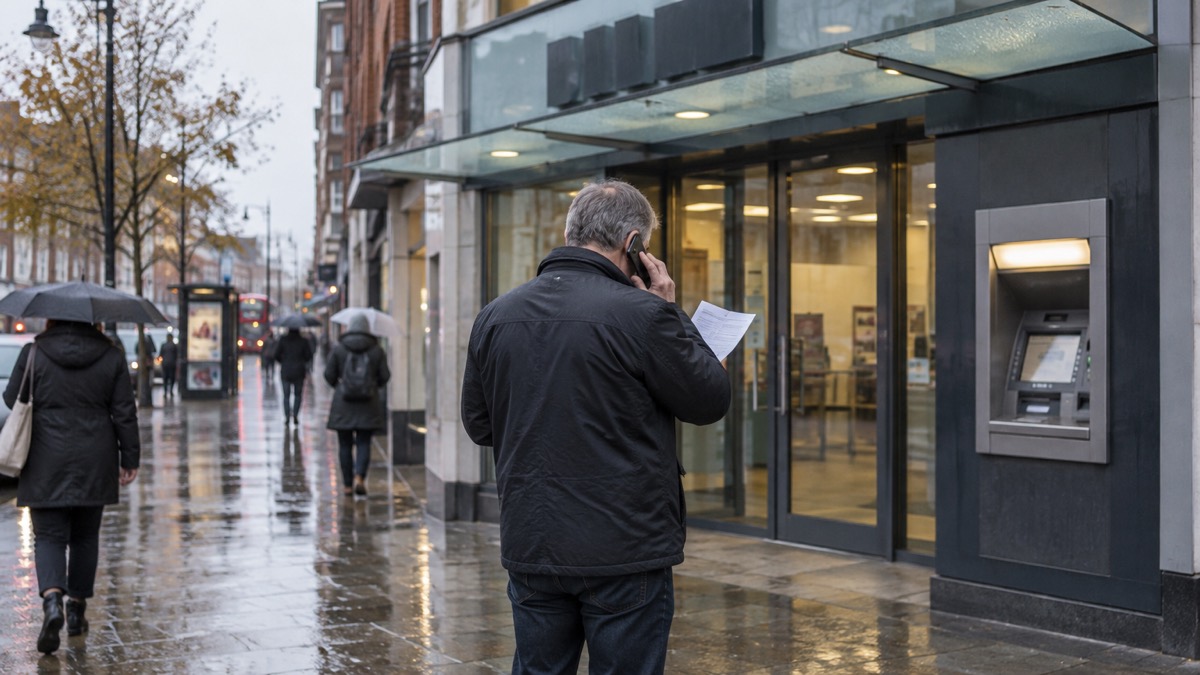
Phishing is the name for scam emails, texts and phone calls that try to trick you into revealing sensitive information such as passwords, or into transferring money. The National Cyber Security Centre (NCSC), the UK's official cyber security body, defines it as scam emails or text messages that contain links to websites which may contain malware, or which may trick you into revealing sensitive information or moving money1. The criminals behind them pretend to be someone or an organisation you trust: your bank, the NHS, a parcel delivery firm, a government service or your internet provider2.
The single most important rule: do not click links, do not reply, do not download attachments and do not give out private information such as bank details or passwords unless you are certain a message is genuine3. If a message turns out to be suspicious, reporting it takes about a minute and is free: forward suspicious emails to report@phishing.gov.uk, and forward suspicious texts to 77264. Reporting reduces the amount of scam communications you receive, makes you a harder target and protects others from cyber crime online5.
What phishing is and what the scammers are after
Phishing is a scam that arrives through your everyday communications. The NCSC describes it as bogus emails asking for security information and personal details, and the same trick now arrives by text message, phone call and social media2. West Yorkshire's local resilience forum, which plans for emergencies in the region, sums it up as scams that trick individuals into revealing sensitive information or credentials10.
The aim is usually to make you visit a website. That website may download a virus onto your computer, or it may present a convincing fake login page that steals your bank details or other personal information11. Criminals create fake phishing emails and SMS messages that link to scam websites designed to capture your passwords12. Some phishing emails go further and try to frighten or pressure you directly: sextortion emails, which claim to have compromising material and often quote a password you have used in the past, are an example of a phishing attack where victims receive emails that try to trick them into doing the wrong thing13.
What makes modern phishing so convincing is how much the criminals already know about you. The NCSC warns that criminals use information about you that is available online, including on social media sites, to make their phishing messages more convincing11. After a data breach, the same applies: criminals can use leaked information when creating phishing messages so that they appear legitimate14. A message that knows your name, your address or an old password feels personal, and that feeling is what makes it so effective. Reviewing your privacy settings and thinking about what you publish online makes you harder to target15.
Phishing is not only a household problem. Local businesses, councils and individuals are all targeted through emails or fraudulent websites10. For an ordinary household, the practical point is the same either way: treat any unexpected message that asks you to click, reply or confirm something as suspicious until proven otherwise.
Warning signs in a scam email
The NCSC's guidance on spotting scams sets out the patterns to look for, and several warning signs recur across every kind of phishing email11. None of these signs alone proves a message is fake, but the more you see, the more suspicious you should be.
- Urgency and pressure. Official-sounding emails urging you to act immediately, or within a limited timeframe, are a recognised warning sign, particularly in scam messages that follow a data breach16.
- Requests to confirm or reset. Look out for official-sounding emails about 'resetting passwords', 'receiving compensation' or 'confirming identity'16.
- Tech speak. Emails full of technical jargon, designed to confuse you into clicking, are another recognised sign of breach-related scams16.
- QR codes. Be wary of scanning QR codes within emails. The NCSC warns that criminals are increasingly using QR codes in phishing emails to trick users into visiting scam websites11.
- An odd sender address. NHS vaccination phishing emails, for example, were "quite convincing at first glance, but by checking the sender you can see where they have come from"17.
"These emails are quite convincing at first glance, but by checking the sender you can see where they have come from. Do not click on any links in these emails."
The lures change with the news. During the COVID-19 pandemic, Nottinghamshire County Council warned of unwanted callers asking for donations to help those in need, alongside scam emails and texts18. The lesson is that whenever a major event is in the headlines, expect scammers to use it, and hold unexpected messages about it to a higher standard.
One specific lure worth knowing about: during power cuts and network failures, scammers have sent phishing emails and texts pretending to be SP Energy Networks, asking people to claim compensation or verify their account. The advice from the company itself is to pause before you click, check the sender's address, look for red flags, never share personal information, and verify by calling the company directly on a number you find yourself19. The same approach works for any utility or internet provider message: if it mentions money or account verification, hang back and check independently. If you want to go further, our page on how to check a message from your bank is genuine covers the banking version of the same trick.
Scam texts: the same tricks in a shorter message
A scam text message, sometimes called smishing, compresses the email trick into a line or two. The purpose of a scam text is often to get you to click a link that takes you to a website criminals use to download viruses or steal passwords or personal information6. The fake 'missed parcel' text is the classic UK example: the NCSC has published specific advice on scam missed parcel SMS messages, which lure you to a website that installs malware20.
That malware does not stop with your phone. In the missed parcel campaigns the NCSC analysed, the malware also attempts to access your contact list and send scam SMS messages to those numbers as well, helping it spread across the world20. So a text that seems harmless to click can end up sending the same scam to everyone you know, from your own number. Our page on FluBot and fake parcel texts on Android phones covers this family of scams in detail.
The signs to look for in a text are the compressed versions of the email signs:
- A link you do not recognise, often shortened or disguised, where the message pushes you to click it6.
- Urgency: a delivery that will be 'returned' today, a payment that will 'fail' within hours16.
- A request to confirm details, pay a small fee or reschedule, all of which lead to fake websites20.
- A sender number or name that does not match how that organisation normally contacts you11.
If you receive one, do not reply and do not click. Forward it to 7726, a free spam-reporting service provided by phone operators: most phone providers are part of a scheme that lets customers report suspicious text messages for free by forwarding them, so your provider can investigate the origin and block or ban the sender if it is malicious6. You can also take a screenshot or picture of a QR code or scam text, add it to the main content of an email and send it to the NCSC6. Reporting scam texts reduces the amount you receive, makes you a harder target and protects others6. Our page on how to report a scam text message gives the step-by-step.
Never click, reply or give out your PIN or password
Whatever the channel, the core protective actions are the same, and they come from official guidance. The NCSC is plain that it is important not to click on any links in the message, or enter any information8. GOV.UK's reporting service advises: do not give out private information such as bank details or passwords, do not reply to text messages, do not download attachments and do not click on any links in emails if you are not sure they are genuine3.
Beyond the moment of receiving a message, there are habits that reduce your exposure. Surrey's emergency planning guidance advises using strong passwords and staying vigilant to phishing emails, text messages and phone calls, and keeping all software and systems up to date, including mobile phones21. Fraud protection guidance adds practical household rules: do not give personal information before verifying credentials, keep anti-virus software and your firewall up to date, do not trust emails asking you to confirm bank details, and destroy receipts that carry card details22. IT security guidance also advises not opening emails from unknown or suspicious senders23.
If someone turns up at your door out of the blue, the same principle applies. Nottinghamshire's advice during the pandemic was to always ask for identification from those who arrive unexpectedly, and if in doubt call the organisation directly to verify18. Belfast City Council, advising on bogus callers, puts it simply: be aware of the warning signs and report any concerns, and always report if you have been scammed or think someone is attempting to scam you or someone you know24. For the wider picture of keeping your accounts safe, see protecting email and bank accounts and home online security.
Report it: forward emails to report@phishing.gov.uk and texts to 7726
Reporting is quick, free, and it works. Forward suspicious emails to report@phishing.gov.uk: the National Cyber Security Centre will investigate4. Forward suspicious text messages to 7726, which is free4. The 7726 service is a national number that most UK mobile customers can use, run by the phone operators as a free spam-reporting scheme6.
| What you received | Where to send it | Cost | What happens |
|---|---|---|---|
| Suspicious email | report@phishing.gov.uk | Free | The NCSC investigates it4 |
| Suspicious text | 7726 | Free on most UK networks | Your provider investigates the origin and can block or ban the sender6 |
| Scam website | The report suspicious emails, websites and phishing service on GOV.UK | Free | The site is reviewed and can be taken down26 |
| A scam where you lost money | Your bank, then Report Fraud, or Police Scotland on 101 | Free | Reported as a crime27 |
The email reporting route is the NCSC's Suspicious Email Reporting Service, known as SERS27. Reporting is free and only takes a minute, and it reduces the scam emails you receive, makes you a harder target and protects others from cyber crime online4. For suspicious websites, use the report suspicious emails, websites and phishing service on GOV.UK, which the government's Emergency Alerts guidance also points to as the place to report anything you think is suspicious26. Even the NHS, advising patients after the Synnovis cyber incident, directed people to send suspicious emails to report@phishing.gov.uk or texts to 772629. If you use Outlook at work, IT administrators can report emails to the NCSC using Office 365's 'Report Phishing' add-in4.
Where you live changes only the fraud reporting route, not the phishing reporting route. report@phishing.gov.uk and 7726 work across the UK. But if you have lost money, tell your bank and report it as a crime to Report Fraud for England, Wales and Northern Ireland, or to Police Scotland for Scotland7. The Police Service of Northern Ireland's own guidance confirms the UK-wide arrangement: forward scam texts to 7726 free of charge and suspicious emails to report@phishing.gov.uk30. In Scotland, report fraud or cyber crime to Police Scotland by calling 1014. Our pages on how to report a phishing email and lost money to a scam go through each route in detail.
If you clicked a link or shared your details: what to do next
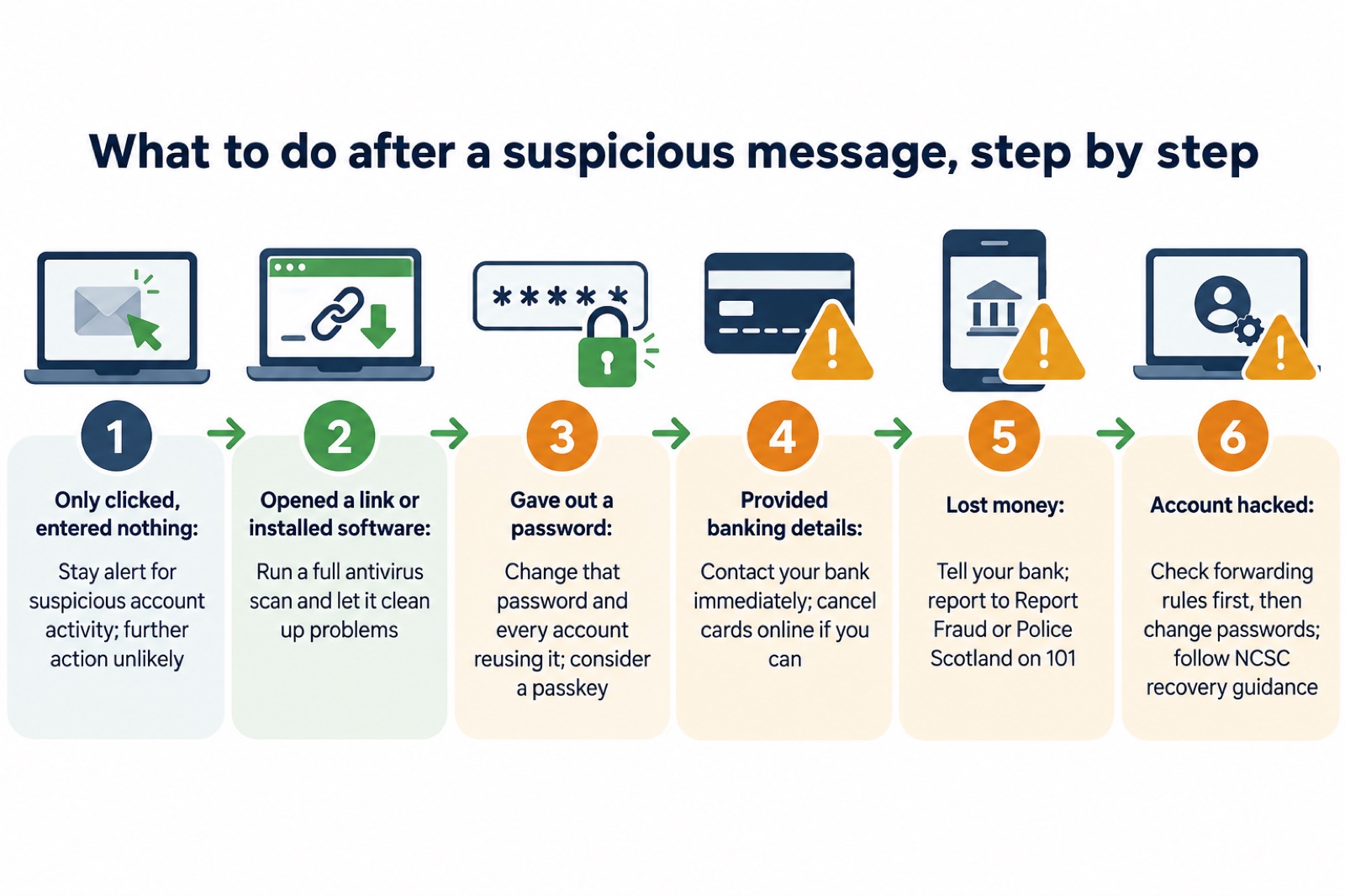
What you should do depends on what actually happened, and the NCSC sets out the branches clearly8.
If you only clicked, and did nothing else. If you have not entered any personal information, downloaded any files or installed software, it is unlikely you need to take further action. But stay alert to emails and notifications on your accounts to check for any suspicious activity7. Our page on what to do after clicking a phishing link expands on this.
If you opened a link on your computer, or followed instructions to install software. Open your antivirus software if you have it, and run a full scan. Allow the antivirus software to clean up any problems it finds8. If you suspect an infection but are not sure, the easiest way to confirm it on a PC or laptop is to run an antivirus scan and see if it detects anything31. See also antivirus software: what it does and malware on a computer or phone.
If you gave out your password. Change the passwords on any of your accounts which use the same password, and if available, you could use a passkey instead2. If you reused your email password across other accounts, change your email password as soon as possible, and make it strong and different from all your other accounts32. If a suspicious message includes a password you still use, change it as soon as you can, and change any other accounts using that password27. If the message quoted an old password you no longer use, that is a sign your details were in a data breach: see your details in a data breach.
If you provided your banking details. Contact your bank immediately and let them know. If you use online banking, you can cancel your cards online8. If you have lost money, tell your bank straight away and report it as a crime to Report Fraud, or Police Scotland in Scotland7.
If you think your account has already been hacked. You may have received messages sent from your account that you do not recognise, or you can no longer get in. Refer to the NCSC's guidance on recovering a hacked account2. One step matters before you change anything: check your email filters and forwarding rules. A common tactic used by cyber criminals is to set up a forwarding rule, which means they are automatically sent copies of all your emails, which would allow them to reset your passwords even after you change them. Change the password for the hacked account, and for any accounts using the same password, only once no unwanted forwarding rules are in place33. See how to recover a hacked email account and how to check for forwarding rules.
Finally, reduce what the next scammer knows about you. Review your privacy settings and think about what information you post and publish online, because easily viewed personal information can make criminals' phishing emails more convincing15. Strong, separate passwords, up-to-date software and two-step verification on your important accounts all shrink the damage a successful phish can do21. For a full rundown, start with protecting email and bank accounts, and for the wider picture of what a major cyber incident means for a household, see our guide to cyber attacks and major IT failures.
Sources (33)
- Phishing, National Cyber Security Centre, NCSC, 2026
- Phishing scams: what to do, National Cyber Security Centre, NCSC, 5 September 2022
- Report suspicious emails, websites and phishing, GOV.UK, GOV.UK, 2026
- Report a scam email, National Cyber Security Centre, NCSC, 26 November 2021
- Phishing scams, National Cyber Security Centre, NCSC, 2026
- Report a scam text message, National Cyber Security Centre, NCSC, 26 November 2021
- Phishing: respond and recover, National Cyber Security Centre, NCSC, 2026
- Suspicious email actions, National Cyber Security Centre, NCSC, 2026
- Cyber attacks, West Yorkshire Prepared, West Yorkshire Prepared, 2026
- Cyber attacks, threats and scams, Essex Prepared, Essex Prepared, 2026
- Phishing scams: how to spot and report them, National Cyber Security Centre, NCSC, 5 September 2022
- Using passwords to protect your devices and data, National Cyber Security Centre, NCSC, 2026
- Sextortion scams, National Cyber Security Centre, NCSC, 2026
- Data breaches guidance for individuals and families, National Cyber Security Centre, NCSC, 2026
- Protecting your family: cyber security, Essex Prepared, Essex Prepared, 2026
- Data breaches infographic, National Cyber Security Centre, NCSC, 2023
- Coronavirus scam calls and texts, Ofcom, Ofcom, 31 March 2022
- COVID-19 and scams, Nottinghamshire County Council, Nottinghamshire County Council, 2026
- Power cut support, SP Energy Networks, SP Energy Networks, 2026
- Scam missed parcel SMS messages: advice on avoiding malware, National Cyber Security Centre, NCSC, 23 April 2021
- Prepare for emergencies: risks, Surrey County Council, Surrey County Council, 2026
- IT security and online communications, Protect UK, Protect UK, 6 October 2022
- West Mercia Risk Register, West Mercia local resilience forum, West Mercia, January 2025
- Bogus callers, Belfast City Council, Belfast City Council, 2026
- Community Risk Register, West Yorkshire Prepared, West Yorkshire Prepared, 2025
- Report a scam website, National Cyber Security Centre, NCSC, 2026
- Data breaches guidance, National Cyber Security Centre, NCSC, 28 January 2021
- Emergency Alerts, GOV.UK, GOV.UK, 2026
- Synnovis cyber incident questions and answers, NHS England, NHS England, 10 November 2025
- Protect Yourself booklet, Police Service of Northern Ireland, PSNI, October 2024
- Infected devices, National Cyber Security Centre, NCSC, 2026
- Use a strong and separate password for your email, National Cyber Security Centre, NCSC, 21 December 2021
- Recovering a hacked account, National Cyber Security Centre, NCSC, 24 August 2022
 Accounts to Protect With 2-Step
 After Fixing an Infected Device
 Home Online Security Checklist
 Antivirus Software
 Backing Up Files and Photos
 Council Online Services Down
 Your Details in a Data Breach
 FluBot Fake Parcel Texts
 Hacked Online Accounts
 How Services Respond
 Malware Signs and Removal
 National Cyber Security Centre
 NHS Services During an IT Outage
 Keeping Key Records Offline
 Shopping Online Safely