An email arrives claiming the sender has taken control of your webcam, has a video of you, and will send it to your contacts unless you pay a ransom, often in Bitcoin, within a short deadline. To make the threat look real, it quotes a password you recognise. The National Cyber Security Centre (NCSC) is clear about what this is: a sextortion scam, in which a criminal attempts to blackmail someone, usually by email, claiming they have login details or a video of the victim visiting an adult website, and threatening to disclose this unless the victim pays1.
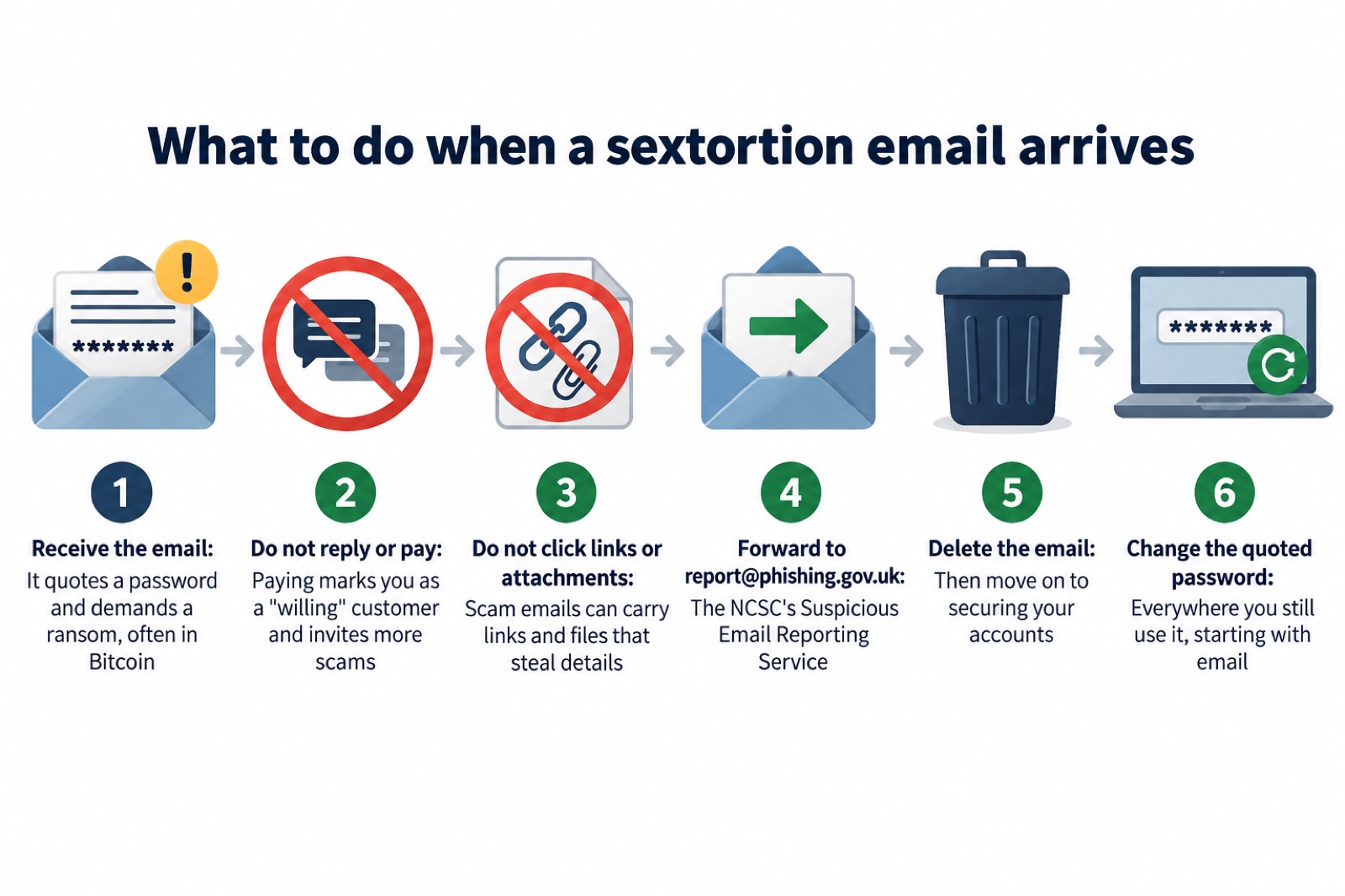
The single most important thing to know is that the criminals behind these attacks do not know if you have a webcam, and do not know if you have visited adult websites1. There is no video. The password looks convincing because it is real, but it almost certainly comes from an old data breach, not from any device of yours2. The NCSC's advice is simple: do not engage with the sender, do not pay, forward the email to the NCSC's Suspicious Email Reporting Service at report@phishing.gov.uk, and then delete it2.
This page walks through each step in the order you need it: what to do in the first minutes, why the password is in the email, how to secure your accounts afterwards, how to check whether your details have been exposed, how to report it, and what to do if you have already paid. It also covers where to find emotional support, which matters if the email has shaken you or someone in your household.
What to do first: do not reply, do not pay
The NCSC's guidance on sextortion scams, first published in November 2018 in response to a rise in these emails and still the basis of current advice, is not to engage with the phisher3. Do not reply, do not negotiate, do not ask what they claim to have, and do not pay the ransom. The email is a mass-produced scam, and any reply simply confirms that your address is live and read by a real person.
Do not pay, above all. The NCSC warns that paying the Bitcoin ransom will likely encourage more scams, because the phisher will know they have a "willing" customer3. A household that pays once can expect to be targeted again, by the same criminal or by others who share lists of people who respond. Payment also gets you nothing: there is no video to be withheld, so there is nothing to be bought.
"doing so will likely encourage more scams as the phisher will know they have a 'willing' customer"
While the email is in front of you, do not click on any links in it and do not open attachments. The NCSC's general advice on suspicious emails is not to give out private information such as bank details or passwords, not to reply, and not to download attachments or click links unless you are sure they are genuine4. Nottinghamshire County Council's scam guidance puts the same point plainly: if an email does not look right, never click on links or attachments5. A sextortion email is written to pressure you into acting before you have time to think, and links and attachments are there to exploit exactly that pressure.
The steps, in order:
- Stop and do not reply. The threat is not real1.
- Do not pay the ransom, in Bitcoin or anything else1.
- Do not click links or open attachments in the email4.
- Forward the email to report@phishing.gov.uk2.
- Delete it2.
- Change the password it quotes, everywhere you use it2.
Why the email knows your password
This is the part that frightens people most, and it has an ordinary explanation. The NCSC says not to worry if the message includes your password: it is probably from an old breach of personal data, but you should change your account password immediately, and anywhere else you use the same password2. Its longer guidance on sextortion scams makes the same point: a password included in the phish has, in all likelihood, been obtained from historic breaches of personal data6.
Passwords are often stolen when an organisation holding your details suffers a data breach7. Over the years, large numbers of services have been breached and their customer lists, including email addresses and passwords, have leaked or been sold. Criminals buy or download these lists and feed them into mass email campaigns. Your address and one old password sit on such a list, and the sextortion email simply quotes it back at you.
That is why the email feels personal when it is not. The NCSC says criminals send millions of these emails in the hope that someone will pay1. The same message, with a different password slotted in for each recipient, goes to every address on the list. Most recipients will not recognise the password, because it belongs to an account they closed years ago; the campaign relies on the minority who do.
If the password quoted is one you still use, treat this as a prompt rather than a threat. The NCSC's data breach guidance says that if you receive a message including a password you have used in the past and still use, change it as soon as you can8. The criminal who sent the email may only be guessing, but the password itself is genuinely out in the world, and anyone else who obtains the same breach list could try it against your accounts. Our page on your details in a data breach covers what to do next in more depth.
Secure your accounts: passwords and extra login checks
Once the immediate shock has passed, do the practical work. The NCSC's advice is to change the password quoted in the email immediately, and to change it anywhere else you use the same password2. If you have reused your email password across other accounts, Wiltshire and Swindon Prepared's guidance, drawing on NCSC advice, is to change your email password as soon as possible, and to make it strong and different from all your other accounts9.
Your email account matters more than any other, because it is the key to the rest. The NCSC explains that if a criminal can access your email account, they could access private information about you including your banking details, post emails and messages pretending to be from you, and reset all your other account passwords10. Criminals with access to your inbox can use it to reset passwords on other accounts11. So start with email, then work outward to banking, shopping and social media accounts.
For the password itself, the NCSC recommends combining three random words to create a password that is long enough and strong enough, and using a different one for each account12. A password manager can safely store them so you do not have to remember them all12. Our guides on creating a strong password and whether you need a password manager go through this step by step.
Then add a second lock. The NCSC advises setting up 2-step verification (2SV) on your email account, which will prevent a criminal from accessing your email account even if they know your password10. With 2SV switched on, a password alone is not enough to get in: a code or a prompt on a device you own is needed as well. That single change would defeat an attacker who has nothing but an old password from a breach list. See how to turn on 2-step verification for instructions, and which accounts to protect for where it matters most.
| Step | What to do | Why |
|---|---|---|
| 1 | Change the quoted password everywhere you use it2 | The password is genuinely exposed in a breach |
| 2 | Give your email account a strong, separate password9 | Your inbox can reset every other password you have10 |
| 3 | Turn on 2-step verification on email10 | A stolen password alone then cannot get an attacker in |
| 4 | Check email forwarding rules13 | Criminals add hidden rules to keep receiving your mail |
| 5 | Install the latest software and app updates12 | Updates close the holes malware uses |
One further check is worth making, especially if you think your email account itself may have been compromised. The NCSC's guidance on recovering a hacked account warns that a common tactic used by cyber criminals is to set up a forwarding rule, which means they will automatically be sent a copy of every email sent to your account13. A hidden forwarding rule lets a criminal keep receiving your mail, including password reset links, even after you change your password. The NCSC's recovery guidance therefore says to check your email filters and forwarding rules, and to change the password for the hacked account and any accounts using the same password only once no unwanted forwarding rules are in place13. Our page on checking for forwarding rules set by hackers shows how.
Check whether your accounts have been exposed
You can find out which breaches your email address has appeared in. The NCSC's sextortion guidance says you can check if your account has been compromised and get future notifications by visiting haveibeenpwned.com6. That service, recommended in the NCSC's own published guidance, lets you enter an email address and see the list of known breaches that included it, and it can notify you if the address appears in a new one. Our page on how to check if your email was in a breach walks through it.
Knowing the breaches changes what you do. Each breach listed is a place where that email address, and possibly a password, has been exposed. Any password you used at the breached organisation, and anywhere else you reused it, should be treated as known to strangers and changed. If the sextortion email quoted a password, you can often work out which breach it came from by matching the password to the service you used it on, which tells you how old the exposure is.
Be careful in the aftermath, because scammers follow breaches with fresh scams. The NCSC warns about official-sounding emails about "resetting passwords", "receiving compensation" or "confirming identity", emails full of "tech speak", and being urged to act immediately8. A real breach notification will not ask you to confirm your identity by email. Our page on spotting scam messages after a data breach covers the warning signs.
Report it, then delete it
Reporting a sextortion email takes a minute and helps everyone. Forward the email to the NCSC's Suspicious Email Reporting Service (SERS) at report@phishing.gov.uk, and then delete it2. The service is run by the National Cyber Security Centre, which will investigate the reports it receives4. The NCSC says reporting is free and only takes a minute, and that it reduces the scam emails you receive, makes you a harder target and protects others from cyber crime14. Every report adds to the picture the NCSC uses to have scam sites and sender addresses taken down.

The same reporting route applies across the UK: England, Scotland, Wales and Northern Ireland all use report@phishing.gov.uk for suspicious emails. If the scam comes as a text message instead, forward it to 7726, which is free15. Scam websites can be reported through the same GOV.UK service16.
If you have paid, that changes, and the next section covers it. And if you clicked a link in the email or opened an attachment before realising, follow the advice on what to do after clicking a phishing link, because the NCSC's guidance on malware-laced scam messages is to change the password for any account or app you logged into since, and to update the same password on any other accounts, making sure they are unique15.
How the scam is built to look believable
Understanding the tricks makes the email easier to dismiss, and easier to explain to a family member who receives one. The NCSC describes sextortion as an example of a phishing attack: victims receive emails that try to trick them into doing the wrong thing1. Phishing more generally is when criminals use scam emails, text messages or phone calls to trick their victims, often to make you visit a website which may download a virus or steal bank details or other personal information17.
The sextortion version layers on several devices at once. The NCSC's guidance notes that these scams are made to appear all the more credible because they provide seemingly plausible technical details about how the supposed hacking was achieved, and the phish can sometimes also include the individual's password3. The technical detail is invented, but it is written to sound specific: named software, claims about router access, talk of a "spy module". None of it reflects anything done to your devices. The criminals do not know if you have a webcam, have been visiting adult websites, or the means by which you communicate with people; in short, they are guessing3.
The deadline is part of the design. A short window is meant to stop you checking with anyone. The ransom is often demanded in Bitcoin1, a currency most people do not know how to buy quickly, and the difficulty of doing so is itself a pressure tactic. The same pattern appears in ransomware, where the NCSC says payment is usually demanded via an anonymous web page and usually in a cryptocurrency such as Bitcoin18; in both cases the payment method exists to make the money hard to trace, not because any service has actually been rendered.
The password is the strongest trick of all, and it works because it is true. A real password, quoted back at you, feels like proof of access to your life. It is proof only of a breach at some service you once used, years ago in most cases6. If you want to see the same trick in a milder form, the NCSC's guidance on scam "missed parcel" text messages shows how criminals use everyday events to lure people into entering details on fake websites15.
If you have already paid the ransom
Paying is a mistake anyone can make in a moment of fear, and it is not the end of the story. The NCSC's advice is that if you have already paid the ransom, you should visit Report Fraud for further advice at www.reportfraud.police.uk1. Its guidance for victims is more specific still: if you have been a victim of a sextortion scam and have paid the ransom, report it to your local police force by calling 1012. Do both, and do not let embarrassment stop you: the police and Action Fraud deal with these reports routinely, and yours helps build the national picture.
Contact your bank or cryptocurrency provider immediately. If the payment went from a bank account or card, the bank may be able to act; if you bought Bitcoin to pay, tell the exchange you used. Nothing in the pack guarantees recovery, so treat this as a step to take quickly rather than a promise.
Then expect follow-up attempts. The NCSC's warning is direct: paying marks you as a willing customer, and further scams become more likely1. A second email may raise the demand, or a different one may try a new story. The defence is the same as before: no reply, no payment, report and delete. Our page on lost money to a scam covers who to contact and in what order.
It is worth knowing that paying ransoms rarely buys what it promises even in the more serious attacks where criminals do hold something. The NCSC's ransomware guidance for home users and small businesses states that there is no guarantee you will get access to your data, that your computer will still be infected unless you complete extensive clean-up activities, and that you will be paying criminal groups19. A parliamentary inquiry into ransomware heard that several participants had paid the ransom, and most of those who paid had their data unlocked or returned20, but that concerns real ransomware, where files are genuinely encrypted; in a sextortion scam there is nothing to unlock, because nothing was ever taken. Our page on whether to pay a ransomware or sextortion ransom sets out the fuller picture.
Support after a sextortion scam
These emails are designed to humiliate as well as frighten, and the distress they cause is real even when the threat is empty. If you need emotional support, the charity Victim Support offers help to victims of crime. Its guidance gives the phone number 0808 168 9111 and the website victimsupport.org.uk3. Support is free, and you do not have to have lost money to use it.
If a young person in your household receives one of these emails, or shows you one, the same rules apply, and the reassurance matters even more. The NCSC's message for any recipient is that the criminals do not know if you have a webcam or what sites you have visited2; saying that plainly, and showing that the password came from an old breach2, is usually enough to defuse the fear. Then do the practical steps together: report the email, delete it, and change the password. Victim Support is there for young people and parents too.
One warning sign to watch for afterwards: the NCSC's guidance on hacked devices notes that unexpected emails sent from your account, advertising unlikely products or asking for money, are a sign of infection21. If contacts start receiving messages that really do come from your address, that is a different problem from a sextortion scam, and you should follow the steps on recovering a hacked email account.
Where this fits in the wider picture
Sextortion emails are one corner of a much larger criminal economy built on phishing and extortion. The NCSC's annual review notes that increasingly it is seeing data extortion as a fundamental part of the ransomware business model, as criminals realise that encrypting files is not the only way to extract payment18. The same breach lists that feed sextortion campaigns feed ransomware and fraud too, which is why the boring steps on this page, unique passwords and 2-step verification, protect you against far more than one frightening email.
For households, the priorities are the ones the NCSC and local resilience partners repeat: use a strong and separate password for your email, install the latest software and app updates, turn on 2-step verification, use password managers to safely store passwords, and back up your data12. Essex Prepared adds the reason in one line: cyber criminals can use your email to access many of your personal accounts, leaving you vulnerable to identity theft17. Our home online security checklist gathers all of it in one place, and the cyber attacks section covers the other scenarios, from phishing to ransomware, that a prepared household should know about.
Sources (21)
- Sextortion scams infographic, National Cyber Security Centre, 2026
- Sextortion scams: what to do, National Cyber Security Centre, 2026
- Sextortion scams: how to protect yourself, National Cyber Security Centre, 2018
- Report suspicious emails, websites and phishing, GOV.UK, 2026
- COVID-19 and scams, Nottinghamshire County Council, 2026
- Sextortion scams: how to protect yourself (PDF), National Cyber Security Centre, 2018
- Using passwords to protect your devices and data, National Cyber Security Centre, 2026
- Data breaches infographic, National Cyber Security Centre, 2023
- Having a strong password, Wiltshire and Swindon Prepared, 2026
- Use a strong and separate password for your email, National Cyber Security Centre, 2021
- Use 2SV to protect your accounts infographic, National Cyber Security Centre, 2024
- Cyber crime: basic steps for households, Wiltshire and Swindon Prepared, 2024
- Recovering a hacked account, National Cyber Security Centre, 2022
- Report a scam email, National Cyber Security Centre, 2021
- Scam missed parcel SMS messages, National Cyber Security Centre, 2021
- About Emergency Alerts - GOV.UK, GOV.UK
- Cyber security for your family, Essex Prepared, 2026
- NCSC Annual Review 2022: cyber crime, National Cyber Security Centre, 2022
- Ransomware guidance for home users and small businesses, National Cyber Security Centre, 2026
- Ransomware and UK national security: First Report, Joint Committee on the National Security Strategy, 2023
- Hacked device: action to take, National Cyber Security Centre, 2021
 Accounts to Protect With 2-Step
 After Fixing an Infected Device
 Home Online Security Checklist
 Antivirus Software
 Backing Up Files and Photos
 Council Online Services Down
 Your Details in a Data Breach
 FluBot Fake Parcel Texts
 Hacked Online Accounts
 How Services Respond
 Malware Signs and Removal
 National Cyber Security Centre
 NHS Services During an IT Outage
 Keeping Key Records Offline
 Shopping Online Safely