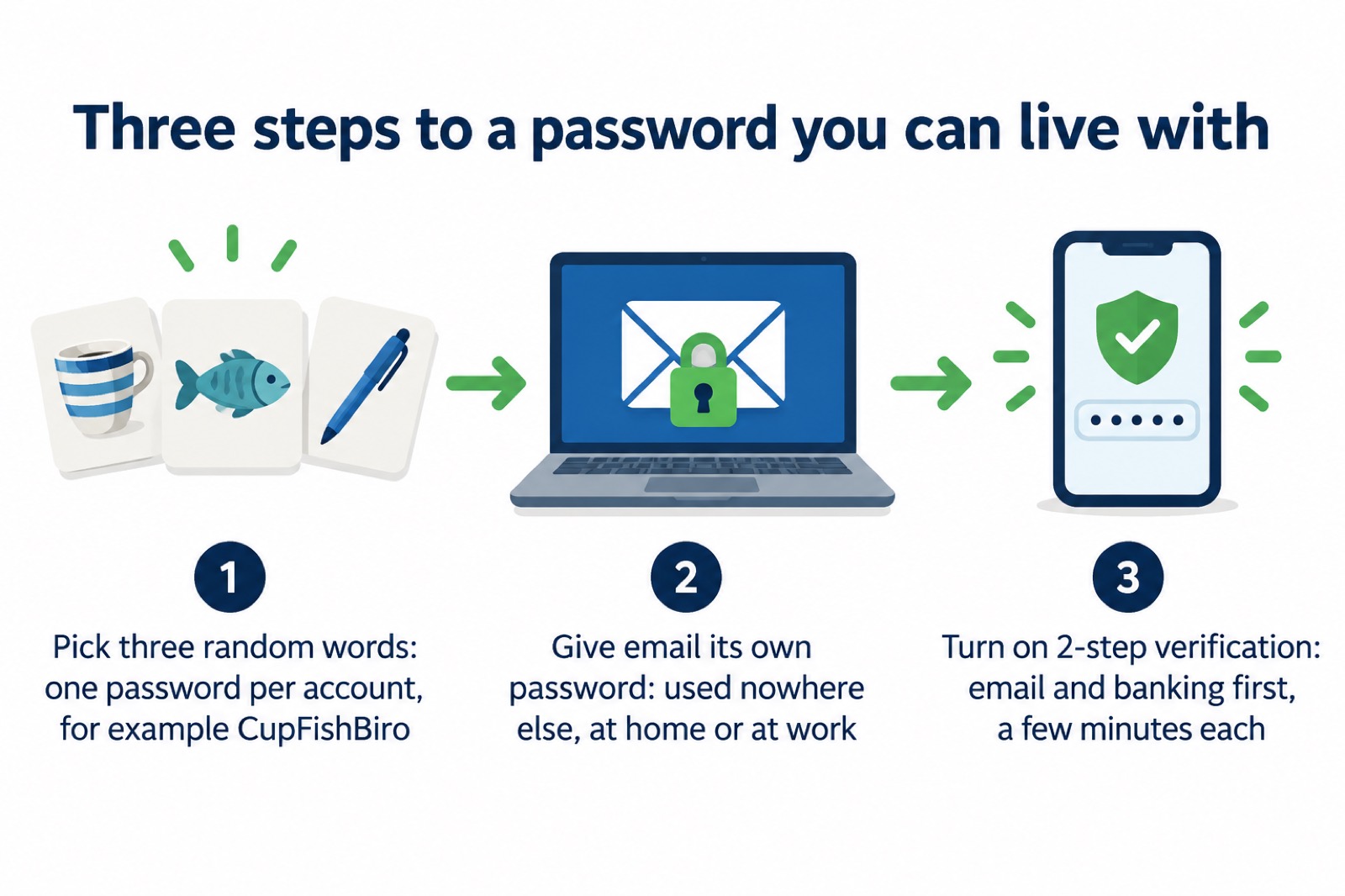
A strong password does not have to be a jumble of symbols you will never recall. The National Cyber Security Centre's advice is to combine three random words into a single password, for example CupFishBiro, which gives you something difficult to crack and easy to remember1. That one habit, repeated for each account, removes most of the risk that a criminal who gets one password can walk into the rest of your life.
The second habit is separation. Always use a strong and separate password for your email, one you do not use for any of your other accounts, either at home or at work3. If a criminal can access your email account, they could access private information about you, including your banking details, post emails and messages pretending to be from you, and reset all your other account passwords3. Your email is the master key to everything else, so it gets its own.
The third is a second check. Turn on two-step verification (2SV) on your most important accounts, such as email and banking, even if they are already protected by a strong password; it only takes a few minutes4. With 2SV, even if a criminal knows your password, they will not be able to access your accounts2. Together these three steps cover the great majority of what an ordinary household needs to do.
Three random words make a strong password you can remember
The method is deliberately simple. Combine three random words to create a single memorable password, for example CupFishBiro2. The National Cyber Security Centre recommends using three random words, such as "BallDogRed", to create memorable but strong passwords7. A good way to make your password difficult to crack is by combining three random words to create a password, for example applenemobiro1.
Why words rather than symbols? Length is what makes a password hard to crack, and words are long. Three words also give you something you can actually recall without writing it on a sticky note. The advice is repeated across official guidance for households, including the simple instruction to use three random words to create a password that's difficult to crack8.
Two cautions come with the method. First, avoid the most common passwords that criminals can easily guess, like 'password'1. Second, do not bother with clever letter swaps: swapping the letter 'o' with a zero will not make your password significantly stronger, but it will be harder for you to remember1. The same applies to adding a stray exclamation mark to the end of a word. It feels safer and is not.
Some services still insist on a mix of character types. Where that happens, follow their rules, but keep the length and the randomness. A strong password typically includes a mix of uppercase and lowercase letters, numbers, and special characters and is at least 12 characters long10. Three random words will usually clear that bar on length alone.
Use a separate password for your email
Your email account is the one that matters most, because it is the route back into everything else. If a criminal can access your email account, they could access private information about you (including your banking details), post emails and messages pretending to be from you, and reset all your other account passwords3. Cyber criminals can use your email to access many of your personal accounts, leaving you vulnerable to identity theft8.
So the rule is absolute: always use a strong and separate password for your email, that is, a password that you don't use for any of your other accounts, either at home or at work11. Your email password should be strong and different from all your other passwords; combine three random words to create a password12. Use strong passwords and a different password for every online account5.
If you have used the same password across different accounts, cyber criminals only need one password to access all your accounts3. That is the whole argument for separation in one sentence. A breach at a shop, a forum or an old app you barely remember hands over a password that also opens your inbox.
The same logic applies to the accounts that hold your backups. Protect your cloud accounts, and access to your backups, by using strong passwords and turning on two-factor authentication, because anyone who is able to access your cloud account will also have access to your backups13. If your photos and documents are backed up to a cloud account, that account deserves the same care as your email. For more on keeping copies safe, see Backing Up Files and Photos at Home.
Passwords to avoid reusing across accounts
Reuse is the single most common weakness in household security, and it is the one criminals count on. Use a different password for each of your online accounts5. Don't reuse the same password on different online accounts14. Avoid using the same password across multiple sites; instead, create strong, unique passwords for each account and consider using a password manager15.
The reason is mechanical. If you use the same password across different accounts and one of your accounts is compromised, a hacker can try the same password on your other accounts and potentially gain access to them too16. They do not need skill or a targeted attack; they need a list of leaked passwords and a script that tries them everywhere.
The practical problem is memory. Most people reuse because they cannot hold thirty different passwords in their heads. There are three workable answers:
- Three random words per account. Each account gets its own three words, unrelated to the others. No two accounts share a password1.
- A password manager. The National Cyber Security Centre encourages people to use password managers, which can create strong passwords for you and remember them11. Many include automatic password generation to quickly create a strong and unique password for each account16.
- Writing them down, carefully. This can be done safely because an attacker would need physical access to where the passwords are stored16. See the conditions below.
Whichever route you take, the goal is the same: one password per account, so that a single leak stays a single leak. If you are working through which accounts matter most, Protecting Email and Bank Accounts: Passwords and 2-Step Verification sets out the order to tackle them.
Adding 2-step verification to your most important accounts
A strong password is the lock. Two-step verification is the second lock that still holds if someone copies your key. The first and most important step is to turn on two-step verification (2SV) to help protect you if your password gets phished or otherwise compromised16. Two-step verification gives you a code to enter from an app or SMS, and means even if a criminal knows your password, they won't be able to access your accounts2.
Set it up on important accounts like email and banking, even if these are already protected by a strong password; it only takes a few minutes4. 2SV, which is also known as two-factor authentication or 2FA, usually works by sending you a PIN or code, often via SMS or email, to prove it is really you17. Some services offer an authenticator app instead, which keeps working when you have no mobile signal.
For accounts that don't yet offer passkeys, continue using a strong and unique password and two-step verification16. Passkeys are a newer sign-in method some services now offer; where one is available, it can replace the password entirely, but 2SV remains the reliable fallback across the accounts you already hold.
If you are not sure which accounts to protect first, Which Accounts to Protect With 2-Step Verification works through the list, and How to Turn On 2-Step Verification covers the settings themselves. Households without a mobile phone can still use 2SV through an app or email; see Can You Set Up 2-Step Verification Without a Mobile?.
If a password leaks: breach messages and sextortion emails
Sooner or later a service you use will be breached, and a password you once chose will appear in a list. The response is calm and specific. If you receive a message that includes a password you've used in the past and still use it, change it as soon as you can6. If a suspicious message includes a password you still use, change it as soon as you can, change any other accounts using the same password, and consider using a passkey instead18.
Sextortion emails are a particular kind that quote an old password to frighten you. Don't worry if the message includes your password, as it is probably from an old breach of personal data, but change your account password immediately and anywhere else you use the same password15. If a password you still use is included, then change it immediately14. These messages are sent in bulk: criminals will send millions of emails in the hope that someone will pay14.
"Don't worry if the message includes your password, as it is probably from an old breach of personal data. But you should change your account password immediately and anywhere else you use the same password."
Forward the email to the National Cyber Security Centre's reporting address and then delete it14. Do not reply, and do not pay. Sextortion Emails That Quote Your Password explains how the scam works in more detail, and Your Details in a Data Breach: What to Do Next covers what to do when a company tells you your data was taken.
Recovering a hacked email account
If you suspect your email has been taken over, act in order. Start with the service's own recovery process. Once you are back in, check your email filters and forwarding rules, as criminals set up forwarding rules to receive copies of all emails, which would allow them to reset your passwords4. This is the step people miss: the account looks normal, but a hidden rule is quietly copying everything to a stranger. How to Check for Forwarding Rules Set by Hackers walks through where to look.
Then change the password for any account that has been hacked and for any accounts that are using the same password, once no unwanted email forwarding rules are in place4. Force all devices and apps to log out, usually from the 'Settings' menus of the app or website, so anyone attempting to use the account is prompted to supply the new password17. Finally, set up 2-step verification (2SV)17.
If the account cannot be recovered with the online service, create a new account, give your contacts the new details, tell them you have abandoned the old account, and update any bank, utility or shopping websites with your new details17. That is a chore, but it closes the door properly.
For a fuller walkthrough, see How to Recover a Hacked Email Account and What to Do If an Online Account Is Hacked. If a device rather than an account is the problem, Malware on a Computer or Phone: Signs and Removal covers the next steps.
Sources (19)
- Three random words, National Cyber Security Centre, 21 December 2021
- Using passwords to protect your devices and data, National Cyber Security Centre, 2026
- Use a strong and separate password for your email, National Cyber Security Centre, 21 December 2021
- Recovering a hacked account, National Cyber Security Centre, 24 August 2022
- Staying safe online, RNIB, 29 October 2026
- Data breaches infographic, National Cyber Security Centre, 2023
- 3806-Community-Risk-Register-DIGITAL-FINAL-1.pdf, West Yorkshire Prepared (West Yorkshire Local Resilience Forum)
- Protecting your family: cyber security, Essex Prepared, 29 October 2026
- Scam missed parcel SMS messages: advice on avoiding malware, National Cyber Security Centre, 23 April 2021
- York and North Yorkshire Community Risk Register, North Yorkshire Local Resilience Forum (North Yorkshire Council)
- Having a strong password, Wiltshire and Swindon Prepared, 25 October 2026
- Top tips for staying secure online poster, National Cyber Security Centre, 2024
- Backing up your data, National Cyber Security Centre, 17 December 2018
- Sextortion scams infographic, National Cyber Security Centre, 2026
- Sextortion, National Cyber Security Centre, 2026
- Password managers, National Cyber Security Centre, 21 May 2026
- Recovering hacked accounts infographic, National Cyber Security Centre, 2026
- Data breaches: guidance for individuals and families, National Cyber Security Centre, 28 January 2021
- Phishing scams: how to spot and report them | Phishing scams: If you've shared sensitive information | National Cyber Security Centre, National Cyber Security Centre
 Accounts to Protect With 2-Step
 After Fixing an Infected Device
 Home Online Security Checklist
 2-Step Verification No Phone
 Antivirus on Phones and Tablets
 Automatic Updates
 Gave Bank Details to a Scammer
 Checking a Bank Message
 Blocking Nuisance and Scam Calls
 Scams After a Data Breach
 Browser Saved Passwords
 Checking Your Email for Breaches
 Hacker Email Forwarding Rules
 Factory Reset an Infected Phone
 Recover a Hacked Email