
The National Cyber Security Centre (NCSC) is the UK government body that monitors and counters cyber threats, and it provides advice and support to individuals and businesses to make the UK the safest place to live and work online1. It is part of GCHQ, the UK's intelligence, security and cyber agency2. For an ordinary household, its most useful services are free and take minutes: forward a suspicious email to report@phishing.gov.uk, forward a scam text to 7726, and report scam websites through its reporting form3.
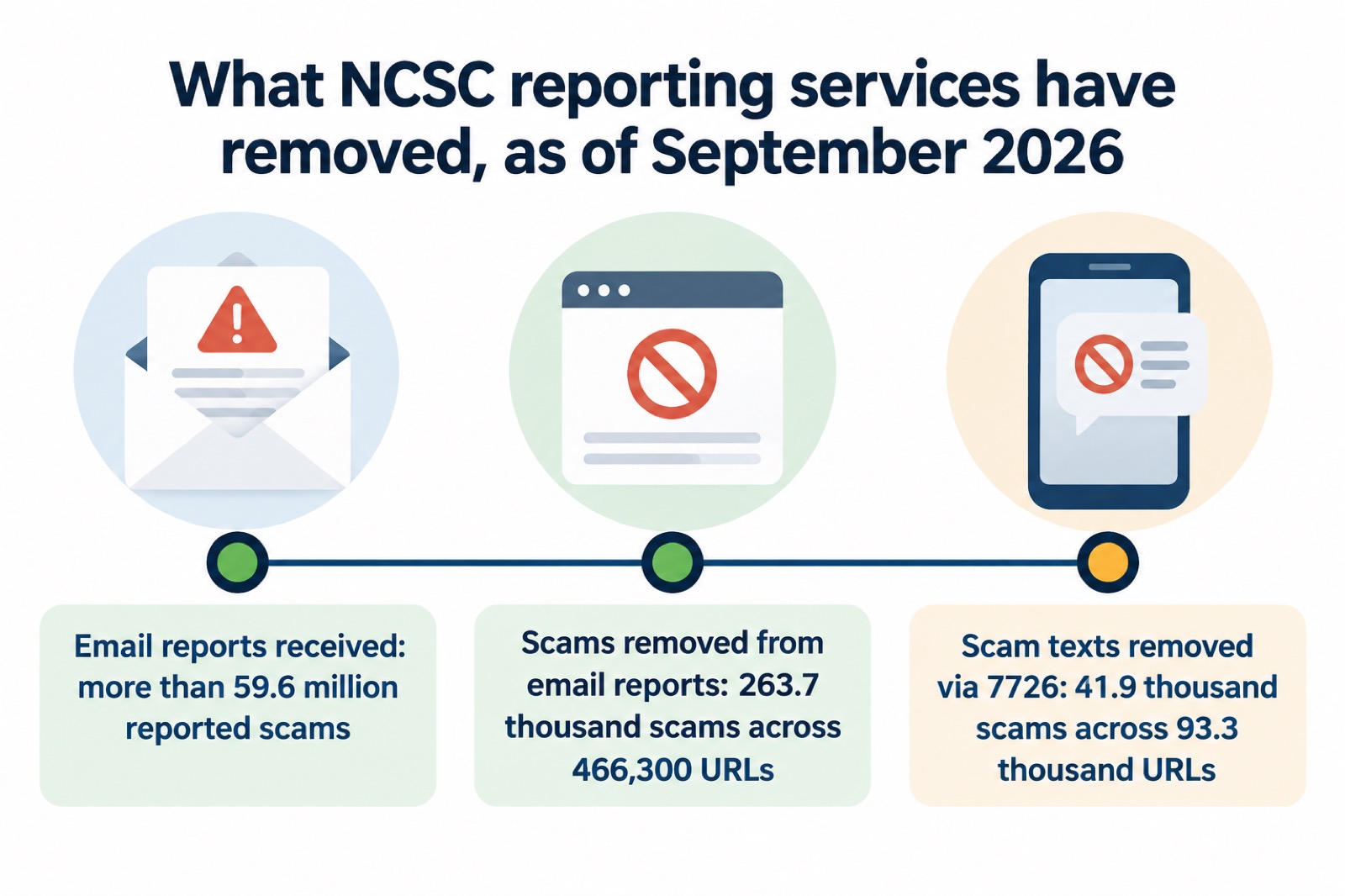
Reporting works at scale. As of September 2026 the NCSC's Suspicious Email Reporting Service had received more than 59.6 million reported scams, resulting in 263.7 thousand scams being removed across 466,300 URLs5. The 7726 text reporting service had removed 41.9 thousand scams across 93.3 thousand URLs over the same period4. Every report from a household adds to that picture.
This page explains what the NCSC does for families, how to report scams to it, what happens after you report, its advice on passwords and passkeys, the extra help it offers people targeted by phishing campaigns, and where its help stops so you know who else to turn to.
What the NCSC is, and what it does for households
The National Cyber Security Centre is a UK government organisation that has the power to investigate and take down scam email addresses and websites5. It sits within GCHQ2, and its stated role is to monitor and counter threats and to provide advice and support to individuals and businesses1. In practice that splits into two things a household can use: the takedown machinery behind its reporting services, and plain-language advice on staying secure online.
The advice side is delivered through the Cyber Aware programme, from the NCSC, which helps you stay secure online whether at work or at home8. Small businesses and individuals can also get a free personalised Cyber Action Plan from the NCSC website, which creates tailored advice on steps you can take to reduce the chance you become the victim of an online attack9. If you want a single starting point for your household, that plan asks you a few questions and gives you a short list of actions rather than a long document.
The NCSC also publishes its advice as short PDF infographics, including one on using passwords to protect your devices and data10. These are designed to be read quickly and shared, which suits a family noticeboard or a community group's newsletter as well as a screen.
The scale of the problem it works against is large. Several million cases of fraud and computer misuse nationwide are reported to the police every year9, and in the year ending March 2019 it was estimated there were 966,000 incidents of computer misuse experienced by adults aged 16 and over in the UK1. The NCSC is not the body that investigates fraud against you as an individual; that is the police. What the NCSC does is work on the infrastructure of scams: the email addresses, the text numbers and the websites criminals use, and the national guidance that helps people avoid them in the first place.
How to report a suspicious email, text or website
Reporting is the single most useful thing a household can do for the NCSC, and it is free. There are three routes, one for each kind of scam.
| What you have | What to do | Where it goes |
|---|---|---|
| Suspicious email | Forward the whole email to report@phishing.gov.uk3 | The NCSC's Suspicious Email Reporting Service (SERS)11 |
| Scam text message | Forward the text to 772612; or screenshot it and email it to the NCSC4 | The 7726 reporting service4 |
| Suspicious website | Report it through the NCSC's suspicious website reporting form7 | The NCSC, which has the power to investigate and remove scam websites7 |
Forwarding an email is exactly that: you forward it, as you would forward any email, and the NCSC will investigate it3. If a forwarded email contains more than one link and is rejected, send separate emails each containing only one link, or submit each link to the NCSC's suspicious website reporting form13. For scam texts, you can also take a screenshot or picture of a QR code or scam text, add it to the main content of an email and send it to the NCSC4.
If you have seen a website you think is a scam, for example a fake shop, report it to the NCSC14. It is free to report a suspicious website and it only takes a minute7. Once you have reported a message, you can delete it6.
Do not click links while you are deciding
The NCSC's instruction is consistent across every kind of scam: do not interact with the message while you are deciding whether to report it.
"Don't click on any links on a suspicious website"
The same rule applies to emails: do not click on any links in a suspicious email13, and do not give out private information such as bank details or passwords, reply to text messages, download attachments or click on any links in emails if you are not sure they are genuine3. If a message pretends to be from your bank, do not use the contact details provided or click on any links you are sent; contact your bank using details you already have14. Some scam emails are quite convincing at first glance, but by checking the sender you can often see where they have come from15.
If you have already clicked a link or handed over details, the steps change: see our guides on what to do after clicking a phishing link and what to do if you gave your bank details to a scammer.
What happens after you report, and how many scams have been removed
A report to the NCSC is not a complaint that sits in a queue. The NCSC analyses reports, and it may work with hosting companies to remove links to malicious websites and raise awareness of commonly reported suspicious emails and methods via partners13. In other words, your single forwarded email feeds a national system that can pull the scam's infrastructure down for everyone, not just for you.
The numbers show the effect. As of September 2026 the Suspicious Email Reporting Service had received more than 59.6 million reported scams, which has resulted in 263.7 thousand scams being removed across 466,300 URLs5. The same figures are given in the NCSC's guidance on suspicious email actions16. Separately, the 7726 service for scam texts had removed 41.9 thousand scams across 93.3 thousand URLs as of September 20264. Earlier in the year, the NCSC's report-a-scam-email page recorded 454.8 thousand scam URLs removed as of July 202613, a figure that has since grown with the September totals.
The NCSC also says reporting has a personal benefit: it can reduce the amount of scam communications you receive, make you a harder target for scammers and protect others from cyber crime online5. Forwarding a scam text to 7726 costs nothing and can reduce the amount of scam texts you receive whilst helping to protect others6.
What happens to the information you send
The NCSC holds information provided to it securely, with strictly limited access. It may be shared with law enforcement partners such as the National Crime Agency and the City of London Police, and it is exempt from Freedom of Information requests13. You are not signing yourself up to anything by reporting; you are adding to a pool of evidence used for takedowns and warnings.
Passwords: three random words and a password manager
Alongside reporting, the NCSC's core advice for households is about passwords. Its long-standing recommendation is to use three random words to create a password that is difficult to crack17, for example "BallDogRed"2. The same advice applies to smart devices in your home: create a secure password, for example by combining three random words8.
For remembering them, the NCSC encourages people to use password managers, which can create strong passwords for you and remember them18. A password manager often includes automatic password generation, so you can quickly create a strong and unique password for each account19. The NCSC's own infographic puts it simply:
"Use a password manager app to create strong passwords for you (and remember them)."
Your email account deserves special treatment. The NCSC advises using a strong and separate password for your email, because your email is the account that can be used to reset the passwords on your other accounts18. If you have given out a password, change the passwords on any of your accounts which use the same one, and if available use a passkey instead20.
If you prefer writing passwords down rather than using a manager, the NCSC sets conditions: make sure the passwords are not predictable or guessable, check you are not breaking the service's terms and conditions, since some online banking services forbid writing down passwords, and consider who has access to where they are kept19. Our page on whether it is safe to write your passwords down works through this.
Two-step verification completes the picture. Find out how to set it up on popular services at ncsc.gov.uk/2sv, or look in the security settings included in antivirus or password manager tools10. See also our guide to protecting email and bank accounts.
Passkeys: the NCSC's preferred replacement for passwords
The NCSC's guidance, reviewed and updated on 21 May 2026, now goes further than passwords. It recommends making passkeys your first choice of login and using them wherever they are offered19. A passkey is a login method tied to your device that replaces the password entirely; our page on what a passkey is and whether you should use one explains how it works in practice.
For a household, the practical approach is layered. Where a service offers a passkey, use it. Where it does not, use a strong, unique password created by a password manager, and turn on two-step verification. The NCSC's role is to leverage national expertise and resources to protect against cyber threats17, so its current guidance is the place to check before changing how anyone in the family signs in.
Phishing aimed at politicians, journalists and activists
Most phishing a household receives is broadcast: millions of identical fake parcel texts or scam invoices. But the NCSC, whose role is to leverage national expertise and resources to protect against cyber threats21, also deals with targeted phishing, known as spear-phishing, aimed at specific people rather than at everyone at once. The practical response is the same as for broadcast phishing: check before you click, and report suspicious messages to the NCSC's reporting service.
If you or a family member falls into one of these groups, a councillor, a journalist, a campaigner, a candidate, the NCSC's advice on reducing your exposure is the same as its general advice, but it matters more. You can reduce the likelihood of being phished by thinking about what personal information you and others post about you, and by reviewing your privacy settings within your social media accounts20. Criminals use information about you that is available online, including on social media sites, to make their phishing messages more convincing5, so a public profile of your job, interests and contacts is raw material for a targeted message.
For election periods specifically, the NCSC has offered what it described as "personal support" for "candidates and Returning Officers ahead of the General and Mayor Elections"21. If you are standing for election, treat your campaign accounts as high-value targets: strong separate passwords, two-step verification, and prompt reporting of suspicious emails.
For everyone else, the same awareness of language helps. If a message or call makes you suspicious, stop, break the contact, and consider the language it uses; the tell-tale signs are authority, urgency, emotion, scarcity and current events17. Scam messages that follow a data breach show the same pattern: official-sounding messages about resetting passwords, receiving compensation, scanning devices or missed deliveries, emails full of tech speak, and being urged to act immediately or within a limited timeframe22. Our page on spotting scam messages after a data breach goes through these in detail.
Government-branded scam messages
One pattern worth knowing is that criminals copy the government. During the COVID-19 period, the NCSC detected more UK government branded scams relating to COVID-19 than any other subject23. Examples included text messages claiming to be from GOV.UK requesting money for breaching stay-at-home regulations24, and phishing emails that imitated NHS vaccination messages; these were quite convincing at first glance, but by checking the sender you could see where they had come from15.
The lesson for any emergency, not just a pandemic, is that a message carrying an official logo is not evidence of anything. During a real national event, expect scammers to use it. Check the sender, do not click links, and forward the message to the NCSC. If you want to know whether an NHS message is real, see our guide on how to tell if an NHS email or text is genuine.
Notably, the NCSC and the US Cybersecurity and Infrastructure Security Agency have also said that from the data seen at the time, overall levels of cyber crime had not increased, but they were seeing a growing use of current events as themes by malicious cyber actors23. The threat shifts shape more than it grows.
Reports of cyber attacks are rising
The NCSC's own caseload of serious attacks has grown. The UK Government Resilience Action Plan records that the NCSC received almost 2,000 reports of cyber attacks, including from UK government and the private sector, of which 90 were deemed significant and 12 at the top end of severity, and that this was three times as many as the previous year, 202325. Part of that rise is likely to reflect better reporting as organisations learn to contact the NCSC, but the trend is real and it shapes national planning.
For context on the serious end, the NCSC's annual review records that during one year it co-ordinated the national response to 18 ransomware attacks26, and a Joint Committee report recommended that the NCSC and National Crime Agency should be funded to provide support to all public sector victims of ransomware, to the point of full recovery27. Ransomware against public bodies can reach households indirectly, when council or NHS systems go down. Our pages on ransomware and on what to do when banks, shops and public services go offline cover that side.
None of this changes what a household should do. The response to a rising national picture is the same small set of habits: strong unique passwords or passkeys, two-step verification, software updates, and reporting scams to the NCSC.
Where the NCSC's help stops
The NCSC takes down scam infrastructure and publishes advice. It does not investigate your individual fraud case, recover your money, or advise you on your consumer rights. Knowing where its job ends tells you who to contact next.
If you have lost money to a scam, tell your bank and report it as a crime to Report Fraud for England, Wales and Northern Ireland, or to Police Scotland for Scotland12. Our guide on losing money to a scam sets out the steps in order.
For wider problems that follow from a scam or an online problem, you can contact Citizens Advice for concerns around money, benefits, housing, employment, legal, debt, family and consumer problems28. If your details have been exposed in a data breach, the NCSC does publish guidance on what to do, including referring to its guidance on recovering a hacked account if you suspect an account of yours has been accessed22; our page on your details in a data breach walks through it.
For specific scam types, the NCSC's advice plugs into the same reporting route. For sextortion emails that quote a password, its advice is not to engage with the criminal: forward the email to report@phishing.gov.uk, which is the NCSC's Suspicious Email Reporting Service, and then delete it11. Our page on sextortion emails covers this in full.
A last distinction worth making: the NCSC acts on scams before they reach you or after you report them. It does not warn you in advance about every campaign. The warning system for households is partly your own: report what you see, and the takedown numbers above are what comes of it.
Sources (28)
- Cyber crime risk information, Wiltshire and Swindon Prepared
- West Yorkshire Community Risk Register, West Yorkshire Prepared, 2025
- Report suspicious emails, websites and phishing, GOV.UK, 2026
- Report a scam text message, National Cyber Security Centre
- Phishing scams: how to spot and report them, National Cyber Security Centre
- Scam missed parcel SMS messages: advice on avoiding malware, National Cyber Security Centre, 2026
- Report a scam website, National Cyber Security Centre
- Smart devices security guidance, National Cyber Security Centre, 2024
- Prepare for emergencies: risks, Surrey County Council, 2026
- Using passwords to protect your devices and data infographic, National Cyber Security Centre
- Sextortion scams infographic, National Cyber Security Centre
- Phishing: respond and recover, National Cyber Security Centre, 2026
- Report a scam email, National Cyber Security Centre
- Shopping online: respond and recover, National Cyber Security Centre, 2026
- Coronavirus scam calls and texts, Ofcom, 2022
- Suspicious email actions, National Cyber Security Centre
- Protecting your family: cyber security, Essex Prepared, 2026
- Use a strong and separate password for your email, National Cyber Security Centre, 2021
- Password managers guidance, National Cyber Security Centre, 2026
- Phishing scams: what to do, National Cyber Security Centre, 2022
- Joint Committee on the National Security Strategy report, Parliament, 2023
- Data breaches guidance, National Cyber Security Centre
- Joint advisory: COVID-19 exploited by malicious cyber actors, NCSC and CISA, 2020
- COVID-19 and scams, Nottinghamshire County Council
- UK Government Resilience Action Plan, GOV.UK, 2024
- NCSC Annual Review 2022: cyber crime, National Cyber Security Centre, 2022
- Joint Committee on the National Security Strategy summary, Parliament, 2023
- COVID-19 community support, Suffolk County Council
 Accounts to Protect With 2-Step
 After Fixing an Infected Device
 Home Online Security Checklist
 Antivirus Software
 Backing Up Files and Photos
 Council Online Services Down
 Your Details in a Data Breach
 FluBot Fake Parcel Texts
 Hacked Online Accounts
 How Services Respond
 Malware Signs and Removal
 NHS Services During an IT Outage
 Keeping Key Records Offline
 Shopping Online Safely
 Paying for Essentials