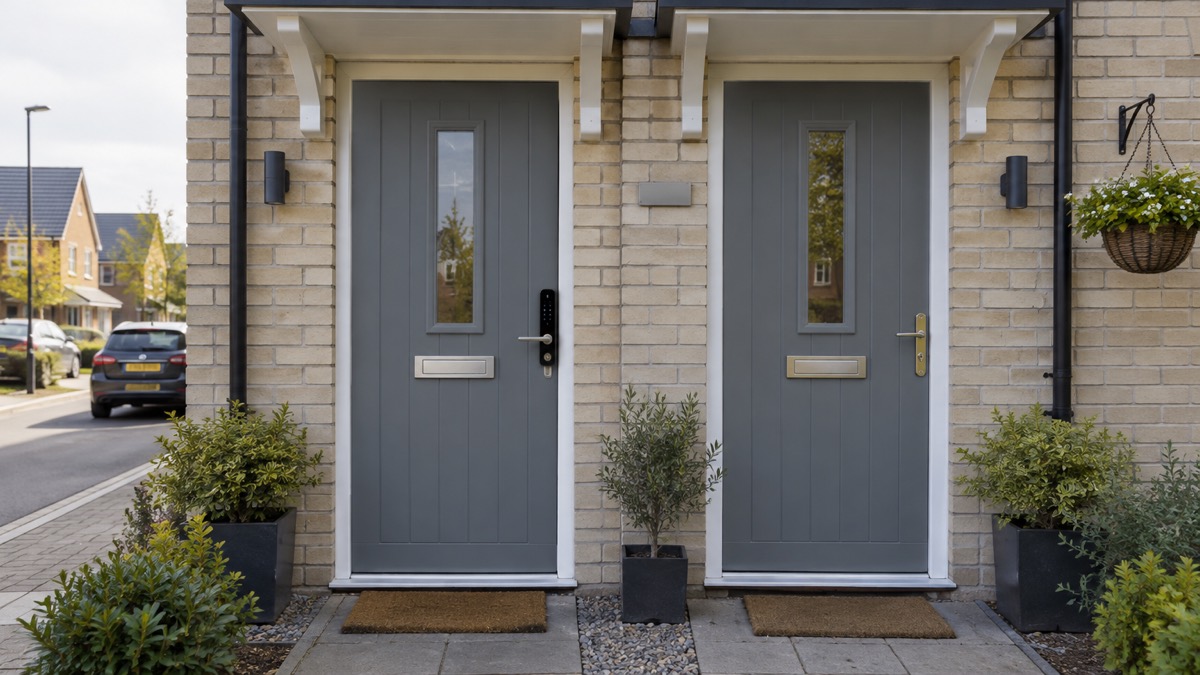
A smart lock and a traditional key lock do the same job, but they fail in different ways. A smart lock replaces your door lock, or part of it, with a digital system that opens by PIN code, fob, fingerprint, phone app or voice, depending on the model1. A key lock opens with a key and nothing else. The question for most households is not which is more modern, but what happens on the day the power goes, the battery dies or the internet drops.
The reassuring answer is that most smart locks are battery-powered, so a mains power cut does not stop them working: the door stays locked and the motor still works3. Most also come with a manual backup, usually a key, so you can still get in if the battery dies2. What you lose in an outage is usually the remote side: unlocking from away, access logs and voice control may stop until the connection returns3.
The practical choice comes down to your circumstances. If you rent, share a home or let a property, PIN codes let you change access without changing the lock2. If your broadband is weak, a lock that works offline may suit you better4. If anyone in the house finds keys fiddly, a fingerprint lock can help, provided you keep a backup5. This page sets out how each type behaves when things go wrong, and how to keep a way in.
Smart lock or key lock: how each behaves in a power cut
A traditional key lock is entirely mechanical. It has no battery, no motor and no connection, so a power cut changes nothing about how it works. A smart lock is an electronic lock that works without physical keys, and it is either hard-wired in or battery-powered2. Most are battery-powered, which is why they keep working when the mains supply fails8. Verisure states that its smart locks can still function during power outages thanks to built-in battery backup and manual key or thumb-turn options5.
The difference shows up in what you can still do. With a battery-powered smart lock in a power cut, the door stays locked and the motor still works, and you can enter with a keypad, fob, fingerprint scanner or a nearby phone over Bluetooth3. What may stop is anything that needs the internet: remote unlocking, access logs and voice control3. A hard-wired lock with no battery backup is the exception. If the power fails, it may stay locked until power returns, so check how yours is powered before you rely on it.
There is a second power question that matters more than most people expect: the lock's own battery. A smart lock that is battery-powered is not affected by a mains outage, but it is affected by a flat battery, and Verisure warns that if there is a power outage or the battery dies, you could find yourself stuck2. That is why the manual backup matters, and why the battery warning matters more than the power cut itself.
For a household deciding between the two, the power cut test is simple. A key lock always works, because it has nothing to fail. A smart lock works in a power cut if it is battery-powered and charged, and it works if you have kept the manual backup to hand. If either of those is uncertain, the key lock is the more predictable choice.
What happens when a smart lock's battery dies
A smart lock's battery is the part most likely to let you down, and the good models warn you long before it does. Nuki locks warn when the battery level drops below 20 per cent6. The Aqara U600 sends app push notifications when the remaining battery reaches 20 per cent and 10 per cent, and plays a reminder tone each time the door is opened7. The Aqara U200 Lite has a low battery alert specifically to avoid being locked out unexpectedly10.
How long a battery lasts depends on the lock and how it is used. Nuki states that battery life depends heavily on usage, door type, locking modes and other factors, and that its Smart Lock Pro lasts for months on a single charge11. Aqara states that the U200's batteries last over a year in a one-person household12. Those are the maker's own figures for its own products, and they vary with how often the door is used.
The batteries themselves differ by model, which matters when you come to replace or recharge them:
| Lock type | Power source | What you do when it runs low |
|---|---|---|
| Nuki Smart Lock Go | 4 AA batteries included; optional rechargeable Power Pack6 | Replace the AA cells or charge the Power Pack |
| Nuki Smart Lock Pro (5th Gen) | Built-in lithium-ion battery11 | Recharge the built-in battery |
| Nuki Smart Lock Ultra | Built-in lithium-polymer battery11 | Recharge the built-in battery |
| Aqara Smart Lock U200 | Rechargeable Li-Ion battery for the lock; AAA batteries or hard-wiring for the keypad13 | Recharge the lock battery; replace or wire the keypad |
| Aqara Smart Lock U200 Lite | Rechargeable Li-ion battery10 | Recharge the battery |
The safest habit is to act on the first warning rather than the last. SwitchBot's own instruction is to replace batteries upon low battery notifications14. If you manage several locks, Nuki Web can send battery notifications by email so you do not end up with empty batteries15. And whatever the warning says, keep the manual key where you can reach it, because a lock with a flat battery and no backup is the one scenario that turns a convenience into a problem.
When Wi-Fi or Bluetooth is down: the features you lose
Most smart locks will function just fine without Wi-Fi, but you may not be able to use their monitoring features or remote access4. Verisure puts it plainly: if these connections are down, you might find yourself unable to use some features such as remote access, although that should not affect your ability to lock or unlock the door2. The lock itself keeps working; the extras that depend on the network do not.
What you lose depends on how the lock connects. Bluetooth-enabled locks connect when in proximity to your device, often with fewer features and no remote control3. Wi-Fi locks let you see who is entering and exiting from an app and can often provide temporary access to certain people, so those are the features that stop when the connection drops3. Some locks rely on a wireless connection to run at all, whether Bluetooth, Wi-Fi or another network such as Zigbee, so check before you buy4.
The lock's own behaviour offline varies. Aqara states that if its lock loses Wi-Fi access and goes offline, local access control remains active while remote access is disabled, and in a total power failure the device remains locked until power is restored16. Igloohome builds its locks to work offline, with no Wi-Fi or internet connection needed at the lock, which it says gives greater reliability and security against Wi-Fi hacking17.
If your broadband is weak, the choice of lock matters more than the choice of brand. Verisure advises that homes in more remote areas where a strong broadband connection is not guaranteed may want a lock that does not require a Wi-Fi connection to run4. For remote access, some locks have built-in Wi-Fi and need no bridge, while older models need an external bridge or a hub15. Nuki's Smart Lock Go needs a one-time Remote Access purchase to connect to the internet, and without it all features work only within Bluetooth range6.
PIN codes for shared homes and rented properties
For households with multiple occupants or rental properties, smart locks with a PIN code reduce the risks that come with having many copies of a key, because you can change the access combination as often as you wish without replacing the whole lock2. Rental property owners often opt for PIN code-operated locks for the same reason: they can change the access code whenever a new guest checks in4. An administrator can change the combination or add and remove guest access without changing the whole lock1.
The mechanics vary. Igloohome locks generate a PIN code at random with the validity duration built into it, and the lock translates the code into the desired action, such as granting access once only17. You can set up to 199 PIN codes on an igloohome lock, and generated codes do not need to be synced within Bluetooth range to work17. Codes can be shared by WhatsApp, Facebook Messenger, SMS and more, and guests do not need to download an app to receive access17. For hosts, an Airbnb listing calendar can be synchronised so PIN codes are created automatically for guests18.
If you rent rather than let, the position is different. Verisure advises that if you are a renter and want to install a smart lock, you should check with your landlord or property manager first4. Some locks are designed to be installed and removed without leaving residue or marks, which makes them more suitable for rented flats11. The underlying cylinder matters too: for rented flats a single-differ lock is often used, where the door cylinder only locks with the corresponding key19.
Biometric smart locks: fingerprint, voice and face
Biometric locks open with a part of you rather than a key or a code. Some smart lock models allow unlocking via a keypad, a key fob, or biometric access such as fingerprints, palm, face or voice recognition8. Depending on the model, the lock could be operated via a PIN code, your biometrics using fingerprints or face recognition, a fob or voice recognition2. For locks that work with biometrics, you can even find out who is locking or unlocking the door2.
Fingerprint capacity is the specification that decides whether a biometric lock suits a family. The Aqara U600 stores up to 50 fingerprints, which the maker says easily covers multiple household members7. The Aqara U200 offers mechanical keys, PIN codes, fingerprint recognition and app integration12, and the wider Aqara range adds NFC, custom passcodes, Apple Home Key and the Zigbee protocol16. SwitchBot's Lock Ultra offers fingerprint, auto unlock, NFC, voice or a smartwatch20, and the Lock Ultra Max adds facial recognition, palm vein recognition, passcode, NFC card, voice control and Apple Watch21.
Voice and face recognition are the least predictable of the biometrics, because they depend on the model and on the conditions. Some locks work with voice assistants such as Amazon Alexa and Apple Siri10, and the Aqara range pairs with Alexa, Google Assistant or Siri for voice-activated control16. That is convenience, not a substitute for a reliable primary way in.
For families, the practical points are these. A fingerprint is quick for a child or for anyone who finds keys fiddly, and the Alzheimer's Society advises that if keys are fiddly or difficult to use, you should consider changing the locks so they are easier to operate5. But a finger that is wet, cut or not recognised needs a fallback, so keep a PIN code and a physical key as well. And check the security of the biometric data: the Aqara U200 uses AES encryption and fingerprint module encryption binding to safeguard personal data and access credentials22.
Keeping a way in if the smart lock fails
The single most important habit with any smart lock is to keep a way in that does not depend on the electronics. Both types tend to be equipped with a manual backup so you can still lock and unlock your door in the event of a power outage or if the battery dies2. Verisure states that most smart locks, including its LockGuard, come with a manual backup such as a key which lets you lock or unlock the door even if the power is down2.
The backup takes different forms. With a Nuki Smart Lock Go, you can still unlock from the outside with a physical key if you use a Nuki Universal Cylinder or a cylinder with an emergency function, or by other means such as Nuki Web, a compatible smartwatch, a keypad code or fingerprint, a fob, or someone with access permission6. Nuki recommends using a cylinder with an emergency function so you can always unlock the door with your mechanical key even if a key is inserted on the inside of the cylinder, as is the case when using the lock15. The Aqara U200 requires a cylinder with an Emergency Function, and fits over existing locks without modifications12.
The Electrical Safety First charity's advice for smart homes applies directly here: have a plan in case the smart system itself fails, including a manual alternative such as a manual light or a door that can be opened manually23. That is the principle behind every backup key, and it is worth testing before you need it.
There is a wider security point. The National Cyber Security Centre warns that when updates are no longer provided, smart devices are easier to hack, or may stop working as designed24. Which? advises creating a long, unique password, keeping the software updated, and connecting the lock to other security devices where possible3. A lock that no longer receives updates is a lock you should think about replacing.
Where to get help and what to check before you choose
Before you choose, check the door and the cylinder. Some smart locks replace only the deadbolt part of your lock, while others replace the whole system, including the door handle2. A smart lock can replace your whole lock, including the latch and handle, or replace the deadbolt only, depending on the model8. If you rent, check with your landlord first4. If anyone in the house has dementia or finds keys difficult, the Alzheimer's Society advises considering changing the locks so they are easier to operate5.
The physical lock underneath still matters. A smart lock is only as good as the cylinder it turns, and a cylinder with an emergency function is what lets your key work when a key is inserted inside15. Avocet's ABS locks come with a security key card with the option of registering25, and the range is available in keyed alike, thumbturn, singles and double profile formats25. For the standards behind the cylinder, see our guide to doors and locks and to British Standard door locks.
On security more broadly, Sussex Police advise double-locking the door every single time you leave the house, because simply shutting the door will not prevent burglaries26. Police Scotland advises changing your locks if you want to when moving into a new home27. For the smart lock itself, Which? advises a long, unique password, updated software and, where possible, connection to other security devices3.
If you are locked out, do not force the door. Our guide to being locked out sets out what to do and how to choose a locksmith. If the lock fails in a power cut, our page on smart locks in a power cut goes further, and how long smart lock batteries last covers the battery side. For the wider picture, start with Home Security: A Household Guide and Smart Locks: How They Work and What to Check.
Sources (27)
- How do smart locks work?, Verisure, 2026-09-14
- Are smart locks secure?, Verisure, 2026-03-17
- Do I need a smart door lock?, Which?, 2026-04-15
- Smart lock suitable properties, Verisure, 2026-10-27
- Cylinder purchase tips, ABUS, 2026-11-03
- Nuki Smart Lock Go, Nuki, 2026-11-03
- Aqara Smart Lock U600, Aqara, 2026-10-26
- What is a smart lock?, Verisure, 2026-03-30
- Nuki Smart Lock Ultra, Nuki, 2026-11-03
- How igloohome works, igloohome, 2026-11-02
- Nuki Smart Lock Pro (5th Gen), Nuki, 2026-11-03
- Aqara Smart Door Locks range, Aqara, 2026-10-14
- Aqara Smart Lock U200 Lite with Hub M100, Aqara, 2026-11-03
- SwitchBot Lock Ultra and Keypad Vision review, Trusted Reviews, 2025-05-21
- Nuki app and web, Nuki, 2026-11-02
- Aqara Smart Lock U200 adjustable cylinder, Aqara, 2026-11-03
- igloohome Deadbolt 2S Metal Grey, igloohome, 2026-11-02
- igloohome Rim Lock for Wooden Doors, igloohome, 2026-11-02
- ABS Ultimate Series Locks Key/Key, Avocet Hardware, 2026
- SwitchBot Lock Ultra Max Vision Pro Combo, SwitchBot, 2026-09-03
- Verisure FAQ, Verisure, 2026
- Aqara Smart Lock U200, Aqara, 2026-11-03
- Security law for smart devices, NCSC, 2024
- Door and window lock advice, Sussex Police, 2026-11-02
- SwitchBot Lock Pro, SwitchBot, 2026-11-03
- Break-in and housebreaking, Police Scotland, 2026-11-02
- Keeping secure at home, Alzheimer's Society, 2026-10-29