
SwitchBot is a maker of small smart home devices: retrofit smart locks that fit over your existing door lock, smart plugs and switches, sensors, and the hubs and app that tie them together. For a household getting ready for emergencies, the useful question is not what the kit can do on an ordinary day but what it does when the power goes, the broadband drops or a storm keeps you indoors. The answer is mixed, and it depends on which piece of kit you have and how you have set it up.
The single most important point is the door. A smart lock that depends on a hub, an app or your home Wi-Fi can stop responding in a power cut, so keep a physical key and a keypad route in, and never let the app become the only way into your home. SwitchBot states that the Lock Pro is a retrofit design that installs without replacing the original door lock and is suitable for European homes1. That is the kind of fallback to look for.
The second point is power. SwitchBot's locks run on ordinary batteries, and the maker's own instruction is to replace them when you get a low battery notification1. Treat that alert as a job for the same day. Beyond the door, the kit is best seen as a way to watch the house and switch things on and off remotely, not as a substitute for a torch, a power bank and a written list of phone numbers, which official guidance puts at the centre of power-cut preparation2.
What SwitchBot makes for UK households
SwitchBot's range falls into four groups that matter for preparedness. Smart locks are the retrofit kind: the Lock Pro is designed to install over your original door lock without replacing it, which SwitchBot describes as suited to European homes and a setup that preserves the existing lock1. Smart plugs and switches let you control lights and appliances from an app. Sensors watch for problems, from a door opening to smoke. Hubs and the app are the glue: they connect the devices to each other and, through your home broadband, to your phone when you are out.
That last part is the weakness as well as the strength. Anything that relies on a hub and your internet connection is only as reliable as the broadband and the mains supply behind it. The National Cyber Security Centre lists smart plugs, light bulbs, kettles, thermostats, fridges and washing machines among the consumer smart devices now covered by UK security law, which is a reminder that these are ordinary household appliances with a network connection, not specialist emergency equipment5. Police Scotland's advice on smart devices makes the same point from the security side: they are useful, and they need to be set up and maintained with care7.
For a household plan, the sensible approach is to treat SwitchBot kit as convenience and monitoring layered on top of the basics, not as the basics themselves. The Getting Started: Preparing Your Household for an Emergency guide sets out those basics, and the Home Security: A Household Guide covers how locks, lighting and alarms fit together. If you are buying, register the product with the manufacturer for safety updates, recalls and warranties4.
Smart locks: a 2-year warranty on every model
SwitchBot states that all its smart locks come with a 2-year warranty, and the same 2-year cover is stated for its Video Doorbell1. The Lock Pro is the model built for retrofitting: it fits over the existing lock, so you keep the original mechanism and the original key, and SwitchBot describes setup as taking minutes1. For an emergency-preparedness plan that is the right shape of product, because the door still works the old way if the smart part fails.
The Lock Pro runs on 4 AA batteries, which SwitchBot lists as 1.5 V 2900 mAh cells1. The maker's instruction is plain: replace the batteries when you get a low battery notification1. A lock that dies while you are out is a lockout, so build the check into a routine you already keep, such as the monthly test of your smoke alarms. Keep a spare set of the right batteries in the house, in the same drawer as your torch and power bank.
The Lock Pro pairs with SwitchBot's Hub Mini Matter Enabled to connect to Google Home, Amazon Alexa, Home Assistant, SmartThings and Apple Home1. That matters in an emergency for one reason: if you already run one of those systems, the lock can sit inside it rather than needing a separate app. It does not make the lock work without power. For the wider question of doors, keys and alarms, see Home Security: A Household Guide, and for the Lock Ultra model specifically, see SwitchBot Lock Ultra.
Smart plugs and switches for lights and appliances
A smart plug does one simple thing that is genuinely useful in a storm or an outage: it lets you switch a lamp or an appliance on and off from your phone, and on a schedule. That is a comfort and security measure, not a power supply. The plug still needs mains power, and the app still needs your home network and a hub to reach you when you are out.
The practical use in a preparedness plan is lighting and presence. A lamp on a timer makes a house look occupied when you are away, and a plug that switches a small light on at dusk saves you fumbling for a torch in a dark hallway. The Emergency Lighting at Home: Torches, Lanterns and Candles guide covers the lighting you actually need when the mains fails, which is battery light, not a smart plug. Keep the two separate in your mind: smart plugs manage the normal supply, torches and lanterns cover the gap.
There is a safety point that official guidance makes for power cuts generally and that applies to anything you leave plugged in. Switch off appliances that could be a hazard if the power comes back on while you are out, such as irons, ovens and electric fires8. A smart plug can help here, because you can switch an appliance off remotely, but do not rely on it: switch off at the wall before you go out. For the wider picture on managing supply and demand at home, see Backup Power at Home: A Household Guide.
Sensors that warn of problems at home
Sensors are where smart kit earns its place in an emergency plan, because they tell you something is wrong while you can still act. North Yorkshire Fire and Rescue Service advises households to consider monitored smart smoke alarms so that somebody is alerted if a fire breaks out and nobody is at home9. That is the principle to apply across the range: a sensor is only useful if the alert reaches a person who can do something about it.
The same logic sits behind telecare. NHS inform describes a door monitor as a small sensor placed on a door, often used where someone is at risk of wandering out of the house and getting lost10. For a household with an older or disabled member, that kind of sensor is part of the Extra Help in an Emergency: Older, Disabled and Medically Dependent Households picture, alongside the Priority Services Register and other support. It is not a substitute for a person checking in, but it can prompt one.
What sensors cannot do is work without power and a connection. A sensor that reports through a hub will go quiet when the hub loses power or broadband, so pair it with the basics: a working smoke alarm on each level, a carbon monoxide alarm where you have a fuel-burning appliance, and a neighbour who will knock. The Home Emergencies: Fire, Carbon Monoxide, Gas Leaks and Burst Pipes guide covers those essentials. For pets, the fire service's advice on protecting them at home is worth reading alongside any monitoring you install9.
Hubs and the app that control the kit
The hub is the part of a SwitchBot setup that most affects how it behaves in an emergency, because it is the bridge between the devices and your phone. Without a hub, a lock or sensor can still work locally, but remote control and alerts while you are out depend on it. The Lock Pro connects through the Hub Mini Matter Enabled to Google Home, Amazon Alexa, Home Assistant, SmartThings and Apple Home1. If you already use one of those systems, the hub lets SwitchBot kit join it rather than adding another app to your phone.
The app is where you set schedules, check battery levels and see alerts. Two habits make it useful in a crisis. First, know which functions work without the internet, and test them: SwitchBot states that the Lock Ultra requires a compatible Hub1. Second, keep the app's notifications on for low battery and device offline alerts, so a problem surfaces before it becomes a lockout.
That is the same lesson official guidance gives for power cuts generally: keep a charged power bank, a torch and spare batteries, and keep important telephone numbers written down somewhere you can find them3. The Staying Informed and in Touch in an Emergency: A Household Guide covers how to keep communications going when the mains and the network fail. For the security side of connected devices, including passwords and updates, see Cyber Attacks and Major IT Failures: A Household Guide.
Keeping SwitchBot kit working in a power cut
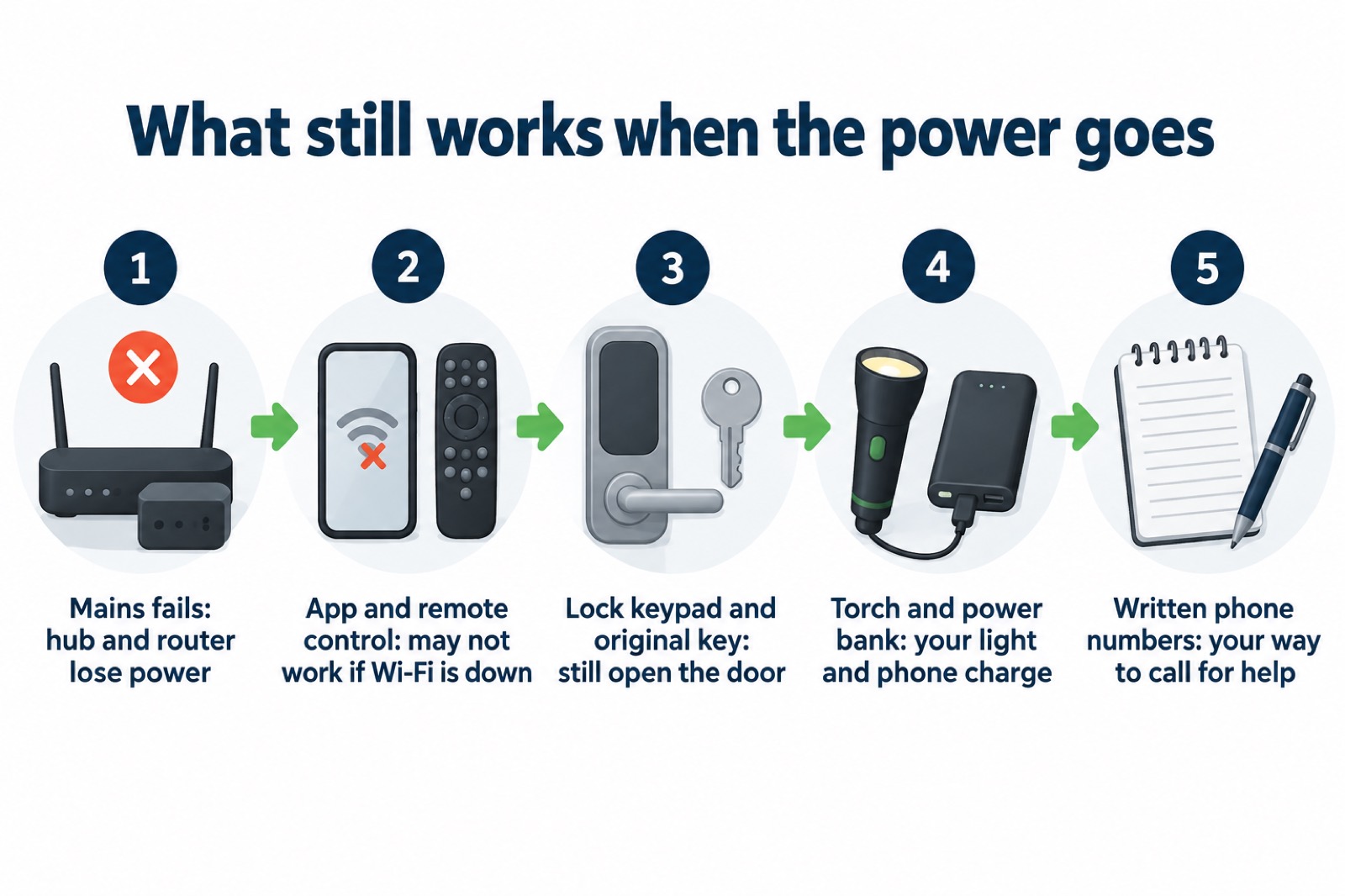
A power cut is the test that matters most for smart kit, and the honest answer is that most of it stops. The hub loses power, the broadband router loses power, and the app on your phone can no longer reach the house. What still works is whatever runs on its own battery and does not need the network: the lock's keypad, the original key, and any sensor with a local alarm.
Plan for that. The fire and rescue services and local resilience guidance are consistent on what a household should have ready: a battery-operated torch, a power bank and spare batteries2; a fully charged torch kept handy12; and important numbers written down3. Fire Scotland's power-cut page and the London Fire Brigade's winter guide make the same point about light13. None of that is SwitchBot kit, and that is the point: the smart devices are the layer above, not the foundation.
Two further habits keep the kit ready. Check battery levels on a fixed day each month, alongside your smoke alarm test, and replace cells as soon as the app warns you1. And before a forecast storm, charge your phone and power bank and check your torch, as official warnings for strong winds advise households to prepare14. The Power Cuts: A Household Guide and Storms, Snow and Ice: A Household Guide set out the full routine. If you are adding backup power, the Backup Power at Home: A Household Guide explains what a power station can and cannot run, and the fire service's advice on e-bikes and e-scooters is a reminder to register your product with the manufacturer for safety updates, recalls and warranties4.
Support, warranty claims and safety notices
SwitchBot's stated warranty position is simple: all its smart locks come with a 2-year warranty, and the Video Doorbell is covered for 2 years as well1. A warranty claim normally needs proof of purchase, so keep the receipt, and register the product with the manufacturer when you buy it. The fire service advises registering products for safety updates, recalls and warranties4, and the National Cyber Security Centre points device-specific questions to the manufacturer's own support area6.
Check the Government's product safety alerts and recalls service, and your local council's recall page, from time to time15. The pattern in the notices is worth knowing: power banks sold through online marketplaces have been recalled16, as have electric blankets21, a radiator fan sold through several online platforms22, and a jump starter sold on an auction site19. The lesson for a household buying smart kit is to register the product with the manufacturer for safety updates, recalls and warranties, keep the paperwork, and act on a recall notice the day you see it4.
For the wider picture on how a household plan fits together, the Emergency Kit: What a UK Household Should Keep Ready guide sets out the basics that no app replaces. SwitchBot kit is a useful layer of convenience and monitoring on top of that foundation, provided you keep the key, the batteries and the written numbers where you can find them.
Sources (30)
- SwitchBot Lock Pro, SwitchBot, 2026-11-03
- How you can prepare for a power cut, Lancashire Prepared, 2026-10-29
- Be prepared for winter emergencies, NHS Norfolk and Suffolk ICB, 2026-10-01
- E-bikes and e-scooters, Cheshire Fire and Rescue Service, 2026-09-30
- Smart devices law, NCSC, 2024-04-29
- Security law for smart devices, NCSC, 2024
- Smart devices, Police Scotland
- Community Risk Register, West Yorkshire Prepared, 2025
- Protect your pets, North Yorkshire Fire and Rescue Service, 2025-03-10
- Telecare, NHS inform, 2024-08-13
- The digital switchover, Suffolk County Council, 2026-10-29
- Extreme weather winter guide, London Fire Brigade, 2025-01
- Power cuts, Scottish Fire and Rescue Service, 2026-10-25
- Strong winds weather warning information and advice, nidirect, 2026-10-24
- Product recalls, Bath and North East Somerset Council, 2026
- Product recall: Anker 321 Power Bank, GOV.UK, 2024-08-09
- Product recall: ESR HaloLock Wireless Power Banks, GOV.UK, 2025-11-26
- Product recall: POM Power Banks, GOV.UK, 2026-06-01
- Product recall: Multi-Function Jump Starter JX27, GOV.UK, 2023-04-18
- Product recall: Søstrene Grene LED String Lights, GOV.UK, 2026-03-27
- Product recall: B&Q GoodHome Saturnia Electric Blanket, GOV.UK, 2025-12-15
- Product recall: Valiant Radiator Fan, GOV.UK, 2025-11-07
- Product recall: HAMAX Buddy Baby Seat, GOV.UK, 2026-10-26
- Product recall: Mattressman Comforcel Elite and Supreme Mattresses, GOV.UK, 2026-10-13
- Product recall: Snuggla King Size Electric Underblanket, GOV.UK, 2025
- Product recall: Hamilton McBride Electric Blankets, GOV.UK, 2024
- Check your boiler: important product recall, Molescroft Parish Council, 2025-12-02
- A.Vogel Ltd recalls Rapunzel Biosnacky seeds, Food Standards Scotland, 2026-08-07
- Digital Switchover Scam Warning, Snape Parish Council, 2025-04-25
- Product recalls, London Borough of Bromley
 SwitchBot Lock Ultra