A Nuki smart lock is a battery-powered lock that lets you open your front door with a code, a fingerprint, a small fob, a smartwatch or your phone, while still leaving a physical key as a way in. For a household getting ready for emergencies, that is the point of it: several ways in, none of which depends on the mains power staying on.
The thing to understand before you buy is that a smart lock is not a substitute for a key. The maker states plainly that you can use your physical keys to open your door even with a Smart Lock Ultra installed1, and that the Ultion Nuki can always be operated manually with a physical high-security key or the manual thumbturn2. Official emergency kit lists for UK households already tell you to keep spare keys to your home and car at home3. A Nuki lock fits that advice rather than replacing it.
This page covers what Nuki makes, how each way of opening the door works, what happens when the power or the internet goes down, how to keep a key as a backup, how the lock connects to a smart home, where it is made, what owners report, and where to get support. It is written for a household thinking about a power cut, a storm or a flood, not for someone shopping on specifications alone.
What Nuki makes for UK households
Nuki's range is built around one idea: a lock you can fit to an existing door and open in more than one way. The maker describes the Nuki Universal Cylinder as a lock cylinder designed specifically for Nuki Smart Locks1, and the Smart Lock Pro (5th Gen) as compatible with existing cylinders and keys1. That matters for a household because it means the lock can go on the door you already have, rather than requiring a new door.
The range splits into three locks, each covered on its own page:
- Nuki Smart Lock Ultra: the maker's current flagship, with a brushless motor, built-in Wi-Fi so no bridge is required, and Matter over Thread for smart home connection1.
- Nuki Smart Lock Pro: the model the maker lists as compatible with existing cylinders and keys1.
- Nuki Smart Lock Go: covered on its own page.
There is also the Ultion Nuki, a smart door lock with a built-in Wi-Fi bridge, sold with a 3-star PLUS Ultion lock and a Nuki unit carrying the highest AV security rating with three stars2. Which.co.uk describes the Ultion Nuki Smart Lock 2025 as needing no drilling or wiring to install, with the auto-lock sensor, keypad and keyfob sold separately, and notes that the Ultion Nuki cylinder is BSI Kitemark certified5.
For emergency planning, the useful question is not which lock is newest but how many independent ways into the house you have. A lock that offers a key, a code and a fob gives you three, and they fail for different reasons. Our guide to home security sets that alongside the rest of a household's arrangements.
Ways to open the door: fingerprint, code, Fob, smartwatch or key
A smart door lock, as Which.co.uk describes the category, secures your property using an entry code, biometric recognition like a fingerprint, or remotely via an app on your smartphone, sometimes with a fob or keycard5. Nuki's own list for the Smart Lock Ultra is broader: a physical key through the emergency function, remote opening by someone with access permission, the Nuki Web service, a smartwatch, and accessories that use a code, fingerprint or Fob1.
Each method behaves differently in an emergency, so it is worth knowing what each one needs.
| Way in | What it needs | What to know in an emergency |
|---|---|---|
| Physical key | Nothing but the key | Works even with the lock fitted; the maker says so for the Ultra1 and the Ultion Nuki2 |
| Fingerprint | Fingerprint keypad, battery and Bluetooth | Keypad can sit anywhere within Bluetooth range, not on the door2 |
| Entry code | Keypad accessory | 6 digit code; up to 200 codes, settable to times and days2 |
| Fob | Bluetooth fob, battery | Unlocks within 10 metres; needs 2 or 3 presses to avoid accidental opening2 |
| Smartwatch or app | Smart home system or Nuki Web | Depends on your network and hub, so treat as a convenience, not the only route1 |
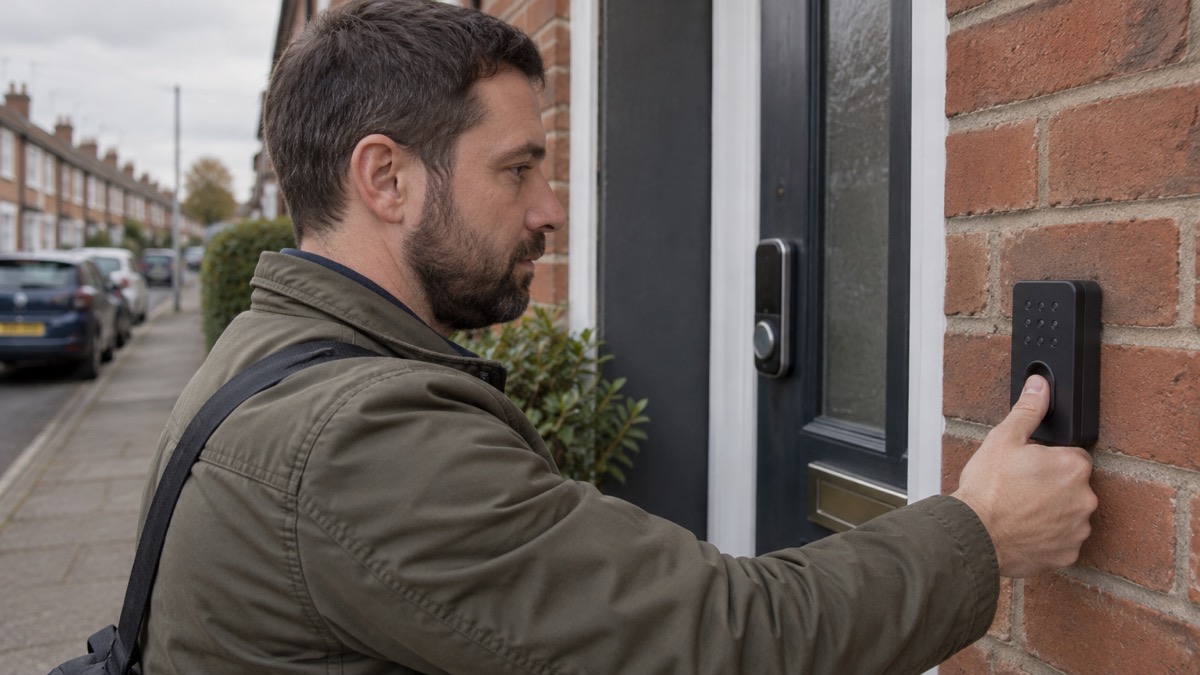
The fingerprint keypad is the accessory that changes how a household uses the lock. The maker says it can be accessed with fingerprint recognition and that you can set 200 different passwords or up to 200 customer entry codes2. Because it is battery and Bluetooth powered, with no wires and no drilling, it can be positioned anywhere within Bluetooth range of your door rather than on the door itself2. For a household where children, a carer or a neighbour may need to get in, that is a practical arrangement: codes can be set to work only at specific times and on particular days2.
Getting in when the power or internet is down
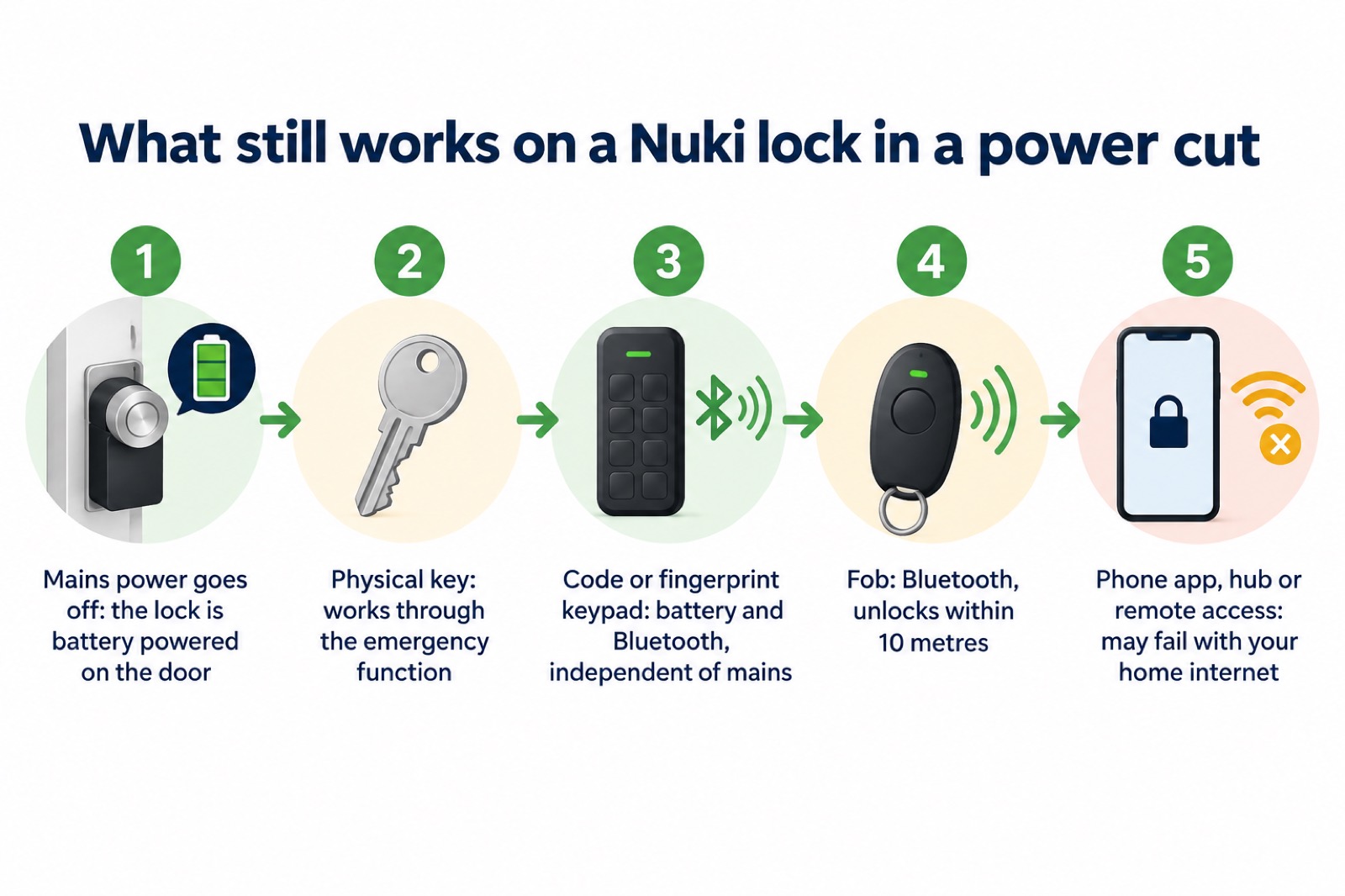
This is the question that matters most on a preparedness site, and the answer is reassuring: a smart lock is a battery device on the door, so a mains power cut does not stop it opening. The maker's own list of ways in includes the physical key through the emergency function, which works regardless1.
What a power cut does affect is everything around the lock. The government's Be Ready campaign says gas ovens, boilers, heat pumps and your home internet won't work without power, and that the mains water supply could also be disrupted during and after power cuts6. Greater Manchester's resilience guidance makes the same point about interdependency: in the event of a power cut, the internet and mains water supply may not work in your home7. So the app on your phone, the smart home hub and the remote access route may all be unavailable at the moment you want them.
Openreach puts it plainly: it has backup plans in the event of local power cuts to keep its network running, but you might find it hard to connect if your own power is disrupted8. Energy Networks adds that mobile devices, including internet dongles, could have limited or no service during a power cut, and suggests asking your internet and telephone providers for advice9. The government's guidance on phone and broadband outages notes that if your mobile network is down but you have a working internet connection, you may still be able to make calls over Wi-Fi by enabling Wi-Fi Calling on your device10.
For a Nuki household, that produces a simple rule: the lock will still open, but the ways of opening it that depend on your phone, your hub or your broadband may not. Plan on the key, the code and the fob first, and treat the app as the convenience it is. Our guides to power cuts and to staying informed and in touch cover the wider household arrangements.
Keeping a physical key as a backup
Official UK emergency advice is consistent on this: keep spare keys. The emergency kit checklist from Newport City Council lists spare keys to your home and car3, and Wiltshire Council's kit list specifies spare keys for your windows, car and house4. Surrey County Council's guidance on utility failures goes further and tells households to keep a physical copy of key information such as telephone numbers and insurance details11. The principle is the same one that applies to a smart lock: do not let a single point of failure sit between you and your own front door.
Nuki's own instructions support this. The maker says the Ultion Nuki can always be operated manually through the use of a physical high-security key or the manual thumbturn2, and that you can use your physical keys to open your door even with a Smart Lock Ultra installed1. For the Ultion Nuki, the maker also offers to match a new lock to your existing Ultion key: give the code on your current key, input it when you order, and the new lock will work with it2.
A sensible household routine, drawn from that official advice:
- Keep spare keys to your home and car at home in case of an emergency3.
- Keep a written copy of key phone numbers and insurance details with it, in case your phone is flat or the network is down11.
- Store a copy of your household emergency plan somewhere visible, such as near the fuse box, the fridge or the emergency kit12.
- The Ultion Nuki can always be operated manually through the use of a physical high-security key or the manual thumbturn1.
The same logic applies to the information you would need if the lock, the phone and the broadband all failed at once. The National Cyber Security Centre defines a backup as a copy of your important data stored in a separate safe location, usually on the internet or on removable media such as a USB stick, SD card or external hard drive13. Wiltshire and Swindon's personal resilience guidance says to keep important numbers such as family or insurance written down somewhere safe in case you cannot access them on your phone or online14. A spare key and a written number in the same drawer is a small thing that covers a lot of failure modes.
Smart home connections through Matter and Thread
The Smart Lock Ultra uses Matter over Thread, and the maker says this lets you integrate the lock with any major smart home system, listing Google Home, Apple Home, Samsung SmartThings and Alexa1. The older Ultion Nuki can be integrated with Apple HomeKit, Google Home and Amazon Alexa, and the maker also names Homey and other smart home systems2.
For emergency planning, the useful part of that is local control. A Thread connection is a low-power mesh between devices in the home, and Matter is the common language they speak, so the lock can be operated through a hub in the house rather than only through a manufacturer's cloud service. That is a meaningful difference when the broadband is down, though it still depends on the hub having power and on your phone being able to reach it.
Two practical points from the maker's own instructions:
- If you unlock through Alexa or Google Home, the maker says a passcode is required for unlock requests, and that the code is not required when you lock the door2. That is a sensible default: locking stays quick, unlocking is protected.
- If your door has a handle that must be lifted to lock, the maker says all Ultion Nuki unlocking features work with it, and you lift the handle as normal when passing through2.
The maker also states that Nuki uses state-of-the-art encryption mechanisms commonly used in online banking, and that all communication with the Smart Lock is protected1. That is the maker's own claim about its own product, and it is the kind of thing worth checking against independent security testing if it matters to you. Our guide to cyber attacks and major IT failures covers what to do when connected systems in the home stop behaving as expected.
Where Nuki kit is designed and made
The maker states that the Nuki Smart Lock Ultra is designed in Austria and made in Europe1. That is the only origin statement in the material for this range, so it should be read as applying to the Ultra specifically rather than to every Nuki lock or accessory. If country of manufacture matters to your household, check the label on the item you are buying.
The security credentials are worth knowing because they bear on whether the lock is a sensible thing to put on a front door at all. The maker says the heart of the Ultion Nuki is a 3-star PLUS Ultion lock, and that the Nuki unit has the highest AV security rating with three stars2. It also says the Ultion Nuki cylinder carries the BSI Kitemark and is regularly inspected and certified by independent security institutes2. Which.co.uk independently describes the Ultion Nuki cylinder as BSI Kitemark certified, calling it the highest physical security standard5.
The maker also states that the Ultion Nuki External Handle comes with a 20-year anti-corrosion guarantee2. That is a durability claim about a handle, not about the electronics, and it is worth keeping the two apart when you think about how long the lock will last.
What owners say: 4.1 out of 5 from 2,109 reviews
The maker's product page for the Smart Lock Ultra shows a customer rating of 4.1 out of 5 based on 2,109 reviews1. That is a middling-to-good score rather than a perfect one, and it is the maker's own published figure, so read it as a summary of how buyers have got on rather than an independent test result.
What the rating does not tell you is how the lock behaves in the situations this page is about. A review written after a straightforward installation says nothing about a three-day power cut, and a household planning for emergencies should weigh the maker's stated fallbacks more heavily than a star average. The fallbacks are specific and checkable: a physical key that works with the lock fitted1, a manual thumbturn on the Ultion Nuki2, and a keypad that runs on its own battery and Bluetooth rather than the mains2.
If you are comparing a Nuki lock with the rest of a household's security arrangements, our guide to home security sets out the wider picture, and the emergency kit section covers the spare keys and written information that back any lock up.
Support and warranty
Support for a smart lock matters more than for most household kit, because the failure you care about happens at the door. Nuki's accessories are the first line of support, and the maker lists the Smart Lock Ultra as compatible with the Fob, Keypad, Keypad 2, Keypad 2 Pro and Door Sensor1. The Fob is described as shock and waterproof2, which is the sort of detail that decides whether it survives a winter in a coat pocket.
The spares and accessories named for the range are:
- Nuki Power Pack: the maker describes the Smart Lock as a Europe-produced lock with a wide range of accessories and services1. Keeping a charged spare battery is the equivalent of keeping a spare key: it removes the most likely reason for the lock to stop responding.
- Nuki Bridge: the maker's product page for the Smart Lock Ultra states that its built-in Wi-Fi means no bridge is required1. The Ultion Nuki is described as a smart door lock with a built-in Wi-Fi bridge2. If you have an older Nuki lock that needs a bridge for remote access, the bridge is the part that provides it.
On warranty, the only statement in the material is the maker's 20-year anti-corrosion guarantee on the Ultion Nuki External Handle2. There is no warranty period given here for the locks themselves, so ask the maker or the retailer before you buy rather than assuming one.
If you rely on electrical medical equipment at home, a power cut is a medical matter as well as a door matter. NIE Networks runs a Medical Customer Care Register that gives up-to-date information by phone during a power cut or a planned interruption to supply15, and says customers who rely on electrical medical equipment can find which blocks are affected on its website if emergency power cuts are needed16. In Great Britain, call 105 to be put through to your local network operator for help and advice, or visit the Power Cut website17. In Northern Ireland, report a power cut via nienetworks.co.uk, WhatsApp, Facebook or the helpline on 03457 643 64318, and Belfast City Council lists emergency contact numbers for the city19. Our guide to extra help in an emergency covers the registers and support available to households that need it.
Sources (19)
- Nuki Smart Lock Ultra, Nuki, 2026-11-02
- Ultion Nuki 2025, Ultion, 2026-10-08
- Emergency kit checklist, Newport City Council, 2026-10-29
- Planning for an emergency: kit, Wiltshire Council, 2026-10-29
- Do I need a smart door lock?, Which?, 2026-04-15
- Power cuts, UK Government Be Ready campaign, 2026-10-21
- Loss of essential services, Greater Manchester Combined Authority, 2026-10-29
- Extreme weather, Openreach, 2026-10-29
- Care and assisted living providers, Energy Networks Association, 2026-10-25
- Phone and broadband outages, UK Government Prepare campaign, 2026-10-12
- Risks, Surrey County Council, 2026-10-28
- Power cut plan, Northern Powergrid, 2026-10-26
- Backing up your data, National Cyber Security Centre, 2026
- Personal resilience: yourself, Wiltshire and Swindon Prepared, 2026-10-25
- Medical Customer Care Register, NIE Networks, 2026-10-29
- What about people that rely on electrical medical equipment, NIE Networks, 2026-10-25
- Power cuts, Dorset and Wiltshire Fire and Rescue Service, 2023-11-30
- Power cuts help, NIE Networks, 2026-10-29
- Emergency contact numbers, Belfast City Council, 2026-10-29
 Nuki Smart Lock Pro
 Nuki Smart Lock Go