
When your phone, computer or browser asks to update, the most useful thing you can do is say yes. Software and app updates contain vital security updates that help protect your devices from cyber criminals, and applying them is one of the most important and quickest things you can do to keep yourself safe online1. Hackers rely on people ignoring update notifications so they can get in before the update is made, so do not give them that chance2.
The reason is simple: when a manufacturer finds a flaw in their software, they fix it and send the fix out as an update. Until you install it, the flaw is still open on your device, and attackers know exactly what it is. The National Cyber Security Centre (NCSC), the UK's official cyber security body, advises turning on automatic updates in your device's settings so you do not have to remember1. This page explains what updates do, how to keep phones, computers, apps and browsers current, and what to do when a device stops receiving updates altogether.
Why outdated software is how hackers get in
Every piece of software has flaws. Some are harmless annoyances; others are doors. When a flaw that could let an attacker in is discovered, the maker writes a fix, called a patch, and releases it as an update. The flaw itself often becomes public knowledge at the same time, which means criminals can look for devices that have not yet installed the fix and walk straight through the open door. The NCSC puts it plainly: hackers rely on you to ignore those update notifications so they can get in before the update is made2.
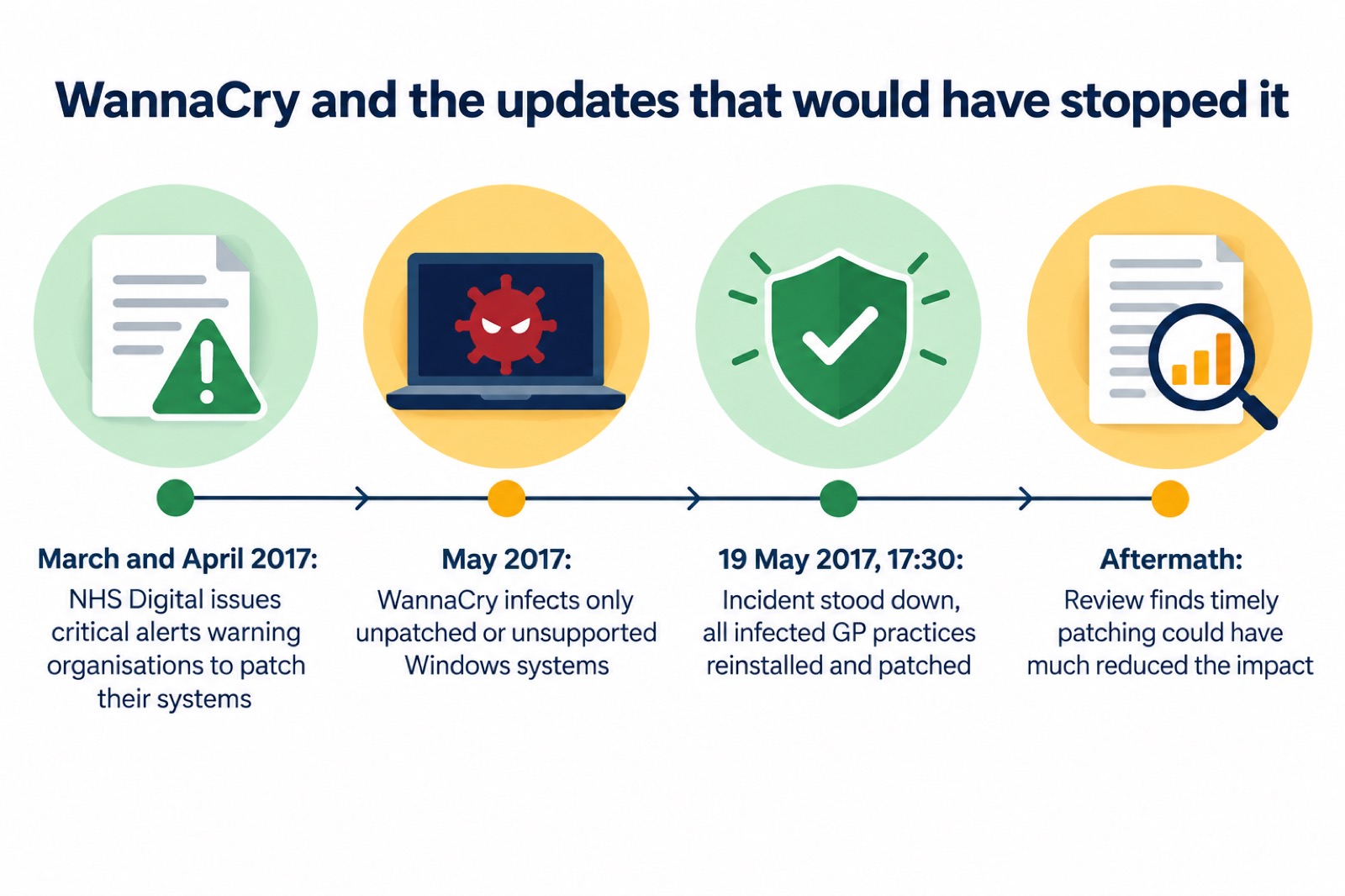
The most damaging example in the UK is WannaCry, the ransomware attack of May 2017. Ransomware makes your data or systems unusable until the victim makes a payment6. WannaCry only affected computers running Microsoft Windows operating systems that did not have the latest security patches installed7, and every NHS organisation infected by it had unpatched or unsupported Windows operating systems, which left them susceptible5. NHS Digital had issued critical alerts in March and April 2017 warning organisations to patch their systems to prevent exactly this, and the National Audit Office later concluded that had that advice been acted on in a timely manner, the scale and impact of the attack could have been much reduced8. WannaCry was the largest cyber attack to affect the NHS in England5.
The same logic applies at home. A parliamentary committee examining ransomware heard that older operational technology is much more likely to use components that are 20 to 30 years old and run older software that is less secure and no longer supported9. Your household devices are newer than that, but the principle holds: the longer software goes unpatched, the more known doors it has open. Installing updates is one of the most important things you can do to prevent your accounts from being hacked as well as your devices10.
What updates actually do: security patches, bug fixes and new protections
An update is not one thing. The NCSC describes what arrives in a typical software or app update: protection from viruses and other kinds of malware, and often improvements and new features as well1. The security part is the patch: code that closes a specific flaw that attackers could use. The rest may fix crashes, improve battery life or add functions, which is why updates sometimes feel like a mixed bag.
Three kinds of change matter most to a household:
- Security patches, which close flaws that criminals know about and can exploit2
- Protection from viruses and other malware, built into the update itself1
- Improvements and new features, which arrive alongside the security fixes1
The NCSC's advice on protecting devices from viruses and malware is to apply updates as one of the most important things you can do, and to make sure your antivirus software is set to receive updates automatically too11. Antivirus software is itself a program, and it needs its own updates to recognise the newest threats. Protect UK, the police-led counter-terrorism security advice service, similarly advises using a firewall and anti-virus software, keeping them up to date, and running system scans regularly12.
There is a second reason updates matter that people often miss: they keep the protections you already have working. The NCSC's guidance on browser password managers warns that passwords stored in the browser are only as secure as your devices and accounts, which is why you should not switch off the security auto-update feature for your browser and operating system13. If you let your browser save passwords, an out-of-date browser is a weaker safe for them.
Turn on automatic updates and install prompts as soon as they arrive
The single best habit is to let the device do the remembering. The NCSC advises turning on the "automatic updates" option in your device's settings, if available, so you do not have to remember to apply updates1. The same advice appears in the NCSC's smart device guidance: turn on the automatic updates option if available4. For PCs and laptops specifically, the NCSC says to install security updates as soon as they are available, ideally by setting them to install automatically14.
When a prompt does appear, act on it. The NCSC's advice is direct: if you receive a prompt to update your device or apps, do not ignore it, because applying these updates is one of the most important and quickest things you can do to keep yourself safe online1. The NCSC's top tips poster repeats the point: apply security updates promptly and turn on automatic updates in device settings if available15.
A few practical points make updating easier:
- Update at home. Updating may take some time and requires a reliable internet connection, so the NCSC says it is best to do it at home where you can access your wi-fi1.
- Keep the device plugged in. The NCSC advises keeping your device plugged in while it updates, so a flat battery does not interrupt the install1.
- Do not postpone repeatedly. Hackers rely on ignored notifications, so treat the prompt as urgent rather than a chore for later2.
- Update after recovering from a hack. If an account or device has been compromised, the NCSC's recovery guidance says to apply updates to your apps and device software as soon as they are available, because updates include protection from viruses16.
If you are unsure whether automatic updates are on, the NCSC has a dedicated page on the question, and the setting is always in the device's main settings menu, usually under a heading such as "software update" or "system"1. For a fuller walkthrough, see our page on whether you should turn on automatic updates.
Keeping phones and computers up to date
The operating system is the foundation: everything else on the device, including your apps and their data, sits on top of it. The NCSC's ransomware guidance for home users and small businesses says to keep your operating system and apps up to date and apply software updates promptly to help keep your device secure17. After a ransomware incident, the NCSC's recovery guidance goes further: connect devices to a clean network in order to download, install and update the operating system and all other software18.
For each kind of device, the practical steps are:
| Device | Where updates live | What to do |
|---|---|---|
| iPhone or iPad | Settings, then Software Update | Turn on automatic updates; install prompts promptly1 |
| Android phone or tablet | Settings, then System or Software Update | Turn on automatic updates; install prompts promptly1 |
| Windows PC or laptop | Settings, then Windows Update | Set security updates to install automatically14 |
| Mac | System Settings, then Software Update | Turn on automatic updates; keep the built-in malware protection current17 |
| Smart devices around the home | The maker's app | Turn on the automatic updates option if available4 |
Two points from the NCSC's guidance deserve emphasis. First, Windows and macOS have built-in malware protection tools which are suitable for the purpose of protecting your device, so make sure that protection is turned on and up to date17. Second, older devices will eventually stop receiving updates1, and when updates are no longer provided, devices are easier to hack, or may stop working as designed4. That is the point at which a device becomes a liability rather than an asset, and the NCSC's WannaCry guidance is blunt about the equivalent choice on computers: it strongly recommends that you do not continue to use unsupported operating systems, but instead upgrade to one which receives regular security updates from the vendor6. Our page on what happens when your phone stops getting updates covers that decision in detail.
One household device worth checking is a smart heating controller. The maker of the Bosch EasyControl states that software updates are performed automatically, and that the update may take a few days after installation19. That is typical of smart home kit: it updates itself quietly, but only while it is connected, so a device left offline falls behind.
Updates also matter for services you may not think of as software. The UK government's Emergency Alerts service, which warns you about serious nearby threats to life through your mobile phone20, is sent to compatible 4G and 5G mobile phones within an area of risk if they have the latest software update, and mobile phones released before 2015 are likely to require some changes to the settings21. The government's own advice on the service is to make sure your device has all the latest software updates22. An out-of-date phone may not receive a life-safety alert.
Apps: the updates you may need to make by hand
Apps are updated separately from the operating system, and this is where households most often fall behind. The NCSC's guidance on protecting devices from viruses and malware says to set your apps, and the tablet or phone itself, to update automatically11. With automatic updates on, the App Store and Google Play install new versions in the background, usually overnight while the device is charging and on wi-fi.
If you prefer to check by hand, or an app is misbehaving, the manual route is straightforward:
- Open the App Store on an iPhone or iPad, or Google Play on an Android device.
- Go to the updates section and look at the list of apps with updates waiting.
- Install the updates, either individually or all at once.
- Repeat every few weeks if you have automatic updates switched off.
Where you get apps from matters as much as updating them. The NCSC's ransomware guidance says to avoid downloading dodgy apps and to use only official app stores, such as Google Play or the Apple App Store, which provide protection from viruses17. Its guidance on scam "missed parcel" text messages, which spread malware, repeats the advice: keep your device up to date by installing the latest software and patches, and only install apps from official app stores such as Google Play, the Apple App Store or the Samsung Galaxy Store3. Fake apps and apps from outside the official stores can carry malware that no amount of updating elsewhere will fix.
Web browsers: a main route for malware

Your browser is the program that touches the outside world most often, and it handles the things criminals most want: logins, passwords, payment details and sessions with your bank. That makes keeping it current especially important. The NCSC's password manager guidance warns that passwords stored in the browser are only as secure as your devices and accounts, so do not switch off the security auto-update feature for your browser and operating system13. Chrome, Edge, Firefox and Safari all update themselves by default; the danger comes from turning that off, or from running a browser on an operating system that no longer supports it.
Browsers also play a role when things go wrong. The NCSC's guidance on infected devices notes that if you cannot download and install an antivirus product because your web browser, such as Chrome, Edge or Firefox, is infected, you will probably need to get expert help23. The same point appears in the NCSC's guidance on what to do if your device has been hacked24. A browser compromised by malware blocks the very tool you would use to fix it, which is why prevention, meaning prompt updates and care with links, beats cure.
If you think you have opened something suspicious, the NCSC's phishing guidance says to open your antivirus software if you have it, run a full scan, and allow it to clean up any problems it finds25. Our pages on phishing, on what to do after clicking a phishing link and on malware signs and removal walk through that in full.
When systems fail: lessons from WannaCry and the NHS
The clearest lesson about updates in recent UK history comes from the NHS. In May 2017 the WannaCry ransomware attack encrypted data and systems and demanded payment to restore access6. It was the largest cyber attack to affect the NHS in England5. The technical cause was simple: WannaCry only affected computers running Microsoft Windows operating systems that did not have the latest security patches installed7, and all the NHS organisations infected had unpatched or unsupported Windows operating systems5.
The warning had existed. NHS Digital had issued critical alerts in March and April 2017 warning organisations to patch their systems to prevent WannaCry8. The NHS's own lessons learned review found that NHS Digital had alerted the service to the vulnerability before the attack via its CareCert service, and that had this advice been acted on in a timely manner, the scale and impact of the attack could have been much reduced26. The incident was formally stood down at 17:30 on Friday 19 May 2017, with all infected GP practices reinstalled and patched26. The knock-on effects reached ordinary households: many local NHS organisations could not communicate with national NHS bodies by email because they had been infected or had shut down their email systems as a precaution5.
For home users, the NCSC's WannaCry guidance was reassuring for anyone already following the advice on this page: if you were using a recent version of Windows and had automatic updates turned on, you were already protected automatically7. The guidance also advised making sure your antivirus product was turned on and up to date6. A community risk register published by North Yorkshire in 2025 records the same root cause in plain terms: many organisations had not applied the recommended software updates in a timely manner, which left systems vulnerable27.
The pattern has repeated since. In August 2022 an attack on a software provider disrupted NHS 111 and patient systems, with doctors reverting to pen and paper for months and patient care badly affected in some settings9. Software failures without any attacker can cause the same disruption: in June 2023 a complex software fault on BT's 999 platform left callers unable to reach the emergency services for part of a day28. These events are why this site treats cyber attacks and major IT failures as a household preparedness topic alongside floods and power cuts, with pages on NHS services during an IT outage, getting prescriptions when GP systems are down and paying for essentials when card machines fail.
When support ends: what to do with a device that stops getting updates
Every device has an end of support. The NCSC notes that older devices will eventually stop receiving updates1, and that when updates are no longer provided, devices are easier to hack, or may stop working as designed4. For a phone or computer, the NCSC's WannaCry guidance sets the standard: do not continue to use unsupported operating systems; upgrade to one which receives regular security updates from the vendor6.
Before that point arrives, a few preparations soften the landing:
- Back up your data now. The NCSC lists many reasons you might be unable to access your data, including a device being lost, stolen or broken, accidental deletion, and ransomware erasing or blocking it29. Our page on backing up files and photos at home explains how.
- Check dependent services. Some connected equipment needs attention at known changeover points: the digital landline switchover guidance notes that devices such as fall monitors and personal alarms may require checks or upgrades before the switchover30.
- Plan the replacement. An unsupported device connected to your wi-fi is a weak point for everything else on the network, so retire it from internet use rather than leaving it connected indefinitely4.
Where to get help
If a device is already misbehaving, the NCSC publishes step-by-step guidance for individuals: what to do if your device has been hacked24, how to recover an infected device23, and how to recover hacked accounts10. Its guidance on infected devices notes that you may already know for sure something is wrong because your antivirus product is telling you it has found an infection23. For scam messages, see our pages on reporting a phishing email and reporting a scam text, and for the wider picture of official help, the National Cyber Security Centre.
Sources (30)
- Install the latest software and app updates, National Cyber Security Centre
- Cyber security: protecting your family, Essex Prepared, 2026
- Scam missed parcel SMS messages: advice on avoiding malware, National Cyber Security Centre
- Security law and smart devices, National Cyber Security Centre, 2024
- Investigation: WannaCry cyber attack and the NHS, National Audit Office, 2017
- WannaCry guidance for home users and small businesses, National Cyber Security Centre, 2017
- Ransomware WannaCry guidance for home users and small businesses, National Cyber Security Centre, 2017
- Investigation: WannaCry cyber attack and the NHS, National Audit Office, 2017
- Joint Committee on the National Security Strategy report, Parliament, 2023
- Recovering hacked accounts, National Cyber Security Centre, 2026
- Protecting devices from viruses and malware, National Cyber Security Centre, 2024
- IT security and online communications, Protect UK, 2022
- Password managers, National Cyber Security Centre, 2026
- Infected devices: PCs and laptops, National Cyber Security Centre, 2026
- Top tips for staying secure online poster, National Cyber Security Centre, 2024
- Recovering hacked accounts infographics, National Cyber Security Centre, 2026
- Ransomware prevention and recovery, National Cyber Security Centre, 2020
- Ransomware attack: what to do, National Cyber Security Centre, 2026
- Bosch EasyControl installation manual, Worcester Bosch, 2017
- Frequently asked questions about Emergency Alerts, UK Government, 2023
- Emergency alerts, Denbighshire County Council, 2026
- How alerts work, UK Government, 2026
- How to recover an infected device, National Cyber Security Centre, 2026
- Hacked device: action to take, National Cyber Security Centre, 2021
- Phishing: what to do, National Cyber Security Centre, 2026
- Lessons learned review of the WannaCry ransomware cyber attack, NHS England, 2018
- Community Risk Register 2025, North Yorkshire Local Resilience Forum, 2025
- 9 August 2019 power outage report, Ofgem, 2020
- Always back up your most important data, National Cyber Security Centre, 2018
- Switchover to digital landlines, South Gloucestershire Council, 2026
 Accounts to Protect With 2-Step
 After Fixing an Infected Device
 Home Online Security Checklist
 Antivirus Software
 Backing Up Files and Photos
 Council Online Services Down
 Your Details in a Data Breach
 FluBot Fake Parcel Texts
 Hacked Online Accounts
 How Services Respond
 Malware Signs and Removal
 National Cyber Security Centre
 NHS Services During an IT Outage
 Keeping Key Records Offline
 Shopping Online Safely