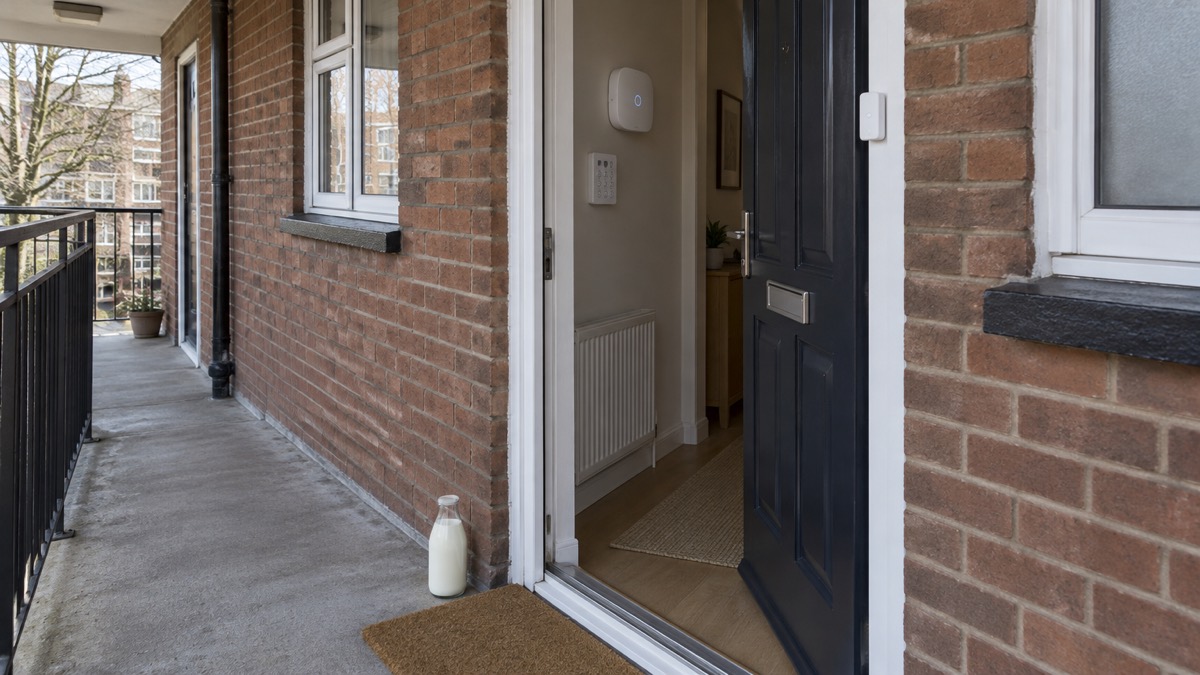
The Abode Security Kit is a do-it-yourself burglar alarm you fit yourself, with no drilling, no wiring and no installer visit. The box contains the Abode Security Hub, one Mini Door/Window Sensor and one Keyfob, and Abode says setup takes less than 30 minutes with no tools required1. It is self-monitored out of the box with no monthly fees, controlled from the free Abode app, and professional monitoring can be switched on and off without a contract1.
That combination suits a household that wants a basic alarm without a long agreement, and is comfortable running it from a phone. What it does not do matters just as much: The Ambient's review noted no HomeKit, Zigbee or Z-Wave support1. If Apple's system is central to your home, settle that question with the maker before you buy.
This page sets out what is in the box, how setup works, what happens in a power cut or broadband outage, the choice between watching the alarm yourself and paying for monitoring, which smart home systems it works with, and the warranty, returns and software support that come with it.
What comes in the Abode Security Kit
The starter box is deliberately small. Abode lists the contents as 1 Abode Security Hub, 1 Mini Door/Window Sensor and 1 Keyfob1. That is enough to protect one door or window and to arm and disarm the system from outside the app, but it is a starting point rather than full coverage of a house.
The hub is the part that matters most, because everything else connects to it. Abode describes the kit as compatible with Z-Wave locks, light switches, garage controllers and third-party sensors, and one customer reported connecting a Z-Wave deadbolt, two light switches and a garage controller through the Abode app1. In other words, the small box is the beginning of a system you build up over time, not a fixed package.
If you are weighing up what a starter kit should contain, it helps to see how packages differ. SimpliSafe, for example, sells several tiers: its Essentials package includes entry and motion sensors and an indoor camera; its Starter package has an entry sensor, motion sensor and indoor camera; its Bamburgh package adds glassbreak sensors plus an indoor camera and siren; its Foundation package pairs an entry sensor and indoor camera with a keypad; its Windsor package has multiple entry and motion sensors and an indoor camera; its Tower package includes both indoor and outdoor cameras; and its Edinburgh package adds temperature and water sensors to entry, motion and cameras3. Those are different products with different contents, listed here only to show the range of what a "starter kit" can mean. The Abode box sits at the simplest end of that range.
For the wider question of what type of alarm suits a house, see Burglar Alarms: Types and How to Choose One. If you are comparing the two broad approaches, Monitored or Self-Monitored Alarm? sets out the trade-offs.
Setting it up: under 30 minutes with no tools or wiring
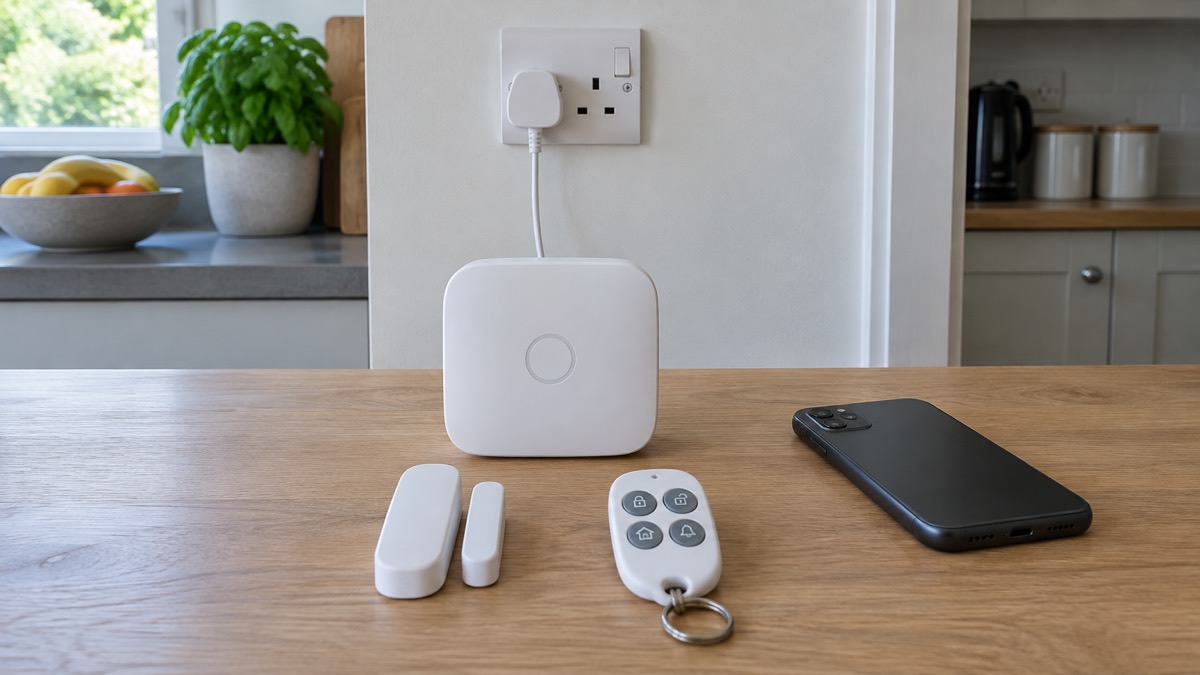
Abode's product page says the kit needs no tools and that setup takes less than 30 minutes1. The same page also says you can set it up easily in under 10 minutes with no tools, wiring or technical expertise required1. Those two figures come from the same source and are not reconciled, so treat "under 30 minutes" as the safer expectation and "under 10 minutes" as the best case.
Customer and press accounts sit in the same territory. One customer reported that setup took about 20 minutes1. Tom's Guide reported installing the kit and a video doorbell in under 20 minutes and found the app-led setup easy1. A 2023 review by Trusted Reviews found installation easy with the sensor and key fob pre-paired, though it noted that the entry-level hub it tested did not support HomeKit, Zigbee or Z-Wave in that configuration1.
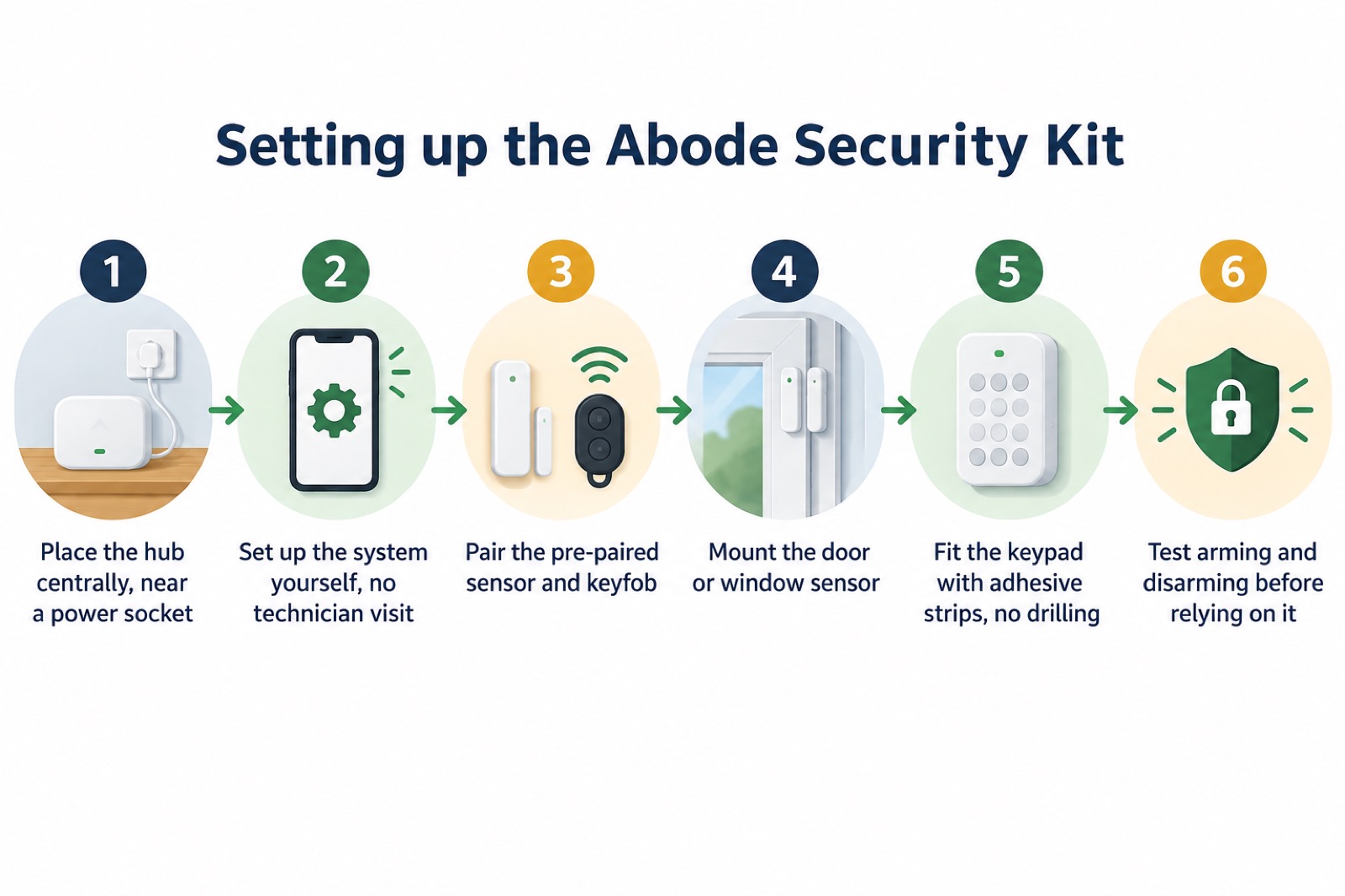
The practical sequence is straightforward:
- Unpack and power the hub. Place it centrally, as below.
- Install the app and create your account. The app leads the setup1.
- Pair the sensor and keyfob. They arrive pre-paired according to the 2023 review1.
- Mount the sensor on the door or window you want to protect.
- Mount the keypad, if you have one, with adhesive strips so no drilling is needed1.
- Test the system before you rely on it, arming and disarming from the app and the keyfob.
Where you put the hub decides how well the rest of the system works. Abode's own guidance is that the system is fully DIY, with all devices wireless and peel-and-stick mounting, so no drilling or technician visits are needed4. The same principle of reachability applies to any household equipment you might need in a hurry: official advice on household emergency kits is that they should be kept somewhere in the house where everyone can get to it if needed5.
Power cuts and internet outages: battery backup and 4G
A connected alarm depends on two things a household often takes for granted: mains power and a working internet connection. The Abode kit is controlled from the app, so if your broadband or Wi-Fi drops, remote control and alerts are affected. The maker's material does not set out a 4G backup option for this kit, so do not assume one.
What you can do is make the rest of the household resilient. Official advice for power cuts is consistent across the UK: keep a torch and spare batteries, a wind-up or battery-powered radio tuned to local news, a power bank or solar charger, warm clothes and blankets, and non-perishable food6. Northern Ireland's household emergency kit advice includes spare batteries7, and the Met Office's power cut essentials list battery candles, torches and batteries and a mobile phone power pack8. A charged portable power bank and charging cables are recommended for emergency kits9.
For keeping communications running, independent guidance notes that uninterruptible power supply devices provide a few minutes of emergency battery backup if power fails and can help keep communications platforms, Wi-Fi connections, and computer and tablet devices running10. A few minutes is enough to send a message or finish a call, not to run a house. The government's telecare national action plan makes the same point for telecare users, noting that in the event of a power cut additional mitigations may be required to ensure continued access to services, such as a battery back-up unit11.
Before a storm is forecast, fire and rescue services advise you to safely charge your phone and laptop and check you have batteries for torches in case you have a power cut12. Keep a torch and spare batteries at home13, and prepare an emergency kit with items such as a torch, portable radio, replacement batteries, matches and bottled water8.
For the wider picture, see Keeping Your Home Protected in a Power Cut and Alarms and Cameras on a Weak Mobile Signal or Slow Broadband.
Self-monitoring or professional monitoring
The Abode kit is self-monitored out of the box, with no monthly fees required and control from the free Abode app1. That means alerts come to you, and you decide what to do with them. Abode also says professional monitoring can be toggled on and off without a contract, which one customer described as a huge selling point1.
The choice is really about who is watching when you are asleep, out, or unable to reach your phone. Self-monitoring suits a household that is at home most of the time, keeps phones charged and to hand, and wants no ongoing cost. Professional monitoring suits a household that is often empty, or where someone would not be able to act on an alert themselves.
| Self-monitoring | Professional monitoring | |
|---|---|---|
| Who responds | You, via the app | A monitoring service, per the maker's plan1 |
| Ongoing cost | None required, per the maker1 | Set by the maker's plan |
| Contract | Not applicable | Can be toggled on and off without a contract, per the maker1 |
| Suits | Households at home often, comfortable with an app | Households often empty, or where someone cannot act on an alert |
Whichever you choose, the alarm is only one layer. Official fire safety advice is to fit a working smoke alarm14, and some monitoring providers extend their cover to smoke and carbon monoxide detectors, natural gas detectors, extreme temperature sensors, flood detectors, panic alarms, fall detectors, epilepsy sensors and medication dispensers14. Those are separate services, not part of the Abode kit.
If you are weighing the two approaches in more depth, Monitored Alarms: Receiving Centres and Who Responds explains how a receiving centre works, and Panic Buttons on Home Alarms: How They Work and Who Is Told covers the panic alarm function specifically.
Which smart home systems it works with
This is the part of the page to read carefully, because the maker's own material is not consistent. Abode's product page states that the Abode Security Kit works with Amazon Alexa and Google Assistant1. The same page also states that the hub is not compatible with HomeKit1, while elsewhere listing Apple HomeKit among the kit's integrations1. The two statements disagree. If HomeKit matters to you, ask the maker to confirm the position for the exact model you are buying.
The 2023 reviews add context. Trusted Reviews noted that the entry-level hub it tested did not support HomeKit, Zigbee or Z-Wave in the reviewed configuration1. The Ambient noted no HomeKit, Zigbee or Z-Wave support alongside quick setup and flexible modes1. A customer writing in March 2026, by contrast, said the Z-Wave and Zigbee support meant they were not locked into one ecosystem1. The most likely explanation is that support varies by hub model and configuration, which is exactly why you should confirm before buying.
For comparison, other makers publish their compatibility plainly. Arlo, for example, lists its Wireless Video Doorbell as integrating with Amazon Alexa, Google Assistant, Apple HomeKit (with SmartHub), IFTTT and Samsung SmartThings15. That is a different product, cited only to show what a clear compatibility list looks like.
The CUE automation engine is where the kit's smart home side shows. Abode describes it as handling schedules, geofence triggers and custom alerts, and one customer described it handling schedules for porch lights, locking the front door at 10pm and opening the garage1. Geofencing is the feature that arms the system automatically when the last phone leaves and disarms it when the first one arrives1.
Warranty, returns and software updates
Abode states a 1-Year Standard Warranty on devices and a 30 day returns period if you do not love it1. Keep your proof of purchase and the original packaging until you are sure the system suits you. One long-term customer reported two years in with zero hardware failures, which is encouraging but is one household's experience rather than a guarantee1.
Software support is the part buyers often overlook. Which? lists a software update period for the Abode Security Kit of until at least 20282. That date matters because a connected alarm is only as secure as its software. Secured by Design, the police-backed security initiative, advises that as with all software, connected devices need updating to receive security fixes for vulnerabilities, and that you should enable automatic updates16. Police Scotland advises keeping software and apps updated for the latest security updates17, and Essex's emergency planning guidance says software and app updates contain vital security updates to help protect your devices from cyber criminals18.
In practice:
- Register the hub so you are told about updates.
- Leave automatic updates on where the app offers the setting16.
- Update the app on every phone that controls the system17.
- Check the update date against the 2028 figure before you rely on the kit for the long term2.
- Keep the account secure, with a strong password and two-factor authentication if offered.
For more on keeping camera and alarm accounts safe, see Camera and Doorbell Accounts: Stopping Strangers Getting In and How Long Do Cameras and Doorbells Get Software Updates?.
Where to get help and what to do next
If you are burgled, or come home to a break-in, the priority is your safety, not the alarm. Official fire safety advice is to leave the building immediately, following your escape plan19, and to lock the door behind you20. Always know where your keys are21. If you have to leave in a hurry, Leaving Your Home Locked When You Have to Evacuate sets out what to do.
For the alarm itself, the practical next steps are:
- Confirm HomeKit support with the maker before buying, given the conflicting statements on its own page1.
- Check the current monitoring terms and how to cancel, since only the account holder can cancel an account with some providers4.
- Test the system with everyone at home, including the geofence arming1.
- Keep spare batteries for torches and the kit, as official emergency advice recommends7.
- Write down your account details and keep them somewhere you can find them in a power cut.
If you need help because of age, disability or a medical condition, ask your energy supplier about the Priority Services Register, and check what your telecare provider does in a power cut. For the wider picture of home security, start with Home Security: A Household Guide, and for the emergency kit that supports any connected system, see Emergency Kit: What a UK Household Should Keep Ready.
Sources (21)
- Abode Security Kit product page, Abode, 2026
- Best burglar alarms and smart security systems, Which?, 2026
- Home security shop packages, SimpliSafe, 2026
- Verisure FAQ, Verisure, 2026
- Household emergency kit, nidirect, 2026
- Power cuts, West Yorkshire Prepared, 2026
- Prepare for emergencies, Dumfries and Galloway Council, 2026
- Storms and power cuts, Devon and Somerset Fire and Rescue Service, 2022
- Be prepared for emergencies | North Devon Council, North Devon Council
- Be winter ready, Electricity North West, 2026
- Telecare national action plan, GOV.UK, 2025
- Storm Ciaran: how you can stay safe, Devon and Somerset Fire and Rescue Service, 2023
- Staying safe in the snow, North Yorkshire Fire and Rescue Service, 2023
- Home safety, Devon County Council, 2025
- Wireless video doorbells, Arlo, 2026
- Cyber security advice, Secured by Design, 2026
- Hacked accounts, Police Scotland, 2026
- Cyber security, Essex Prepared, 2026
- Smoke alarms and CO detectors, Warwickshire County Council, 2026
- Get help and advice in an emergency, Lincolnshire County Council, 2026
- Reduce fire risks for older people, Northern Ireland Fire and Rescue Service, 2021

 Verisure Alarm System