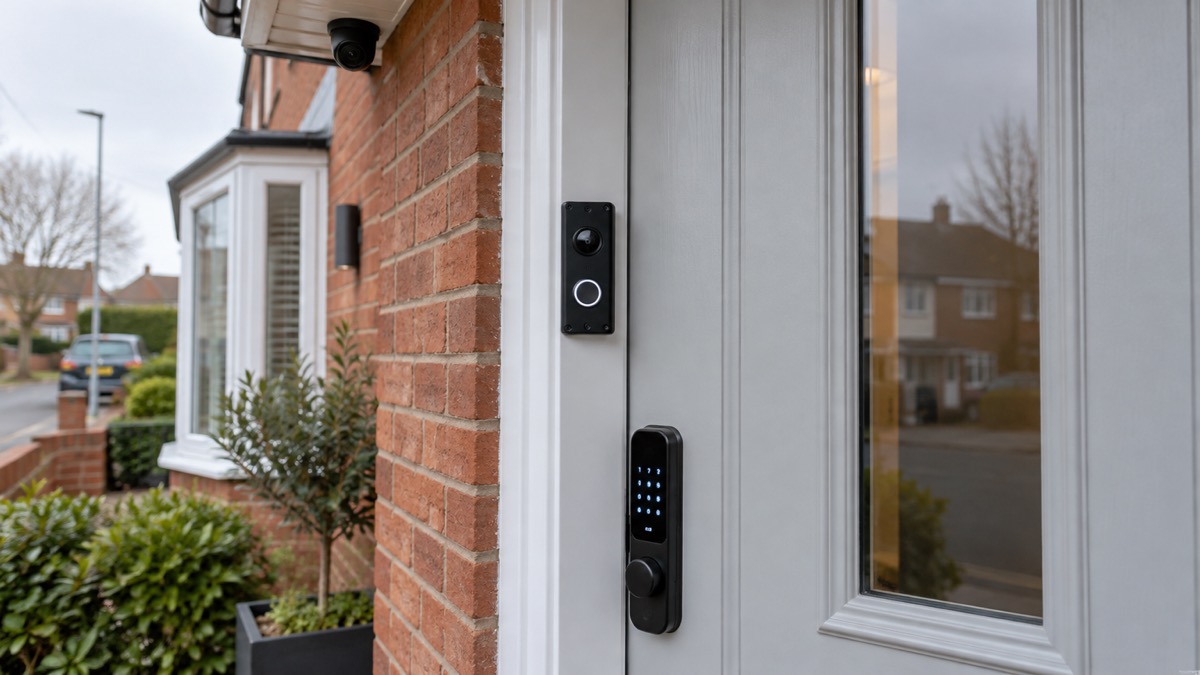
A camera or video doorbell is only as secure as the account behind its app. Account hacking, sometimes called account compromise, is when someone manages to get into your account without your permission1. With a camera account that is not just a privacy nuisance: Police Scotland warns that if someone hacks your smart devices they could get onto your wifi and launch a cyberattack against you, or use the devices to monitor, stalk or harass you2. The National Cyber Security Centre (NCSC) adds that live feeds or images from smart cameras can, in rare cases, be accessed by unauthorised users, putting your privacy at risk3.
The good news is that the two settings that stop almost all of this take minutes to change. Use a strong password that you use nowhere else, and turn on 2-step verification so a criminal who knows your password still cannot get in4. This page walks through what a hacked camera account actually means, how to spot one, what to do in the first hour, and how to keep the account locked down afterwards. For the wider picture on protecting your whole household online, see our guide to cyber attacks and major IT failures; for the camera hardware itself, see home cameras and CCTV and video doorbells.
What someone actually gets when they hack your camera account
Your camera account is the app login that controls the device: the live view, the recordings, the speaker and any settings. When a stranger gets into it, they can see what the camera sees and, on most doorbells and many cameras, hear and speak through it. Police Scotland's smart device advice sets out the wider risks: access to your wifi and a cyberattack launched from it, or the device used to monitor, stalk or harass you2.
Two things make camera accounts a particular target. First, some cameras ship with the default password set by the manufacturer, which is often well-known or guessable, such as admin or 00000, and live feeds can in rare cases be viewed by unauthorised users as a result8. Second, many people reuse a password they already use elsewhere, so a breach of an unrelated shopping site hands over the camera login too. In 2014 a website based in Russia displayed feeds from thousands of cameras by using default login credentials that were freely available online, which prompted the Information Commissioner's Office to publish a blog warning about the vulnerabilities of these cameras and how to set them up correctly9. Default passwords and reused passwords remain the two ways in.
If your camera is linked to a smart lock, the stakes are higher still: the account may control entry to your home as well as the view of it. Treat a camera account that has any lock, garage or alarm control attached to it with the same care as a banking login.
Signs a stranger may be inside your account
The NCSC's recovery guidance lists the signs of unauthorised activity to watch for: changes to your security settings, messages or notifications sent from your account that you don't recognise, logins or attempted logins from strange locations or at unusual times, and unauthorised money transfers or purchases10. The same signs apply to a camera account: a shared-user you never added, an email address or phone number changed on the account, motion alerts from a device aimed somewhere you did not point it, or the camera speaking when nobody at home is using it.
Some signs are blunter. Being unable to log in at all, or receiving password reset messages you did not ask for, can mean somebody else has taken the account over11. The NCSC's password guidance adds a simple indicator of a stolen password: being unable to log in, or messages sent from your account that you don't recognise11. And if someone you know has received unexpected messages from you, advertising unlikely products or asking for money, a device or account of yours may be compromised12.
| Sign | What it may mean |
|---|---|
| You cannot log in, or get password reset emails you did not request | Someone may have changed your password and taken over the account11 |
| Security settings have changed, or a shared user appears you did not add | Unauthorised activity inside the account10 |
| Logins or attempted logins from strange places or at odd times | Someone else is trying the account10 |
| Messages or notifications sent from the account that you don't recognise | Your password has likely been stolen11 |
| Unexpected messages from you received by people you know | A device or account may be infected12 |
One more thing worth knowing: if you receive a threatening email that quotes a password you recognise, do not panic. The NCSC's guidance on sextortion scams is clear that a password included in such a phish has in all likelihood been obtained from historic breaches of personal data, and you can check this at haveibeenpwned.com13. It does not by itself mean the sender can see your camera, but it does mean that password is public and should be changed everywhere you used it.
What to do straight away if you think your account has been hacked
Work through these steps in order. They follow the NCSC's guidance on recovering a hacked account5 and its recovery infographic10.
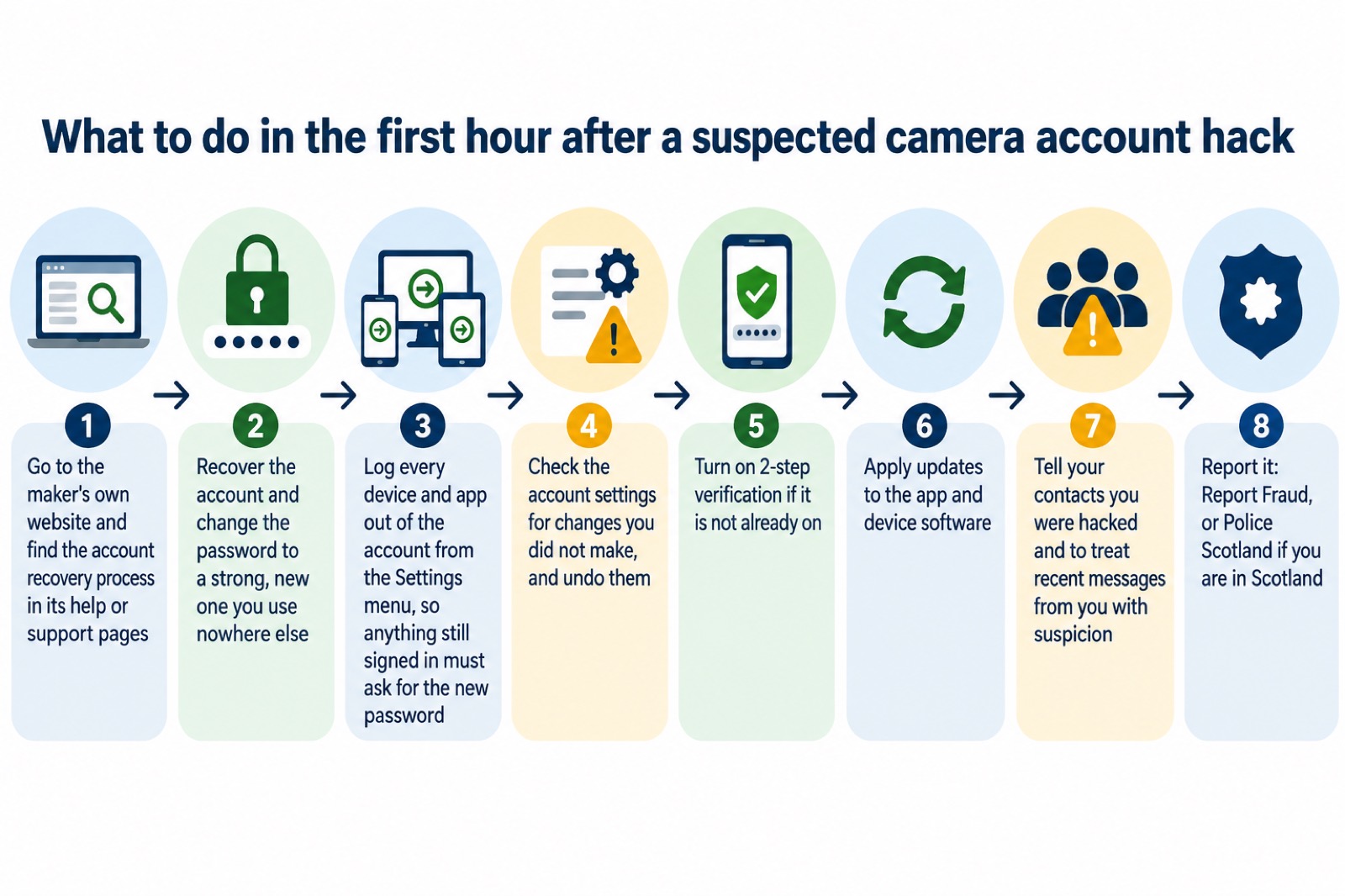
- Start with the maker's own recovery process. Go to the account provider's website and search their help or support pages to find the account recovery process5. Do this from the maker's site rather than a link in an email, in case the email itself is the attack.
- Change the password. Make the new one strong and unlike any password you use elsewhere10.
- Log everything out. Once you have changed your password, make sure any devices and apps that may still be logged in are logged out, usually from the Settings menus of the app or website, so anyone attempting to use the account is prompted to supply the new password5.
- Check the settings. Go through the account for changes you did not make, to security settings, shared users, linked email addresses or phone numbers, and put them right6.
- Turn on 2-step verification if it was not already on10.
- Update the app and the device software, since updates include protection from viruses10.
- Tell your contacts you were hacked, and suggest they treat any recent messages sent from your account with suspicion10.
- Report it. Report Fraud is the UK's reporting centre for cyber crime, and reporting helps the NCSC and law enforcement reduce criminal activity10. If you have lost money, tell your bank straight away and report it to Report Fraud, or in Scotland contact Police Scotland14.
If you think the device itself, rather than just the account, has been attacked, Police Scotland advises resetting the device to factory settings and asking the device manufacturer what extra steps you should take2. And if you believe a phone or tablet used to control the camera is infected with malware, the NCSC warns that you should not log into any accounts on it, because the malware may steal those details; perform a factory reset on the device as soon as you can instead15.
How strangers get in: stolen passwords from data breaches
The most common way passwords are stolen is when an organisation holding your details suffers a data breach16. A data breach occurs when information held by an organisation is stolen or accessed without authorisation17. The password you typed into a shop, a forum or a food delivery app years ago can end up bought and sold, and Police Scotland notes that hackers might use passwords taken from data breaches or bought on the dark web1.
The technique that follows is called credential stuffing: criminals use passwords stolen in one breach to try to access other accounts, and it works because many people use the same password for different accounts16. Your camera account is a valuable target for exactly this, because a reused password turns an unrelated breach into a view inside your home.
Weak passwords are a separate route in. Police Scotland warns that hackers have tools that can crack weak passwords in seconds4. And for older cameras that still run on a manufacturer's default password, no breach is needed at all: the 2014 Russia-based website accessed thousands of camera feeds simply by using default login credentials freely available online9.
Check whether you are already exposed. Avon and Somerset Police advise: if you want to check whether your password or email address has appeared in a data breach, use Have I Been Pwned, and change the passwords for any compromised accounts6. The NCSC gives the same tool by name, and notes that similar services are often included in antivirus or password manager tools17. You can also sign up at haveibeenpwned.com for future notifications, so you hear when a breach affects you18.
| How strangers get in | What it is | What stops it |
|---|---|---|
| Credential stuffing | Passwords stolen in one breach are tried on your other accounts16 | A different password for every account4 |
| Cracking | Tools that can crack weak passwords in seconds4 | A long, strong password or passphrase2 |
| Default passwords | Well-known or guessable maker defaults such as admin or 000008 | Change the password when you set the camera up8 |
| Malware | A virus on your phone or tablet steals logins as you type them15 | Install the latest software and app updates10 |
Use a strong, separate password for the camera account
The rule is simple and comes from every official source in this area: use different passwords for all online accounts4, and avoid repeating passwords for different accounts1. For a camera account this is not fussiness. Because of credential stuffing, one reused password can hand a stranger the live view of your hallway.
Police Scotland's smart device advice gathers the whole set of habits in one place: use strong passwords and passphrases, never reuse passwords for different accounts, avoid opening suspicious emails or messages, avoid clicking on unknown and untrusted links, keep the device software updated, turn on two-factor authentication, and follow any safety advice given by the device manufacturer2.
A few practical points:
- Change the default password when you install the camera. The NCSC's smart camera guidance warns that some cameras ship with a default password that is often well-known or guessable8.
- Older cameras may need a different route. To change the password for older cameras, you may have to type the camera's IP address into your browser; you can find the IP address in your router settings under connected devices8.
- Protect the email account above it. Whoever controls the email address that receives your camera password resets controls the camera account. The NCSC's advice on email applies directly: use a strong and separate password for it19.
- Do not share the password around the household. Police Scotland advises avoiding sharing your passwords with anyone4. Use the app's own shared-user feature instead, covered below.
A password manager makes all of this manageable. A password manager is an app that stores all your passwords securely4; access is usually through one long and strong password or biometrics6. Password managers can sync passwords across all your devices, work across platforms, tell you if you re-use passwords on different accounts, and tell you if your password has appeared in a data breach4. The NCSC encourages their use and notes they can create strong passwords for you and remember them19. If you use the password manager built into your browser instead, remember that those passwords are only as secure as your devices and accounts, so do not switch off the security auto-update feature for your browser and operating system20.
Turn on 2-step verification for every account that matters
Two-step verification, also known as two-factor authentication or 2FA, is an extra layer of security that works by asking for more information to prove your identity before you access your account6. It usually works by sending you a PIN or code, often via SMS or email10. The effect is the one that matters: enabling 2SV protects your accounts from unauthorised access, so even if a criminal knows your password, they will not be able to access your accounts6.
Turn it on for the camera or doorbell account itself, and for the email account that sits above it. The NCSC advises setting up 2SV on important accounts like email and banking, even if these are already protected by a strong password, and notes it only takes a few minutes5. Your camera account deserves the same treatment, because it carries pictures of the inside of your home.
Do the same for your password manager. The NCSC advises switching on 2SV on the password manager account, so a cyber criminal who knows the primary password still cannot access it20. And if you have just cleaned up after a malware infection, the NCSC's advice is to set up 2SV on your accounts where possible while you are updating your passwords15.
One honest limitation: 2SV usually relies on a code sent to your phone, so keep the phone itself protected. Police Scotland advises turning off or locking your device when not in use, using strong passwords on the device, and using extra steps such as face ID or your fingerprint4. If someone can access your device, they might be able to use your saved passwords to log into your accounts4.
Sharing access without sharing your password
Households want more than one person to see the camera, and the safe way is almost never one shared login. Police Scotland's advice is to avoid sharing your passwords with anyone4. Where the app offers a family or shared-user feature, each person gets their own login, you can see who did what, and you can remove one person's access without changing the password for everyone. A shared login does the opposite: it cannot be audited, cannot be selectively revoked, and travels with every phone it is typed into.
For a carer or neighbour, give the least access that does the job:
- A carer who checks on a vulnerable person: a shared-user login in the app if they need to see the cameras, or better, no camera access at all if a key safe for the door meets the real need.
- A neighbour watching the house while you are away: time-limited shared access, removed when you return. Our holiday checklist covers what to arrange before you go.
- Someone answering the door for you: a video doorbell used the way the police recommend for doorstep safety, as an intercom or viewer to check who is calling before the door is opened21. Our page on bogus callers covers spotting doorstep crime.
If a parcel goes missing, Avon and Somerset Police advise contacting the police to get a crime reference number, and checking with neighbours or for CCTV footage21, which is one situation where a neighbour's brief, proper access to a camera genuinely helps.
Updates, old devices and what end of support means
Software updates are not an optional extra. The NCSC's recovery guidance is to apply updates to your apps and device software as soon as they are available, because updates include protection from viruses10. Police Scotland makes the same point for smart devices generally: a device that is not protected with a strong password or kept updated is more likely to be hacked2.
The harder question is what happens when the maker stops issuing them. The NCSC is blunt: when updates are no longer provided, devices are easier to hack, or may stop working as designed7. A device that is no longer supported will not receive security updates from the manufacturer, and without these it is less secure22. Older devices will eventually stop receiving updates22, so this is a stage every camera and alarm reaches.
This is not theoretical. Hive has said that it will end support for the Hive Homeshield smart burglar alarm, including sirens, keypads and sensors, along with the Hive View indoor camera and Hive View Outdoor camera, on 1 August 202523. Households running that kit now hold equipment the maker no longer secures.
The law now gives you something to check before you buy. Under the Product Security and Telecommunications Infrastructure Act, the manufacturer must state the minimum length of time for which the device will receive important security updates7. Look for that statement on the box or product page, and weigh it against how long you expect to keep the device. Our page on how long cameras and doorbells get software updates goes into this in detail.
Two further steps from the NCSC's smart camera guidance harden the network around your cameras: consider disabling UPnP and port forwarding on your router, because cyber criminals can exploit these technologies to potentially access devices on your network such as smart cameras, and check the router's manual or the manufacturer's website for how8.
Where to report a hacked account and get help
Reporting is the step people skip, and it does two jobs: it gets you official help, and it feeds the national picture. Report Fraud is the UK's reporting centre for cyber crime, and reporting helps the NCSC and law enforcement reduce criminal activity10.
Where you report depends on where you are and what has happened:
| Situation | Where to report |
|---|---|
| You have lost money | Tell your bank straight away, then Report Fraud; in Scotland, contact Police Scotland24 |
| You are in Scotland | Police Scotland: report a hacked account or hacked device online, by phone, or in person1 |
| You want government advice on recovery | Stop! Think Fraud, the UK Government's advice on what to do if you've been hacked1 |
Police Scotland accepts reports of hacked accounts and hacked devices online, by phone or in person2, so there is no need to wait for a station to be open. If money has gone, the bank comes first: tell your bank straight away and report it as a crime to Report Fraud, or in Scotland contact the police by dialling 1015.
One further thing worth knowing, from the counter-terrorism police's ACT guidance: report anyone you notice observing CCTV, security arrangements, or taking photos of entrances and exits of specific buildings. Hostile reconnaissance of this kind can be reported through ACT channels25. It is rare, but a stranger photographing where your cameras point is worth telling someone about.
Finally, read the NCSC's guidance on recovering a hacked account before anything goes wrong, so you already know the steps if an incident happens11. The NCSC also advises getting advice from Stop! Think Fraud, the UK Government's service, on what to do if you've been hacked1. For the broader household picture, our home security guide covers the physical side, and our page on how to stop your security camera being hacked covers the device itself.
Sources (25)
- Hacked accounts advice, Police Scotland, 2026-11-03
- Smart devices advice, Police Scotland, 2026-11-02
- Smart security cameras: using them safely in your home (PDF), National Cyber Security Centre, 2020-03-03
- Passwords and two-factor authentication advice, Police Scotland, 2026-11-02
- Recovering a hacked account guidance, National Cyber Security Centre, 2022-08-24
- Keeping yourself safe online, Avon and Somerset Police, 2026-11-02
- Smart devices law blog post, National Cyber Security Centre, 2024-04-29
- Smart security cameras: using them safely in your home, National Cyber Security Centre, 2020-03-03
- Regulator publishes advice on IP camera security, Get Safe Online, 2014-11-20
- Recovering hacked accounts infographic (PDF), National Cyber Security Centre, 2026
- Using passwords infographic (PDF), National Cyber Security Centre, 2026
- Citizen infected devices, National Cyber Security Centre, 2026
- sextortion-scams-infographic.pdf, National Cyber Security Centre
- Citizen hacked accounts, National Cyber Security Centre, 2026
- Scam missed parcel SMS messages: advice on avoiding malware (PDF), National Cyber Security Centre, 2021-04-23
- Activate 2-step verification on your email, National Cyber Security Centre, 2018-12-17
- Data breaches guidance, National Cyber Security Centre, 2021-01-28
- Sextortion emails: how to protect yourself | National Cyber Security Centre, National Cyber Security Centre
- Use a strong and separate password for your email, National Cyber Security Centre, 2021-12-21
- Password managers, National Cyber Security Centre, 2026-05-21
- Doorstep crime advice, Avon and Somerset Police, 2026-11-02
- Install the latest software and app updates, National Cyber Security Centre, 2021-12-21
- Best burglar alarms and smart security systems, Which?, 2026-05-19
- Hacked accounts guidance, National Cyber Security Centre, 2026
- ACT: report suspicious activity, Protect UK, 2026-06-01
 Moving Home Locks Checklist
 After a Break-In Checklist
 Holiday Security Checklist
 Filming Beyond Your Boundary
 Video Doorbells Guide