
A backup is the one thing that turns a ransomware attack from a disaster into an inconvenience. In a ransomware attack you will not be able to access your device or the data stored on it, because the files are encrypted1. If you hold a clean copy made before the infection, you can wipe the device and start again. If you do not, you are left hoping the attacker keeps their word, and the National Cyber Security Centre is clear that there is no guarantee that you will get access to your data or computer1.
The catch is that a backup only helps if ransomware cannot reach it. Malware can spread to attached drives, so a backup left plugged in is not really a backup2. The work is to keep one copy out of reach, check it is clean before you restore from it, and clean the infected device first so you do not simply put the malware back.
This page sets out how to do each of those things, in the order you would need them: what to check before restoring, how to keep a copy ransomware cannot touch, how to recover the device itself, and where to get official help.
Check a backup is free from malware before you restore from it
The single most important rule is easy to skip when you are in a hurry. Before you restore from a backup, confirm that it is free from any malware1. A backup made while a device was already infected carries the infection with it, and restoring it puts the malware straight back on a clean machine. If you cannot be sure the backup was created before the malware arrived, do not restore it: factory reset and restore no backups, and do not back up your data before performing a factory reset, as the backup will also contain the malware2.
The NCSC's guidance on infected devices makes the same point from the other direction: restore your backed-up data from the "last known" good backup3. That phrase matters. You are not looking for the newest copy, you are looking for the newest copy you are confident predates the infection. If you cannot establish when the malware arrived, you cannot be sure any recent backup is clean.
There are practical checks you can make:
- Check the contents. Once you have made your backup, check that it contains all your important data, such as recently taken photos or recently created files or folders2. A backup that opens but is missing half your files is not a backup.
- Scan before you trust it. If you think a device has been compromised, open your antivirus software if you have it and run a full scan, allowing it to clean up any problems it finds5. When you first install antivirus, run a full scan to make sure your computer is free of all known malware6.
- Know when to walk away. If you cannot be sure the backup was created before the malware was installed, the NCSC advises performing a factory reset and not restoring any backups at all4. Losing files is painful; reinstalling an infection is worse.
Keeping a backup copy ransomware cannot reach
Ransomware does not sit still. The NCSC warns that ransomware and other types of malware can move to attached media, which means your backup would also be infected, and advises disconnecting removable media when not in use2. An external hard drive that stays plugged in is, in practice, part of the infected machine.
The NCSC's own summary of the risk is blunt: it is important to always have a recent offline backup of the most important files and data7. Offline is the operative word. The copy has to be somewhere the malware running on your device cannot write to.
There are two broad ways to do this, and most households end up using both.
| Approach | What it does for you | What to watch |
|---|---|---|
| External drive, disconnected after each backup | Physically out of reach when unplugged2 | You must remember to unplug it, and to reconnect it regularly |
| Cloud backup, set to run automatically | Keeps an up-to-date copy without you remembering2 | Only as safe as the account login2 |

Whichever you choose, the account behind a cloud backup needs protecting. The NCSC advises protecting cloud accounts, and access to your backups, by using strong passwords and turning on two-factor authentication2. Turning on two-step verification is described by the NCSC as the first and most important step to help protect you if your password gets phished or otherwise compromised8. It usually works by sending a PIN or code, often by SMS or email, to prove it is really you9. If you use a password manager, switch on two-step verification on that account too, so a criminal who knows the primary password still cannot access it8.
If you are weighing the two, our comparison of cloud backup and an external hard drive sets out which suits which household, and how often to back up covers the schedule question.
Recovering an infected device before you restore
Restoring files onto a machine that is still infected undoes the work. The NCSC is explicit that trying to rescue data while the device is still infected risks carrying the infection through after wiping and reinstalling10. The order is: deal with the device, then restore.
For a PC or laptop, the NCSC's sequence is to update your device and programs, open your antivirus product and run a scan, then follow its advice10. Updates matter in their own right: apply updates to your apps and device software as soon as they are available, because updates include protection from viruses9. The WannaCry attack on the NHS in 2017 is the cautionary example, with many organisations having failed to apply recommended software updates in a timely manner, leaving systems vulnerable11.
For a phone or tablet, the reset is usually the cleaner route. The NCSC advises that when you are given the option to restore backups, you should only do so if you are confident that the backup was created before you installed the malware; if you cannot be sure, perform a factory reset and not restore any backups4. It adds a warning that catches people out: do not back up your data before performing a factory reset, as the backup will also contain the malware4.
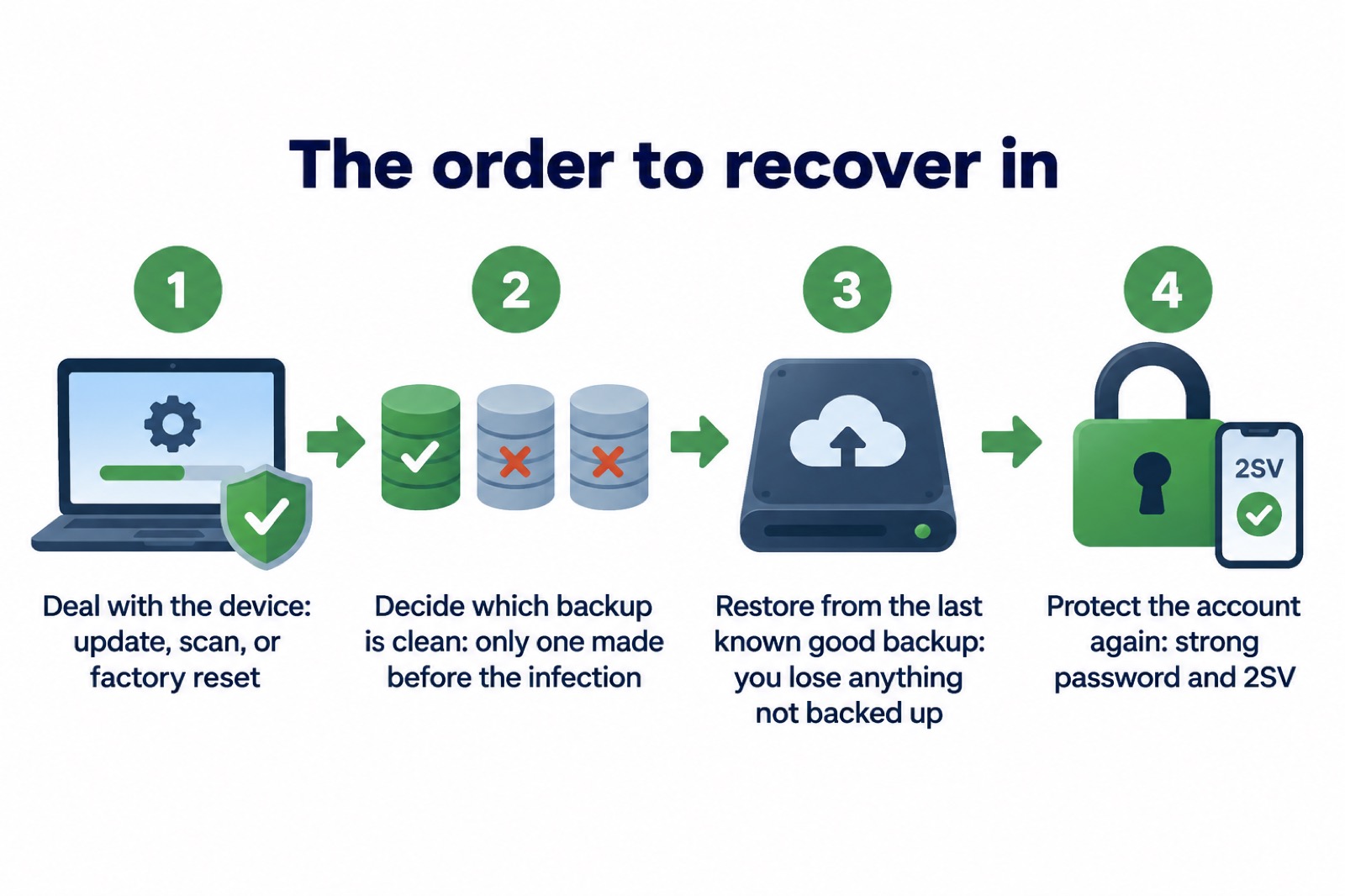
Once the device is clean, the NCSC advises keeping it and its programs up to date, backing up your data, checking the device is encrypted, and, for PCs and laptops, making sure you have antivirus that is updating regularly10. Our checklist for after fixing an infected device walks through the same steps, and how to restore files safely after ransomware or a virus goes deeper on the restore itself.
Where to get official help after a ransomware attack
If your device is locked and files are encrypted, you are dealing with ransomware in the strict sense: malicious software that blocks access to data or a computer system, usually by encrypting it, until the victim pays a ransom fee12. The attacker will usually ask you to contact them via an anonymous email address or follow instructions on an anonymous web page, to make a payment in a cryptocurrency1. You are not obliged to engage, and the NCSC's position is that paying brings no guarantee1.
The NCSC publishes guidance specifically for individuals and families caught up in an attack, and it is worth reading the recovery guidance in advance so you know what to do if you experience an incident13. Its advice for hacked accounts covers the same ground: update your apps and devices as soon as updates are available, and turn on automatic updates in your device's settings14.
For reporting, the NCSC advises forwarding suspicious emails to its reporting service, forwarding texts to 7726 and reporting scam websites5. Reporting has a practical payoff: it can reduce the amount of scam communications you receive, make you a harder target for scammers and protect others from cyber crime online15. If the attack arrived by text, our guide to reporting a scam text message covers the 7726 route; for email, see how to report a phishing email.
The wider picture is not reassuring, and it is worth knowing why the official advice is so insistent on backups. Parliament's Joint Committee on the National Security Strategy reports that ransomware can cause severe disruption to the delivery of core Government services, including healthcare and child protection, with many organisations taking months to recover and long recovery times of up to a year for some16. The government has consulted on counter ransomware measures including a targeted ban on ransomware payments for regulated critical national infrastructure and the public sector, a ransomware payment prevention regime and a mandatory incident reporting regime17. None of that changes what a household should do, but it explains why a clean, offline copy is treated as the baseline rather than the belt and braces.
For the broader picture of what ransomware is and how it affects households, start with Ransomware: What It Is and How It Affects Households, and for the general routine of backing up at home, see Backing Up Files and Photos at Home.
Sources (17)
- Responding to a ransomware attack, National Cyber Security Centre, 2026
- Backing up your data, National Cyber Security Centre, 2026
- Recovering an infected device, National Cyber Security Centre, 2026
- Scam 'missed parcel' SMS messages: advice on avoiding malware, National Cyber Security Centre, 2021
- Phishing: dealing with a suspicious message, National Cyber Security Centre, 2026
- Protecting devices from viruses and malware, National Cyber Security Centre, 2024
- Cyber crime, National Cyber Security Centre, 2022
- Password managers, National Cyber Security Centre, 2026
- Recovering hacked accounts, National Cyber Security Centre, 2026
- Hacked device: action to take, National Cyber Security Centre, 2021
- Community Risk Register 2025, North Yorkshire Council, 2025
- Ransomware, National Cyber Security Centre, 2026
- Recovering a hacked account or service, National Cyber Security Centre, 2024
- Hacked accounts, National Cyber Security Centre, 2026
- Phishing and scams, National Cyber Security Centre, 2026
- Ransomware and the National Security Strategy, UK Parliament, 2023
- UK Government Resilience Action Plan, GOV.UK, 2025
 Accounts to Protect With 2-Step
 After Fixing an Infected Device
 Home Online Security Checklist
 2-Step Verification No Phone
 Antivirus on Phones and Tablets
 Automatic Updates
 Gave Bank Details to a Scammer
 Checking a Bank Message
 Blocking Nuisance and Scam Calls
 Scams After a Data Breach
 Browser Saved Passwords
 Checking Your Email for Breaches
 Hacker Email Forwarding Rules
 Factory Reset an Infected Phone
 Recover a Hacked Email