
On Friday 12 May 2017, a ransomware worm called WannaCry spread around the world and locked computers running unpatched Microsoft Windows software, demanding payment in Bitcoin to unlock them. Ransomware makes your data or systems unusable until the victim makes a payment1. The attack affected over 200,000 computers in more than 150 countries1. NHS England declared a major incident at 4 pm that day and stood it down a week later, on Friday 19 May2.
The attack did not target the NHS specifically. It was a global outbreak that found NHS computers vulnerable because they were running old or unpatched Windows software, and it was stopped largely by chance, when a cybersecurity researcher activated a "kill switch" on the evening of 12 May1. No NHS organisation paid the ransom, and NHS organisations did not report any cases of harm to patients or of patient data being compromised or stolen2.
For a household reading about it years later, WannaCry matters for two reasons. It shows how a cyber attack can disrupt the services a family relies on, from GP appointments to diagnostic tests. And it shows the simple protections, updates, antivirus and backups, that would have stopped it, and that protect a home computer from the same kind of attack today. Our cyber attacks guide covers the wider picture.
What WannaCry was: ransomware that locked computers until payment
Ransomware is a kind of malware that locks victims out of their data or systems and only allows access once money is paid4. WannaCry was a type of malicious software known as ransomware, specifically a "ransomware cryptoworm" that targeted computers running the Microsoft Windows operating system, encrypting data and demanding ransom payment in the Bitcoin cryptocurrency3. Once a computer was infected, its files were scrambled and a message demanded payment to restore access.
Two features made WannaCry unusually destructive. First, it spread by itself from computer to computer across networks, without needing anyone to click a link or open an attachment. Second, it only affected computers running Microsoft Windows operating systems that did not have the latest security patches installed5. Computers that were fully up to date were not locked, which is why the damage fell so unevenly: organisations that had applied their updates carried on working, and those that had not lost systems.
The National Cyber Security Centre (NCSC), the UK's official cyber security body, published guidance for home users and small businesses on 16 May 2017 while the incident was still running6. Its core message has not changed since: ransomware makes your data or systems unusable until the victim makes a payment, and there is no guarantee that you will get access to your data even if you pay5. For what ransomware means for households more broadly, see our page on ransomware.
How the attack unfolded, from Friday 12 May
The WannaCry cyber attack began on the morning of Friday 12 May 2017 and was released worldwide the same day2. Within a day, it was reported by Europol to have infected more than 230,000 computers in at least 150 countries3. In the UK, the attack particularly affected the NHS, although the NHS was not the specific target2.
The NHS timeline was compressed into a single afternoon:
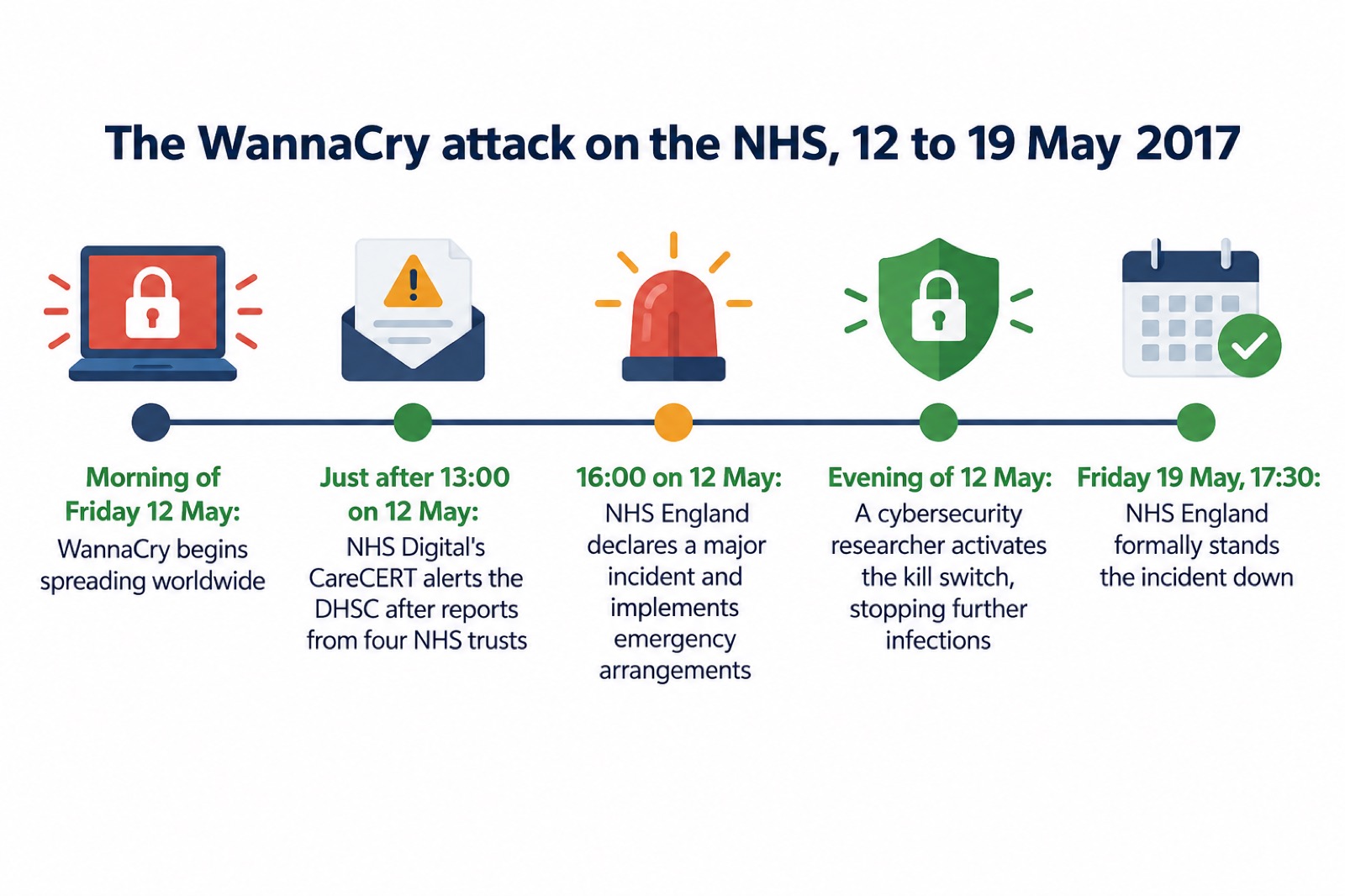
NHS England initially identified 45 NHS organisations, including 37 trusts, that had been infected by the WannaCry ransomware on 12 May2. NHS England's response initially focused on maintaining emergency care1. NHS Digital sent 54 staff out to hospitals to provide direct support, and locally NHS staff shared information through personal mobile devices, including using the encrypted WhatsApp application, because many local organisations could not communicate with national NHS bodies by email, having either been infected or shut down their email systems as a precaution2.
The incident was formally stood up at 16:00 on Friday 12 May 2017 and stood down at 17:30 on Friday 19 May 2017, with all infected GP practices re-installed and patched3. NHS England "stood down" the incident on Friday 19 May after a week of emergency response2.
How many NHS trusts were affected
The headline figure is that the attack led to disruption in at least 34% of trusts in England1. In total, at least 81 out of 236 trusts across England were affected1. The independent lessons learned review published by NHS England in February 2018 put it slightly differently: at least 80 out of 236 trusts were affected, with 34 infected and locked out of devices (of which 27 were acute trusts), and 46 not infected but reporting disruption3. The two official reports therefore give 80 and 81 as the count of affected trusts, a small difference of definition between documents.
| Measure | Figure | Source |
|---|---|---|
| Trusts affected in England | at least 80 out of 236 (NAO) or at least 81 out of 236 (NAO summary) | 2 |
| Share of trusts disrupted | at least 34% | 1 |
| Trusts infected and locked out | 34, of which 27 were acute trusts | 3 |
| Trusts not infected but disrupted | 46 | 3 |
| Organisations infected on 12 May | 45 NHS organisations, including 37 trusts | 2 |
| Primary care and other NHS organisations infected | a further 603 | 3 |
| NHS activity directly affected | 1% | 3 |
| Diagnostic equipment affected | 1,220 pieces, 1% of all such NHS equipment | 3 |
Beyond trusts, a further 603 primary care and other NHS organisations were infected by WannaCry3. NHS England and NHS Digital also identified a further 21 trusts that were attempting to contact the WannaCry domain but were not locked out of their devices, and between 15 May and mid-September they identified a further 92 organisations, including 21 trusts, as contacting the domain2. In total, 1% of NHS activity was directly affected by the WannaCry attack3.
WannaCry was the largest cyber attack to affect the NHS in England1. If a similar incident happened today, the practical consequences for a household would be cancelled appointments, delayed tests and diverted services. Our pages on NHS appointments, A&E and tests during an IT outage and getting prescriptions when systems are down explain what to do.
The NHS was not a specific target
Although WannaCry impacted the provision of services to patients, the NHS was not a specific target3. The same conclusion appears in the National Audit Office's investigation: in the UK, the attack particularly affected the NHS, although it was not the specific target2. WannaCry was a single global outbreak that spread automatically, and it damaged the NHS heavily because of the state of NHS computers, not because anyone set out to attack hospitals.
This distinction matters for how you read the risk today. Ransomware attacks since 2017 have increasingly been deliberate, targeted operations. The NCSC has described seeing data extortion as a fundamental part of the ransomware business model, as criminals realise that making stolen data public increases pressure on victims, and it has continued to see increased use of Ransomware as a Service, where ransomware variants are leased to less-skilled affiliates who can launch cyber attacks without building the ransomware themselves7. Targets may include local government systems, healthcare providers, schools and businesses8. The volume of ransom payments quadrupled in 20219.
For households, the lesson is that both kinds of attack, indiscriminate worms like WannaCry and targeted attacks on service providers, can disrupt the things you depend on. The Synnovis ransomware incident in London in 2024 is the clearest recent NHS example of the targeted kind.
Why NHS computers were vulnerable
Every NHS organisation infected by WannaCry had unpatched or unsupported Windows operating systems, so was susceptible to the ransomware2. That single sentence from the National Audit Office explains the whole pattern of damage. The majority of NHS devices infected were running the supported, but unpatched, Microsoft Windows 7 operating system2. More than 90% of devices in the NHS used the Windows 7 operating system at the time, and about 5% of the NHS IT estate, including computers and medical equipment, was still using Windows XP on 12 May 20172.
The vulnerability itself was known, and a fix existed before the attack. Microsoft issued a patch to address the vulnerability on 14 March 2017, and trusts using Windows 7 could have protected themselves against WannaCry by applying that patch2. NHS Digital had issued CareCERT alerts on 17 March and 28 April asking trusts to apply the patch, and in March and April 2017 it had issued critical alerts warning organisations to patch their systems to prevent WannaCry2. Many organisations had not applied the recommended software updates in a timely manner, which left systems vulnerable10.
The initial infection was likely through an exposed vulnerable internet-facing Server Message Block (SMB) port, rather than email phishing3. In other words, the worm probably got in through a hole in the network's outer wall rather than through someone clicking a bad link. The National Audit Office found that whether organisations had patched their systems or not, taking action to manage their firewalls facing the internet would have guarded organisations against infection2.
Two further findings explain why warnings did not translate into action. Prior to the attack, NHS Digital had conducted an on-site cyber-security assessment for 88 out of 236 trusts, and none had passed, though the inspection was voluntary2. And NHS Digital cannot mandate a local body to take remedial action even if it has concerns about the vulnerability of an organisation2. The Department of Health had developed a plan for responding to a cyber attack but had not tested the plan at a local level2.
The kill switch that stopped the attack
The attack could have caused more disruption if it had not been stopped by a cyber researcher activating a "kill switch"1. On the evening of 12 May, a cybersecurity researcher activated a kill switch so that WannaCry stopped locking devices2. The work of that researcher had the effect of stopping WannaCry infecting further devices3.
A kill switch worked because WannaCry, before encrypting anything, checked whether a specific internet domain was live. When the researcher registered that domain, the malware registered the response and shut down its spread. This was luck as much as planning: the researcher was investigating the malware's behaviour and found the mechanism inside it. Nobody in government or the NHS stopped the attack; a private individual, acting within hours of the outbreak, did.
The practical point for households is that you cannot count on a kill switch. Most ransomware since 2017 has not contained one, and the NCSC's later guidance on ransomware does not mention them as a line of defence. The defences that actually worked in May 2017 were the boring ones: patches applied, firewalls managed, systems supported. Those are the ones to copy at home.
Patient harm and patient data
NHS organisations did not report any cases of harm to patients or of data being compromised or stolen2. The independent lessons learned review reached the same conclusion: no reports of harm to patients or of patient data being compromised or stolen3. NHS Digital told the National Audit Office that it believes no patient data were compromised or stolen2.
This is worth stating plainly because it is often misunderstood. WannaCry was a destructive attack on availability, not a theft. It locked systems so they could not be used; it did not copy medical records and sell them. The disruption was real, appointments and operations were cancelled and equipment was taken offline, but the review found no evidence of patient harm resulting.
WannaCry itself worked by locking systems rather than copying data: ransomware makes your data or systems unusable until the victim makes a payment5. Not every cyber attack on the NHS has taken that form, and an incident that exposes records rather than locking them raises different questions for patients. If your details are exposed in an incident like these, our page on your details in a data breach explains what to do next.
Protecting a home computer from ransomware like WannaCry
Everything that would have stopped WannaCry works at home, and none of it costs anything. The NCSC advises making sure your antivirus product is turned on and up to date, and notes that Windows has a built-in malware protection tool, Microsoft Defender, which is suitable for this purpose5.
Install updates promptly. WannaCry only affected computers running Microsoft Windows operating systems that did not have the latest security patches installed5. For PCs and laptops, the NCSC advises that you install security updates as soon as they are available, ideally by setting them to install automatically11. Our page on software updates covers this in full.
Keep antivirus on and up to date. The NCSC advises: make sure your antivirus product is turned on and up to date5. Windows has a built-in malware protection tool, Microsoft Defender, which the NCSC says is suitable for this purpose5. Install, update and run antivirus software12. See our page on antivirus software.
Do not run unsupported operating systems. The NCSC strongly recommends that you do not continue to use unsupported operating systems, but instead upgrade to one which receives regular security updates from the vendor5. If you are using Windows XP, Windows Vista or older versions of Windows, the advice was to download the WannaCry security update and install it5. Microsoft issued a patch for Windows XP immediately after the WannaCry attack that would prevent WannaCry and similar ransomware2. Our page on what happens when your phone stops getting updates applies the same principle to phones.
Back up your important data. Safeguard your most important data, such as photos and key documents, by backing them up to an external hard drive or a cloud-based storage system4. You can back up your data to an external hard drive, a USB stick or thumb drive, an SD card or DVD/CD-R discs, and cloud-based backups can be created automatically, which means you are more likely to have an up-to-date copy of your data13. Backups can also be used to transfer existing files, apps and settings to a new device or computer13. Our backups guide explains the options.
Use a firewall. Managing firewalls facing the internet would have guarded NHS organisations against infection whether or not they had patched their systems2. At home, the equivalent advice is to install firewalls15, and most home routers include one. Our home online security checklist pulls all of these steps together.
If a computer is infected: disconnect it and do not pay
If you believe a computer in your home has been infected by ransomware, act immediately. The NCSC's advice is:
- Immediately disconnect your computer, laptop or tablet from the network. Turn off your Wi-Fi6.
- Do not copy any data from the infected computer16.
- Do not pay the ransom.
On paying, the official advice is unambiguous. There is no guarantee that you will get access to your data if you pay5. Payment is usually demanded via an anonymous web page and usually in a cryptocurrency, such as Bitcoin7. Even after paying, your computer or networks will still be infected12. During WannaCry itself, NHS Digital advised the trusts it spoke to not to pay the ransom, and wrote to all trusts on 14 May advising against the payment of ransoms; no NHS organisations paid the ransom, as standing advice not to do so was re-circulated by the NCSC during the incident2. Our page on whether to pay a ransomware ransom examines the decision in detail.
On decryption services, the NCSC was blunt about WannaCry specifically:
Signs that a device may be infected include someone you know receiving unexpected emails from you, advertising unlikely products, or perhaps asking for money11. If you have dealt with the infection, our after fixing an infected device checklist and our page on restoring files safely after ransomware take you through the next steps, and our malware guide covers removal.
Warnings before the attack and lessons afterwards
The most uncomfortable finding of the official investigations is that the attack was foreseeable and the fix was already available. The Department of Health and Social Care was warned about the risks of cyber attacks on the NHS a year before WannaCry, and although it had work under way, it did not formally respond with a written report until July 20171. NHS Digital's critical alerts of March and April 2017 had told organisations exactly what to patch2. The National Audit Office concluded that WannaCry was a relatively unsophisticated attack and could have been prevented by the NHS following basic IT security best practice1.
After the attack, the NHS and government made changes. On 12 May, NHS Digital worked with NHS England to put in place a formal mechanism for assessing whether NHS organisations had complied with CareCERT alerts2. NHS Digital issued a further CareCERT alert on 16 May requesting that subscribers patch and fully deploy antivirus software3. The Data Security Protection Toolkit, mandatory for all NHS organisations, launched in April 2018, and there was a plan to remove or isolate unsupported software in the NHS, including Windows XP by April 2018 and Windows 7 by January 20203.
At national level, the Joint Committee on the National Security Strategy has recommended holding regular national exercises to prepare for the impact of a major national ransomware attack affecting multiple critical infrastructure sectors17. Ransomware's use threatens Critical National Infrastructure and poses a risk to national security18. During the last year covered by its 2022 annual review, the NCSC co-ordinated the national response to 18 ransomware attacks, including attacks on a number of organisations7.
For households, the after-action picture is one of steady improvement but continued risk. NHS Digital cannot mandate a local body to take remedial action even if it has concerns about the vulnerability of an organisation9, so responsibility for acting on warnings still rests with each local body. NHS Digital also advised that, whether organisations had patched their systems or not, taking action to manage their firewalls facing the internet would have guarded organisations against infection9. If you want to understand how the NHS and government respond to incidents like these, see how the NHS, government and regulators respond to a major incident, and for the official body that helps individuals, our page on the National Cyber Security Centre.
Sources (18)
- Investigation: WannaCry cyber attack and the NHS, National Audit Office, 27 October 2017
- Investigation: WannaCry cyber attack and the NHS (PDF), National Audit Office, 27 October 2017
- Lessons learned review of the WannaCry ransomware cyber attack, NHS England, 1 February 2018
- Cyber security: protecting your family, Essex Prepared
- WannaCry guidance for home users and small businesses, National Cyber Security Centre, 16 May 2017
- Ransomware WannaCry guidance for home users and small businesses (PDF), National Cyber Security Centre, 16 May 2017
- Annual Review 2022: cyber crime, National Cyber Security Centre, 1 November 2022
- Cyber attacks, threats and scams, Essex Prepared
- Joint Committee on the National Security Strategy report, UK Parliament
- Community Risk Register 2025 (PDF), North Yorkshire Local Resilience Forum, February 2025
- Sole infected devices: what to do, National Cyber Security Centre
- Sole ransomware attack: what to do, National Cyber Security Centre
- Backing up your data (NCSC infographic, PDF), National Cyber Security Centre
- Always back up your most important data, National Cyber Security Centre, 21 December 2021
- Cyber attacks, Dorset Prepared, 22 February 2024
- Ransomware prevention and recovery guidance (PDF), National Cyber Security Centre
- Joint Committee on the National Security Strategy summary, UK Parliament, 13 December 2023
- Cyber attacks, West Yorkshire Prepared
 Accounts to Protect With 2-Step
 After Fixing an Infected Device
 Home Online Security Checklist
 Antivirus Software
 Backing Up Files and Photos
 Council Online Services Down
 Your Details in a Data Breach
 FluBot Fake Parcel Texts
 Hacked Online Accounts
 How Services Respond
 Malware Signs and Removal
 National Cyber Security Centre
 NHS Services During an IT Outage
 Keeping Key Records Offline
 Shopping Online Safely