
TP-Link is a maker of home networking and smart home kit: broadband routers and mesh Wi-Fi systems, mobile Wi-Fi devices that use a mobile network, smart plugs, and cameras and doorbells under its Tapo name. For a household getting ready for emergencies, the useful question is not what the kit does on a normal day but what it does when the broadband drops, the mobile signal weakens or the power goes off, and how long it can be relied on.
The short answer is that TP-Link kit is ordinary consumer equipment with no special emergency rating. A router needs mains power and a working broadband line; a mobile Wi-Fi device needs a mobile signal and charge in its battery; a smart plug or camera needs power and, for most functions, the internet. What you can do is understand those limits before an outage, keep the devices updated, and have a fallback for each job they do.
Two rules matter more than any product choice. First, keep every device's software updated, because the National Cyber Security Centre says applying updates is one of the most important things you can do to protect your devices1. Second, know when your device will stop receiving those updates: UK law now requires smart devices to state the minimum period for which they will receive important security updates2.
Security updates: three years after the product is last on sale
The single most useful thing to know about any connected device, TP-Link's included, is how long it will be supported. Under the UK's security law for smart devices, a manufacturer must state the minimum length of time for which the device will receive important security updates2. That statement is the number to look for before you buy and to note down after you do.
Why it matters for preparedness is simple. The National Cyber Security Centre warns that when updates are no longer provided, devices are easier to hack, or may stop working as designed2. A camera that no longer receives fixes is a weaker point in your home network, and a router that stops being updated is the device everything else sits behind. The same guidance notes that older devices will eventually stop receiving updates6, so this is a date every household will meet eventually, not a rare fault.
The practical routine is short:
- Find the support page for your exact model on the TP-Link website and note the update period it states.
- Write the end date in your household plan, next to the date you bought the device.
- Before that date, decide whether to replace the device or accept it as a lower-trust item on your network.
- Check the model against product recall and safety notices at the same time, as you would for any appliance5.
The government's own resilience planning treats communications as critical infrastructure, and its action plan was last updated in January 20257. That is context, not a guarantee about any one product: the date that matters to you is the one stated for your model.
What TP-Link makes for UK households
TP-Link's range splits into four groups that matter in an emergency, and each behaves differently when things go wrong.
| Kit type | What it does | Needs to work | What it gives you in an outage |
|---|---|---|---|
| Home router and mesh Wi-Fi | Connects your devices to the broadband line and to each other | Mains power and a working broadband line | Local network only while powered; no internet without the line |
| Mobile Wi-Fi and 4G routers | Creates a Wi-Fi network from a mobile signal | Charge in the battery and mobile coverage | Internet where the mobile network still works4 |
| Smart plugs | Switch appliances on and off, often by app or schedule | Mains power and, for app control, the internet | Little during a power cut; useful for scheduling and remote checks |
| Cameras and doorbells (Tapo) | Watch and record, alert you to movement | Mains or battery power and the internet | Recording may continue locally; remote viewing needs the network |
The pattern is that each device is only as resilient as the service behind it. A router is a bridge to your broadband line, so when the line fails the router can do nothing about it. A mobile Wi-Fi device is a bridge to the mobile network, which is why it is the more useful fallback in a broadband outage, provided there is coverage and charge.
For the household plan, the sensible approach is to treat these as layers rather than replacements. Keep the router for normal use, keep a charged mobile phone as the first fallback, and consider a mobile Wi-Fi device only if you have a reason to need more than a phone hotspot. The Staying Informed and in Touch in an Emergency guide sets out the wider picture, and the Cyber Attacks and Major IT Failures guide covers what to do when the problem is not the line but an attack.
Mobile Wi-Fi and 4G routers: staying online when the broadband goes down
When the broadband line fails, the government's advice is to try your mobile instead3. If your mobile network is down but you have a working internet connection, you may still be able to make calls over Wi-Fi by enabling Wi-Fi Calling on your device3. Ofcom's guidance is the same: turn on Wi-Fi calling in your settings to allow calls over your broadband connection if your mobile network is unavailable8.
A mobile Wi-Fi device or 4G router does the reverse job: it takes a mobile signal and turns it into Wi-Fi for the household. That is useful when the fixed line is down but the mobile network is up. The limit is stated plainly in government guidance: the mobile phone network may still temporarily work in specific regions with backup power4. "Temporarily" and "specific regions" are the words to hold on to. A mobile-based fallback is worth having, but it is not a guarantee, and it depends on the local mast having power.
For households with medical or personal alarm devices that use phone or internet connections, the advice is to check with the provider or manufacturer how they work if the network is down, for example how a personal alarm or diabetes sensor would function if mobile or broadband service is lost3. That check matters more than any router choice.
Fixed satellite broadband and new satellite services that connect directly to mobile devices can sometimes help you stay connected when land-based networks are down, but availability and performance can vary, so ask providers what options might best fit your needs3. That is the official position, and it is worth taking at face value: satellite is an option to discuss with a provider, not a default purchase.
If your mobile, broadband or landline is unavailable after a severe weather event, report this to your provider if you can, because it helps make sure that any faults are fixed as soon as possible8.
Home routers and mesh Wi-Fi during a power cut
A router has no battery. When the power goes, the Wi-Fi goes with it, and every device that depends on it loses its connection at the same moment. The government's power cut guidance is to turn off items such as irons, ovens, electric fires and fryers, and to unplug your TV and PC as they can be damaged if there is a surge when power goes back on4. A router is low-powered and not in that hazard list, but the principle of switching off and unplugging before the power returns is worth applying to anything you care about.
What still works is worth knowing in advance. A mobile phone can still be used to call in a power cut9, and the mobile network may still temporarily work in specific regions with backup power4. A cordless landline phone will not work without power at its base, so a non-mains powered landline telephone will help you stay in touch during any disruptions to your power supply10. That is the fallback that does not depend on a mobile signal at all.
Running a router from a battery is possible only with equipment designed to supply mains voltage, and that is a job for an electrician to specify, not a plug-in improvisation. The Backup Power at Home guide covers the options, and the Power Cuts guide covers the household routine from the moment the lights go out.
A mesh Wi-Fi system behaves the same way as a single router in a power cut: the nodes need power, and the ones that are not on a battery go dark. Your home broadband services, including any digital landline, will not work during a power cut unless you have an additional power source10. Internet services, landline phones and some mobile phone networks may not work either, so understanding how to receive information during a power cut can help reduce disruption when incidents occur10.
Smart plugs and cameras: what still works without power or internet
Smart plugs and cameras are the parts of a TP-Link set-up most likely to mislead a household in an emergency, because they look like they are doing something when they are not.
A smart plug needs mains power to switch anything, and app control needs the internet. In a power cut it is simply off, and the appliance behind it is off too. That is not a fault, but it does mean a smart plug is not a way to keep a freezer running or a lamp on. Its real preparedness value is in normal times: scheduling lights, checking that an appliance is off, and seeing at a glance whether the power has returned.
A Tapo camera or doorbell is more useful, with limits. A battery-powered doorbell such as the Tapo D230S1 Smart Battery Video Doorbell keeps working on its own battery when the mains fails, so it can still record and alert. A mains-powered camera such as the Tapo C320WS stops when the power does. In both cases, remote viewing depends on the internet connection, so a camera is only as available as your broadband or mobile fallback. The Home Security guide covers how cameras fit a wider household security plan.
The same rule applies to any smart device: check the maker's own support pages for how it behaves without a connection, because behaviour varies by model. The National Cyber Security Centre's advice is to refer to the support area within the manufacturer's official website for instructions about keeping smart devices up to date6.
Keeping a TP-Link device updated and secure
Updates are one of the most important security measures a household has, and every official body says the same thing. The National Cyber Security Centre states that applying updates is one of the most important things you can do to protect your devices1, and that software and app updates contain vital security updates to help protect your devices from cyber criminals11. Police guidance is to update your apps and devices as soon as updates are available, as these usually contain important security updates12.
For a router, that means checking the maker's firmware updates rather than relying on the app alone. For cameras and plugs, it means keeping the app updated and turning on automatic updates where the device offers them. Secured by Design's advice is to update IoT software to receive security fixes for vulnerabilities and enable automatic updates13. The National Cyber Security Centre adds that you should turn on automatic updates in your device's settings14.
A few practical points make updating easier to live with:
- Updating may take some time and requires a reliable internet connection, so it is best to do it at home where you can access your Wi-Fi and keep your device plugged in6.
- Keep antivirus software on the devices you use to manage the kit, and keep it up to date1.
- If an account is hacked, apply updates to your apps and device software as soon as they are available, as updates include protection from viruses15.
- If a device is infected, update your device and programs as part of the recovery16.
The emergency angle is that a compromised router or camera is a problem you discover at the worst moment, when you are relying on the connection. The Cyber Attacks and Major IT Failures guide covers what to do if an account or device is taken over. Keep software and apps updated for the latest security updates, and apply security updates promptly, turning on automatic updates in device settings where available17.
Support, warranty and safety notices
TP-Link's support pages are where the model-specific facts live: the update period, the manual, the firmware and the warranty terms. The government's advice for appliances generally is to register your appliance so manufacturers can contact you about faults or recalls5, and the same logic applies to connected kit. Registration is what makes a safety notice reach you rather than sitting unread on a website.
Safety notices are not hypothetical. The Office for Product Safety and Standards has notified recalls of power banks sold in the UK, including the ESR HaloLock Wireless Power Banks sold via Amazon, with a notification number of 2511-021718, and the POM Power Banks sold in TK Maxx and Homesense stores in a sales period of December 2025 and May 202619. The Power Evo Wireless Charging Power Bank 5V sold by TK Maxx was also subject to a safety notice, with owners advised to stop using the product immediately and return it to TK Maxx for a refund or replacement20. None of these is a TP-Link product, but they show why checking matters: a power bank bought to keep a router or phone going is exactly the kind of item that can be recalled.
For any appliance, check for recalls or safety notices on the Electrical Safety First website5, and periodically check for any product recalls or safety notices related to your specific model21. When you buy electrical kit, make sure an electrical appliance has a British or European safety mark22. Registering appliances means you receive notification of safety alerts or product recalls22.
The wider household picture is covered in the Getting Started: Preparing Your Household for an Emergency guide and the Emergency Kit: What a UK Household Should Keep Ready guide. For households that depend on a connection for medical reasons, the Extra Help in an Emergency guide explains the Priority Services Register and other support, and the government's heat summary for vulnerable people, updated in 2024 and scheduled for review in 2029, sets out the official approach to supporting them23.
Sources (23)
- Protecting devices from viruses and malware, NCSC, 2024
- Security law for smart devices, NCSC, 2024
- Phone and broadband outages, Prepare, 2026
- Power cuts, Prepare, 2026
- White goods fire safety, Cheshire Fire and Rescue Service, 2026
- Install the latest software and app updates, NCSC, 2021
- UK Government Resilience Action Plan, GOV.UK, 2025
- Stay connected in severe weather, Ofcom, 2026
- The digital phone switchover, Cheshire Fire and Rescue Service, 2026
- Strong winds and heavy rain warning information and advice, nidirect, 2026
- Cyber security, Essex Prepared, 2026
- Keeping yourself safe online, Avon and Somerset Police, 2026
- Cyber security advice, Secured by Design, 2026
- Hacked accounts, NCSC, 2026
- Recovering hacked accounts, NCSC, 2026
- Infected devices, NCSC, 2026
- Hacked accounts, Police Scotland, 2026
- Product recall: ESR HaloLock Wireless Power Banks, OPSS, 2025
- Product recall: POM Power Banks sold by TK Maxx, OPSS, 2026
- Product recall: Power Evo Wireless Charging Power Bank 5V, OPSS, 2026
- Electrical safety, Dorset and Wiltshire Fire and Rescue Service, 2023
- Electrical fire safety, Warwickshire County Council, 2026
- Heat summary: supporting vulnerable people, GOV.UK, 2024
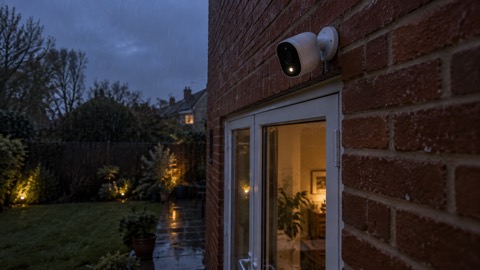 Tapo C320WS
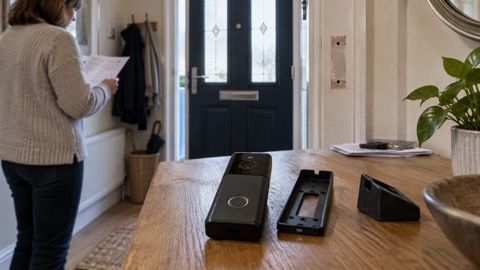 Tapo D230S1 Smart Battery Video Doorbell