The Ajax Hub 2 Plus is the control unit at the centre of an Ajax alarm system: it runs every connected detector, siren and keypad, talks to you through the app, and passes alarms to a monitoring company if you have one1. For a household, the questions that matter are how it stays in touch when the broadband drops, how long it keeps working in a power cut, how much kit it can carry, and how to fit it so it does its job.
On power, the maker states the built-in battery of the Hub 2 Plus provides up to 15 hours of battery life1. On capacity, it supports up to 200 Ajax devices, but the number falls as the polling interval shortens1. It connects to the internet over Ethernet, Wi-Fi and two SIM cards, so a single failure need not silence it1.
This page sets out what the hub does, how the Hub 2 Plus differs from the Hub 2 and Hub Plus, what the lights mean, and how to install, test and look after it. It is a description of one product, not a recommendation over any other.
What the Ajax Hub 2 Plus does in a home alarm system
The maker describes the Hub 2 Plus as the central device in the Ajax system, which controls the operation of all connected devices and interacts with the user and the security company1. In practice it is the box that listens to every sensor, decides what counts as an alarm, sounds the sirens and tells the people who need to know.
It is quick. The maker states that if a detector is triggered, the system raises the alarm in 0.15 seconds, activates the sirens and notifies the central monitoring station1. Notifications reach only the users added to the hub and the security company, by call, push notification with a siren sound, or SMS2. If the system is connected to a central monitoring station, the maker states the alarm signal is sent directly to it, bypassing Ajax Cloud3.
The hub is also the piece that makes the rest of the system work together. It supports up to 200 users, so a whole household can have its own app access1. It carries up to 99 access codes for keypads1, and up to 10 sirens or keypads with a built-in buzzer can be connected regardless of settings1. Ajax cameras and recorders do not need the hub and can be added to the system independently1, but the hub is what ties the alarm side together.
For fire cover, the maker lists the Hub 2 Plus among the hubs that support a residential fire alarm system, alongside the Hub Plus, Hub 2 and Superior Hub Hybrid4. The radio range is stated as up to 2000 m without obstacles such as walls, doors and floors, which is a free-air figure rather than a promise through a typical house1.
Hub 2 Plus, Hub 2 and Hub Plus: how the versions differ
The three hubs share a job but differ in capacity, connection and backup. The table sets the maker's figures side by side.
| Feature | Hub 2 Plus | Hub 2 | Hub Plus |
|---|---|---|---|
| Devices | up to 2001 | up to 1005 | up to 1503 |
| Users | up to 2001 | up to 1005 | not stated in the manual |
| Connection | Ethernet, Wi-Fi, two SIM cards (2G/3G/4G)1 | Ethernet and two SIM cards5 | Ethernet, Wi-Fi and GSM3 |
| Backup battery | up to 15 hours6 | up to 14 hours7 | up to 14 hours7 |
| Battery power saver | up to 80 hours1 | up to 70 hours (2G), up to 100 hours (4G)5 | up to 70 hours3 |
The Hub 2 is sold in two versions, with a 2G modem and with a 2G/3G/4G (LTE) modem, and the maker notes a SIM card is supplied depending on the region5. The Hub 2 Plus does not support the uartBridge and ocBridge Plus integration modules, and neither does the Hub 2, which also cannot have other hubs connected to it1.
One account can manage multiple hubs, so there is no need to create a new account for each one1. The maker also states that Ajax cameras and recorders do not require a hub, so a household that only wants cameras need not buy one1. If you are weighing an alarm against cameras, our guide to burglar alarms and how to choose one and the comparison of a burglar alarm or CCTV camera set out the wider choice.
Four ways to stay connected: Ethernet, Wi-Fi and two SIM cards
The Hub 2 Plus is connected to the internet via Ethernet, Wi-Fi and two SIM cards (2G/3G/4G)1. The point of four routes is redundancy: if the broadband fails, the hub can fall back to a mobile network, and with two SIM slots it can hold two different operators.
The maker's SIM requirements are specific. You need a micro SIM card with the PIN code request disabled, which you can do by putting the card in a mobile phone first, and a sufficient account balance1. For stable operation the maker states a cellular signal strength of 2 to 3 bars is necessary, and at 0 or 1 bar events and alarms by call, SMS or mobile internet are not guaranteed5. The hub also reports its own connection health: the hub-server polling interval is set from 10 to 300 seconds, and a connection failure alarm triggers after 3 unsuccessful polls, with a delay set from 30 to 600 seconds1.
If the Ethernet connection is not established automatically, the maker's manual says to disable proxy and MAC address filtration and activate DHCP in the router settings1. The same advice appears in the Hub 2 manual5.
Backup battery: up to 15 hours in a power cut
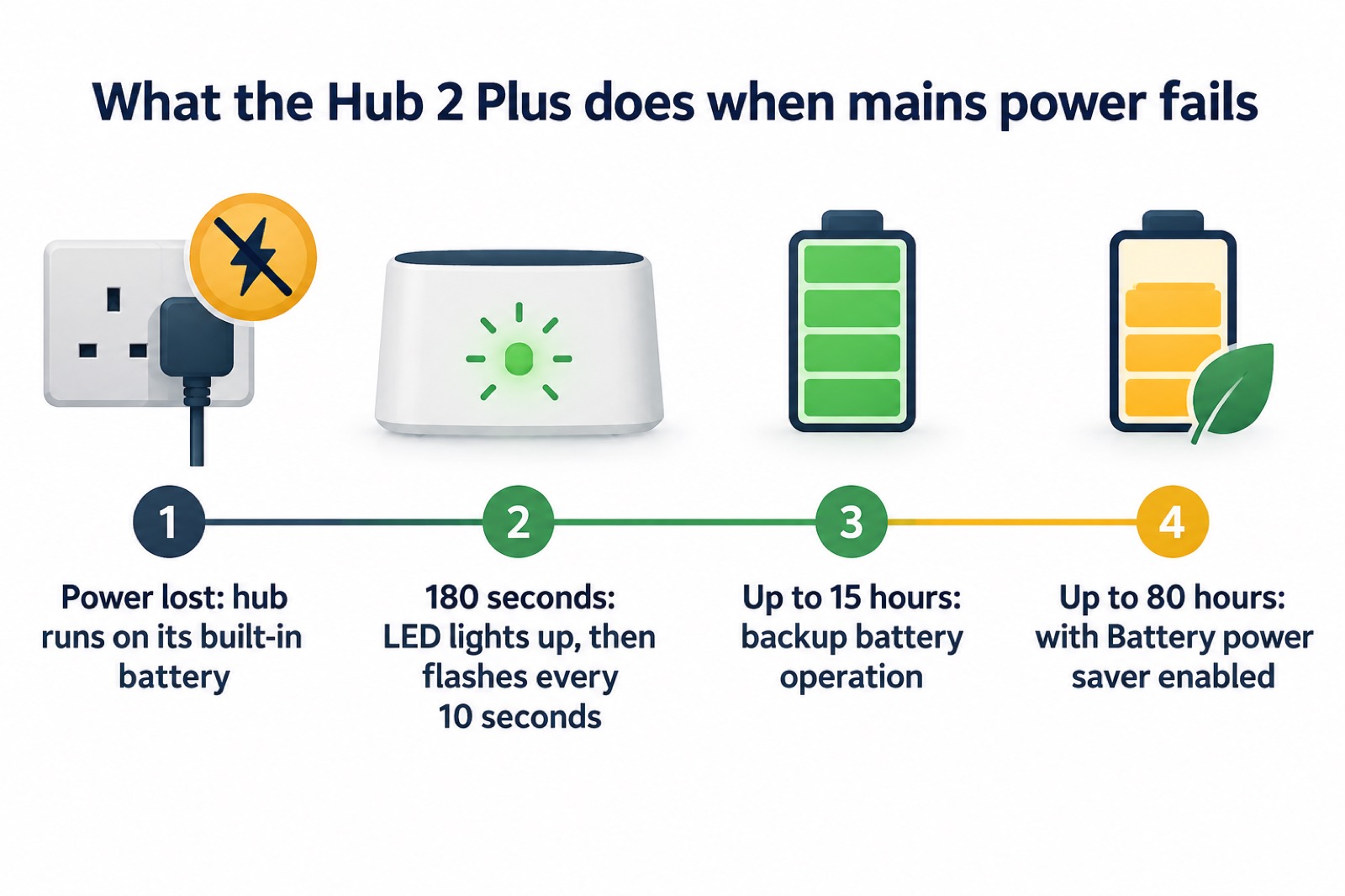
The maker states the built-in battery of the Hub 2 Plus provides up to 15 hours of battery life6. A separate Ajax support article gives up to 14 hours of autonomous operation for the built-in rechargeable battery of an Ajax hub generally7. The two figures come from different Ajax documents and are not reconciled; treat 15 hours as the Hub 2 Plus figure and 14 hours as the general hub figure.
That is a long time by the standards of the telephone network. Ofcom's guidance on landlines states that a provider's battery back-up must last for at least one hour in a power cut, but some providers have back-ups that last up to seven hours10. The hub's 15 hours is the maker's figure for the hub alone, and how long your system really lasts depends on how many devices are connected and how busy the radio is.
The hub tells you what is happening. The LED lights up 180 seconds after the loss of power, then flashes every 10 seconds, and the app shows the battery charge level in 5% increments1. During standby mode the hub LED flashes red every 30 seconds and the brightness drops to the minimum1. If the hub is in standby mode, the maker states that switching arming modes is possible only by using a keypad or a key fob1.
Battery power saver stretches backup to about 80 hours, with a trade-off
The Battery power saver feature allows for extending the backup battery life of Hub 2 Plus Jeweller up to 80 hours1. A separate Ajax support article gives up to 100 hours for the Hub 2 Plus Jeweller with Battery power saver enabled11. The two maker documents disagree, so both figures are given here; the manual's 80 hours is the more conservative.
The trade-off is in how the hub behaves while saving power. The time the hub remains connected to Ajax Cloud after any system event occurs is set to 10 minutes by default, adjustable from 5 minutes to 1 hour1. In other words, the hub does not hold an open line indefinitely; it connects when something happens, then drops back. That is what buys the extra hours, and it is why the setting is worth understanding before you rely on long backup.
The same feature appears across the range with different figures. The Hub Plus Jeweller reaches up to 70 hours3, the Hub 2 reaches up to 70 hours on the 2G version and up to 100 hours on the 4G version5, and the Superior Hub Hybrid 2 reaches up to 200 hours when using a 12 V backup battery with a capacity of 7 Ah, depending on system configuration and the number of devices12. Ajax hubs other than the Superior Hub Hybrid have a built-in backup battery; the Superior Hub Hybrid requires a third-party 12 V battery installed in the casing11.
Device limits: up to 200 devices, depending on the polling interval
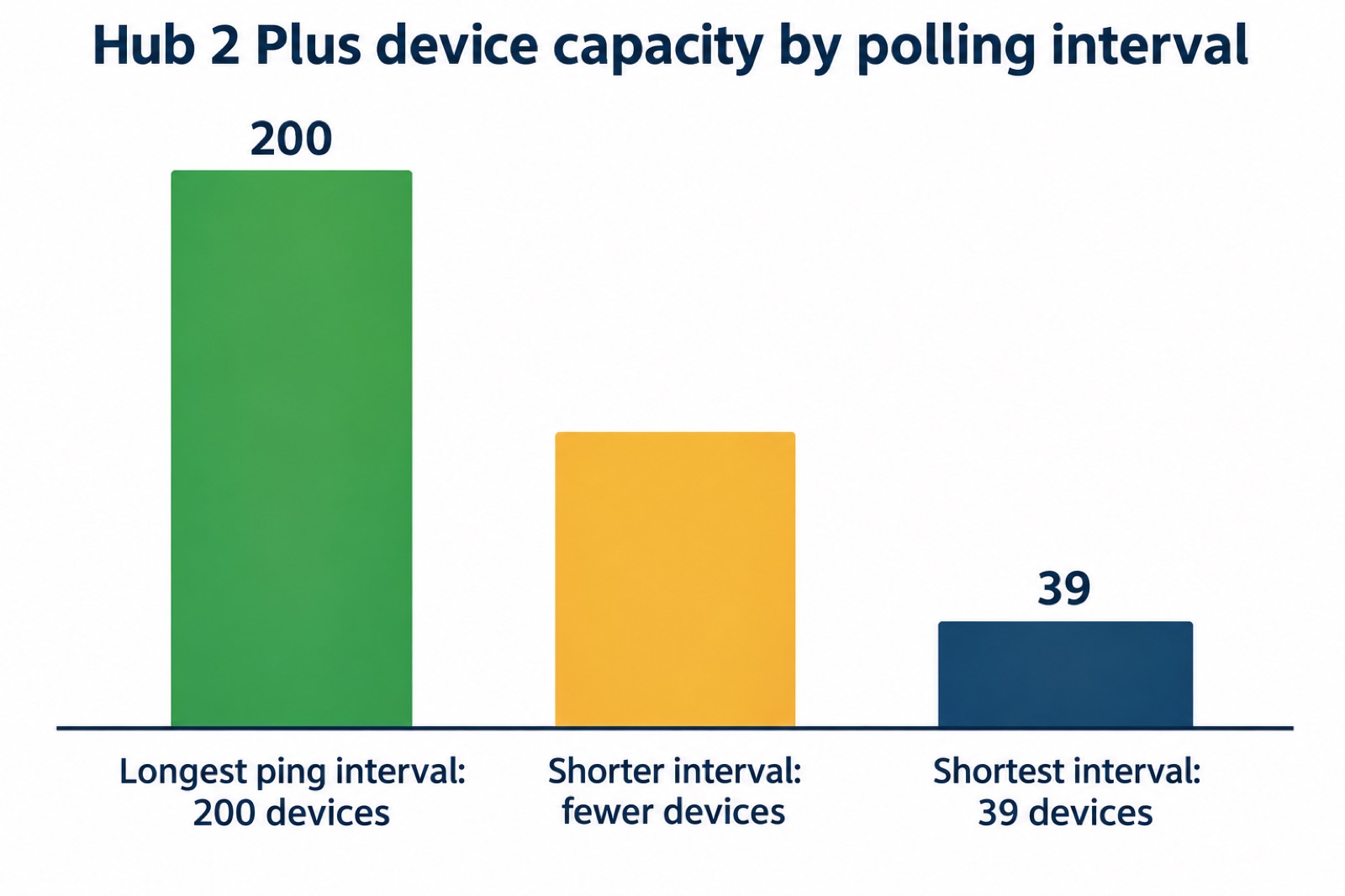
The Hub 2 Plus supports up to 200 Ajax devices connected1. That headline figure comes with a condition: the faster the hub polls its devices, the fewer it can carry. The maker's table gives 200 devices at the longest ping interval and fewer as the interval shortens, down to 39 devices at the shortest setting1.
The detector ping interval is set in the range of 12 to 300 seconds1. So a system set to poll quickly sits well below 200 devices. The number of missed pings used to determine a connection failure is 8 packets by default1, and a separate Ajax article gives 30 undeliverable data packets as the default for considering a device lost, changeable in the hub settings under the Jeweller section14. The two defaults differ between documents.
For most homes none of this bites: a typical house has a handful of detectors, a siren or two and a keypad. It matters in a large property, a small business or a system with many sensors. The Hub 2 supports up to 100 devices and the Hub Plus up to 1505.
What the hub's LED colours mean
The Ajax logo on the front of the hub lights up red, white, purple, yellow, blue or green depending on status3. The colours are the quickest way to tell, without opening the app, whether the system is healthy.
- Red, steady: the hub is not connected to the internet or there is no connection with the Ajax Cloud service1.
- Red, blinking: the hub is being reset to factory settings1.
- White: two communication channels are connected, Ethernet and SIM card1.
- Green: on hubs with firmware OS Malevich 2.15.2 and higher, the LED lights up green when set to Armed, partially armed or Night Mode1.
- Red every 30 seconds: standby mode, with brightness at the minimum1.
Note the firmware condition on green. On the Hub 2, the manual states the LED lights up white when armed, partially armed or Night Mode is enabled, and green when disarmed, with the green-on-armed behaviour applying from OS Malevich 2.15.2 and higher5. If your hub shows a colour you do not expect, the maker's advice is to contact Technical Support1.
Where and how to install the hub safely
The Hub 2 Plus central unit must be installed indoors only1. The maker recommends installing the hub in places with a signal strength of 2 to 3 bars1. The Hub Plus manual adds the detail: do not place it outdoors, near metal objects, in places with a weak GSM signal, less than 1 metre from the router and power cables, or in premises with temperature and humidity over the permissible limits3.
Mounting matters for tamper protection. The Hub 2 manual says to fix the SmartBracket with the bundled screws, use at least two fixing points, and fix the perforated corner for tamper; it advises against double-sided adhesive tape5. The Hub Plus manual is firmer still: do not use double-sided adhesive tape, because it cannot guarantee secure attachment and simplifies removal3. Do not turn the hub upside down or sideways when attaching it vertically; when properly fixed, the Ajax logo can be read horizontally5.
The maker also suggests siting the hub where it is hidden from direct view, to reduce the likelihood of sabotage or jamming5. That is a sensible balance: out of sight from a window, but still with a good radio path to the detectors and a mobile signal of 2 to 3 bars.
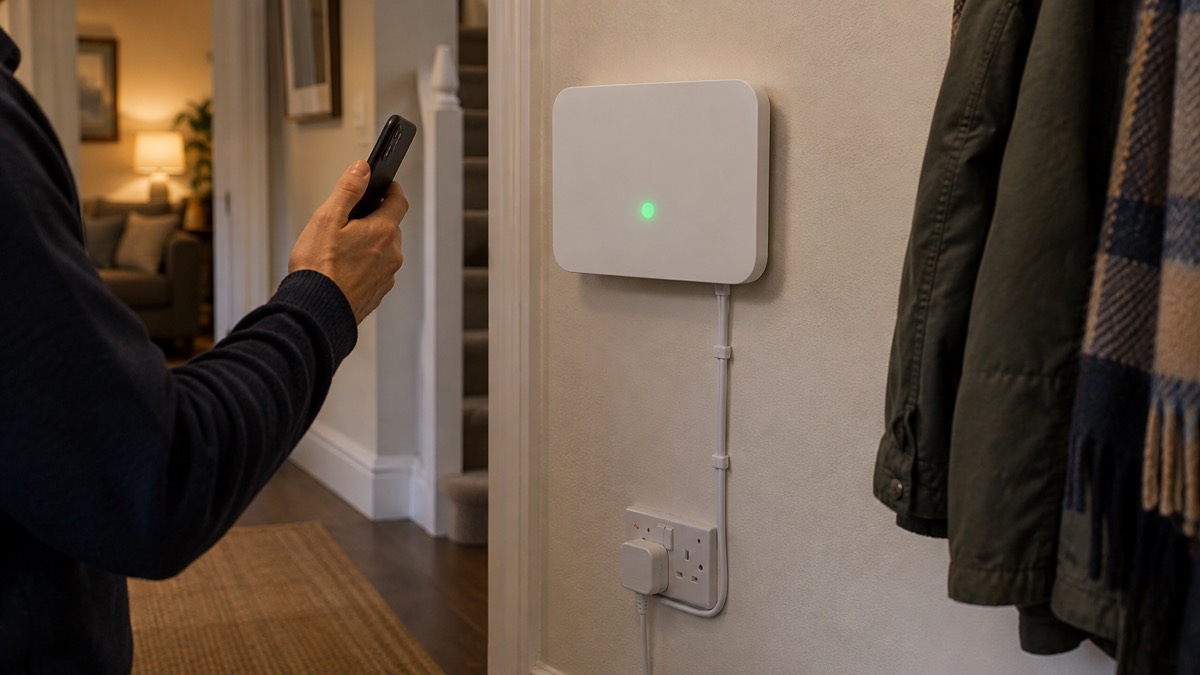
Powering on is a three second press of the power button until the Ajax logo lights up1. The maker states it takes about 2 minutes for the hub to upgrade to the latest firmware and connect to the internet1. If you are commissioning to a standard, the PD 6662 Setting Wizard is at Hub, then Settings, then Service, in the Ajax PRO app5.
Testing, updating and looking after the hub
Walk test mode lets you check every detector without setting off the alarm. When the system is switched to the testing mode, it does not raise an alarm or send it to monitoring software, but the maker states it still reports malfunctions and tamper alarm events1. Walk round, trigger each sensor, and confirm it registers.
Firmware updates can be automatic. If enabled, the firmware is automatically updated when a new version is available, and the maker states the system should be disarmed and external power should be connected to the hub1. Some features need a minimum version: telephony settings over the SIP protocol need OS Malevich 2.25 and later and are available only in the Ajax PRO apps1, and the VdS unavoidability principle needs OS Malevich 2.26 or later1.
On jamming, the maker states that if there is interference at the operating frequencies or a jamming attempt, Ajax switches to a free radio frequency and sends notifications to the central monitoring station and to system users1. The Jeweller protocol uses block cipher encryption and device authentication on every session, and reports jamming and connection loss15. A siren sound on connection loss is enabled by default17.
To reset to factory settings, hold the power button for 30 seconds until the Ajax logo starts blinking red, then remove the hub from your account1. Resetting does not delete connected users1, and on the Hub 2 the maker notes it does not remove users or clear the events feed5.
Support, warranty and where to get help
The warranty for Ajax Systems Manufacturing products is valid for 2 years after the purchase, and the maker states it does not apply to the bundled rechargeable battery1. Keep your proof of purchase and note the date.
If the hub does not function correctly, the maker asks you to contact Ajax Technical Support first, because in most cases technical difficulties can be resolved remotely18. The address given in the manuals is support@ajax.systems1. One Ajax manual states that its AI-powered chatbot and professional technical support team are available 24/75.
For the wider picture, our guides to monitored alarms and who responds and to keeping your home protected in a power cut explain how monitoring and backup fit into a household plan. If you are choosing between a professionally monitored system and one you run yourself, monitored or self-monitored alarm sets out the difference.
Sources (19)
- Hub 2 Plus user manual, Ajax Systems, 2026-09-25
- How Ajax notifies users of alerts | Ajax Systems Support, Ajax Systems
- Hub Plus user manual, Ajax Systems, 2026-09-25
- FireProtect Jeweller user manual | Ajax Support, Ajax Systems
- Hub 2 user manual, Ajax Systems, 2026-10-27
- Hub 2 Plus blackouts FAQ, Ajax Systems, 2024-04-01
- Hub 2 blackouts FAQ, Ajax Systems, 2024-07-03
- Stay connected in severe weather, Ofcom, 2026-10-13
- Ofcom stay connected in severe weather, Mobile UK, 2026-10-23
- Future of landline calls, Ofcom, 2024-02-07
- How an Ajax system operates in case of a power outage, Ajax Systems, 2026-08-19
- Superior Hub Hybrid 2 user manual, Ajax Systems, 2026-10-06
- Customer leaflet on power cuts, SP Energy Networks, 2025-06
- Detector communication failure FAQ, Ajax Systems, 2026-08-10
- FireProtect 2 RB Heat UL Jeweller, Ajax Systems, 2026-11-02
- FireProtect 2 RB Heat Smoke UL Jeweller, Ajax Systems, 2026-11-02
- Alert when connection lost, Ajax Systems, 2025-06-13
- Access devices user manual, Ajax Systems, 2026-05-06
- KeyPad Plus user manual, Ajax Systems, 2026-10-28

 Ajax Hub 4G Jeweller