

Photonic Universe is a UK supplier of solar power equipment: solar panels, charge controllers, batteries and inverters, the four parts that make up a small off-grid solar system. For a household thinking about backup power, the useful question is not what the company sells but what each part does, how the pieces fit together, and what you need to know to use them safely. This page takes each kit type in turn and explains its job in plain terms, then covers charging and storage safety, support, warranty and recalls.
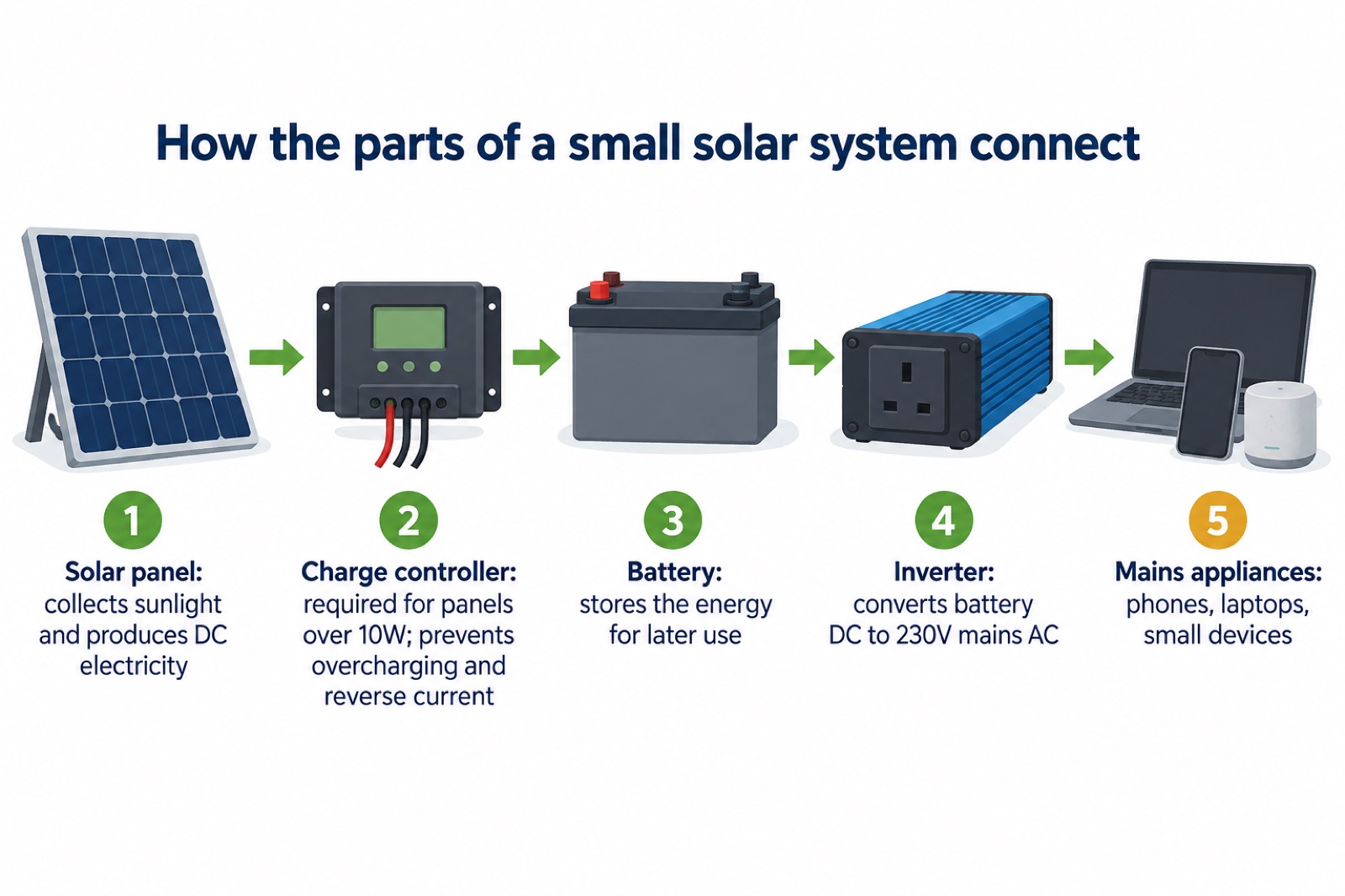
The single most important thing to understand is that a solar panel on its own does nothing useful. A solar charge controller is required for all solar panels over 10W, because it controls the voltage and current between the panel and the battery, preventing overcharging and reverse current flow1. An inverter then converts battery power (DC) into standard 230V mains electricity (AC) so ordinary appliances can run1. A battery stores the energy in between. Get any one of those parts wrong and the system either will not work or will not be safe.
If you already have a solar and battery installation with power backup capability, official guidance notes that some installations can continue to provide power during a power cut if they are designed and configured to operate independently of the electricity grid, which may help keep essential appliances running during an outage2. Whether yours does is a question for the maker or installer, not something to assume.
What Photonic Universe makes for UK households
Photonic Universe Ltd supplies solar power components for off-grid and backup use, and offers free UK delivery1. The range covers the four building blocks of a small solar system: panels to collect the sun's energy, controllers to manage the flow into the battery, batteries to store it, and inverters to turn it into mains power. The company's own guidance is written around leisure batteries and multiple battery arrangements, which is the kind of setup a shed, garage, camper or backup power store tends to use1.
That kit sits alongside the everyday lithium-ion batteries most households already own. Official fire service guidance describes these as rechargeable batteries ranging from mobile phones, vaping devices, e-bikes and scooters, vacuum cleaners, tablets, iPads and ear pods3. The safety principles for charging and storing them are the same whether the battery is in a phone or in a solar store, which is why the safety section below applies to all of it.
For the wider picture of how backup power fits into household planning, see Backup Power at Home: A Household Guide. If you are starting from scratch, Getting Started: Preparing Your Household for an Emergency sets out the order to do things in.
Solar panels and panel kits
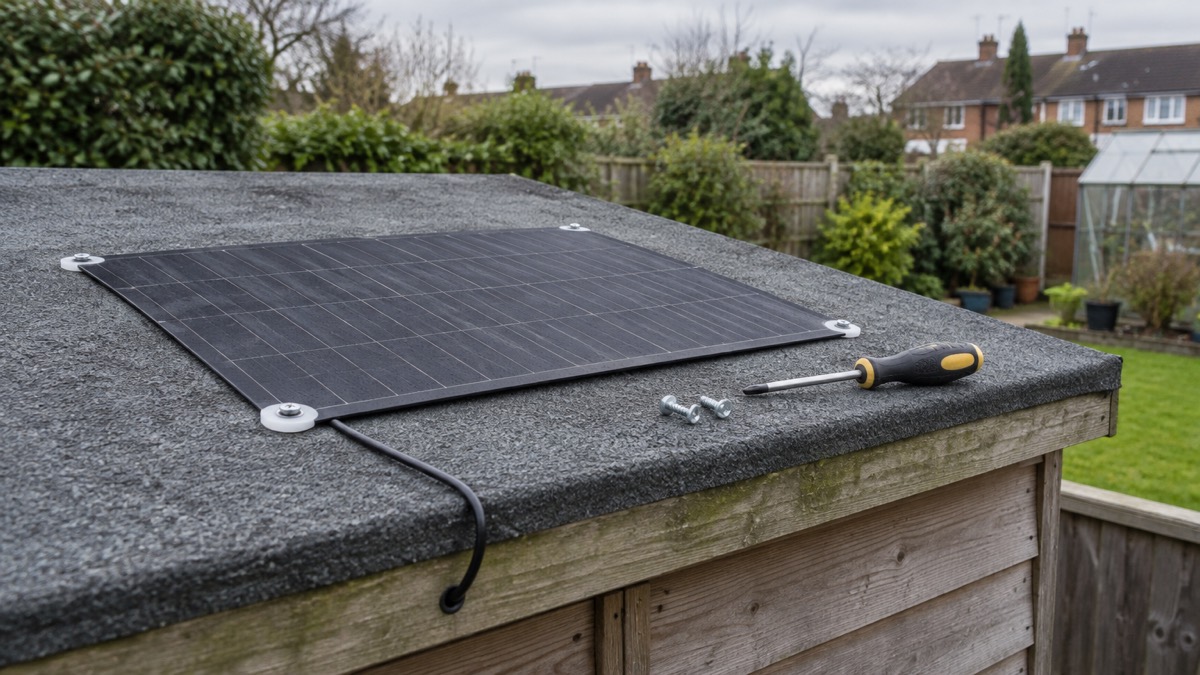
A solar panel turns sunlight into electricity. Photonic Universe supplies both rigid and flexible panels, and its guidance notes that most flexible panels will require self-tapping screws, not supplied by the company, positioned in the white plastic corners of the panel itself1. That is a fitting detail worth knowing before you plan an installation, because it affects what else you need to buy and where the panel can safely sit.
Where the panel goes matters as much as how it is fixed. Official fire safety guidance for plug-in solar panels, which it describes as small solar photovoltaic (PV) systems that can be plugged into a standard electrical socket to generate electricity from sunlight, says they can be placed in sunny outdoor spots such as a terrace, shed or outhouse roof, or a balcony4. But there are firm limits on placement in shared buildings:
- Solar panels and associated equipment should not block balconies which are shared, connecting apartments or common areas5.
- They should not obstruct shared balconies, walkways, corridors, windows or designated escape routes4.
- If you are plugging a solar panel into an outdoor socket, ensure it is a minimum IP65-rated installation fitted by a competent person5.
Those rules exist because a panel and its cabling can become an obstacle or a fire risk in a shared building. If you live in a flat, check with the building owner or managing agent before putting anything on a shared balcony or walkway.
Charge controllers: what they do in a solar setup
The charge controller is the part most people have never heard of, and it is the one that decides whether your battery survives. Photonic Universe's guidance is blunt: a solar charge controller, sometimes called a regulator, is required for all solar panels over 10W, because it controls the voltage and current between the solar panel and the battery, preventing overcharging and reverse current flow1. Without one, a panel can push more voltage into a battery than it can take, and at night current can flow back the other way.
The company's range includes 5A to 60A PWM solar charge controllers, which it describes as suited to connecting solar panels to one leisure battery1. For systems with more than one battery, it lists dual battery controllers, needed for multiple batteries in a solar power system1. Matching the controller to the panel is the main decision:
| Solar panel size | Controller options listed by the maker |
|---|---|
| Up to 60W | 5A standard controller, waterproof 10A controller, 10A dual battery controller, or 10A MPPT controller for maximum efficiency1 |
| Up to 130W | 10A standard controller, waterproof 10A controller, 10A dual battery controller, or 10A MPPT controller for maximum efficiency1 |
The pattern is that a bigger panel needs a controller rated to handle more current, and that MPPT controllers are listed for maximum efficiency rather than as a requirement. A waterproof controller is the sensible choice for an outdoor or shed installation where damp is possible. If you are unsure which applies to your panel, the panel's own rating and the maker's guidance are the two things to check.
Batteries and storing solar power
The battery is where the energy waits until you need it. Photonic Universe's guidance is framed around leisure batteries, the type used in caravans and motorhomes, and around systems with more than one battery, which is why it lists dual battery controllers for multiple battery setups1. The size and number of batteries you choose determines how long your stored power lasts, and the controller has to be matched to that arrangement.
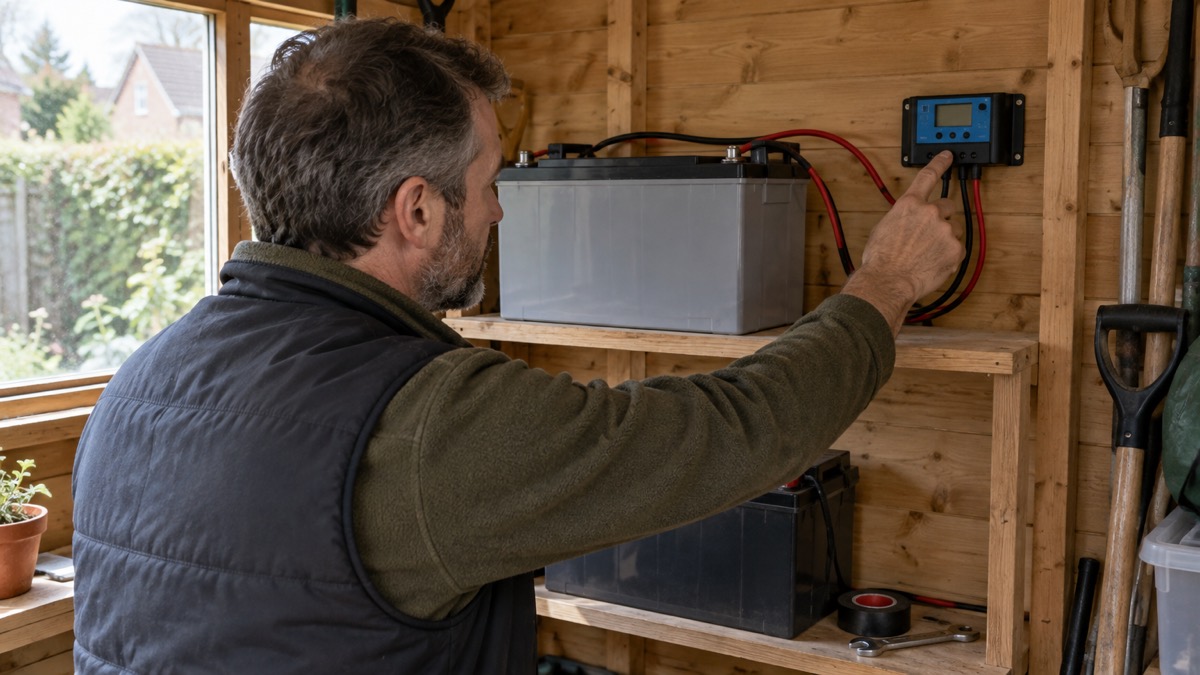
Storage conditions matter as much as capacity. Official fire safety guidance warns that direct sunlight or freezing temperatures can damage a battery, and says to avoid storing, using or charging batteries in these extreme temperatures, for example in a car7. A shed or garage that drops below freezing in winter is therefore a poor home for a battery you rely on. Keep it somewhere that stays within the maker's stated temperature range, and follow the maker's instructions for using, charging, storing and disposing of rechargeable batteries8.
For a household building a backup power store, the practical points are:
- Match the controller to the number of batteries, using a dual battery controller where there is more than one1.
- Keep batteries out of freezing conditions and direct sunlight7.
- Follow the maker's instructions for charging, storage and disposal8.
- Treat a swollen battery as a hazard and contact the manufacturer or a certified technician9.
Inverters: running mains devices from a battery
An inverter is a small device that can convert battery power (DC) to standard 230V mains electricity (AC)1. In practice it is what lets a stored 12V battery run a mains plug, a charger or a small appliance. Without one, your battery can only feed devices designed for its own voltage.
What you plug in decides how big the inverter needs to be and how long the battery will last. The everyday items people want to keep running are the same ones official guidance lists as powered by lithium-ion batteries: phones, laptops, vapes, toys, power tool packs, e-bikes and more6. Small electronics draw little; anything that heats, such as a heater or a kettle, draws a great deal and will flatten a modest battery quickly. Plan around the small, essential loads first.
There is a safety dimension to inverters that is easy to overlook. They produce mains voltage from a battery, so the same care applies as with any mains socket: keep them dry, keep them ventilated, and do not cover them while running. If you are thinking about connecting an inverter to your home's fixed wiring rather than plugging appliances into it directly, that is a job for a qualified electrician, not a DIY addition. For the wider choices, see Backup Power at Home: A Household Guide.
Portable solar for power cuts
Portable solar is the simplest way into solar power: a folding panel that charges a phone or tablet directly, with no battery, controller or inverter of your own. The principle is the same across makers. Anker's SOLIX PS30 portable solar panel, for example, has a USB-C output of 5V 3A and a USB-A output of 5V 2.4A, and the maker states it is compatible with low-power devices such as mobile phones and tablets10. That is the class of device this kind of panel is built for.
Set expectations accordingly. A small folding panel is a way to keep a phone alive during an outage, not a way to run a fridge. For a power cut, the official advice is to have a torch and spare batteries ready11, and to think through what you would actually need to keep charged. A phone for alerts and contact with family is usually top of the list.
For more on planning for an outage, see Power Cuts: A Household Guide and Staying Informed and in Touch in an Emergency.
Safe charging, use and storage
Every battery in your home, whether it came with a solar kit or a phone, carries some fire risk if it is charged or stored badly. The fire and rescue service advice is consistent across the UK, and it is worth following it exactly.
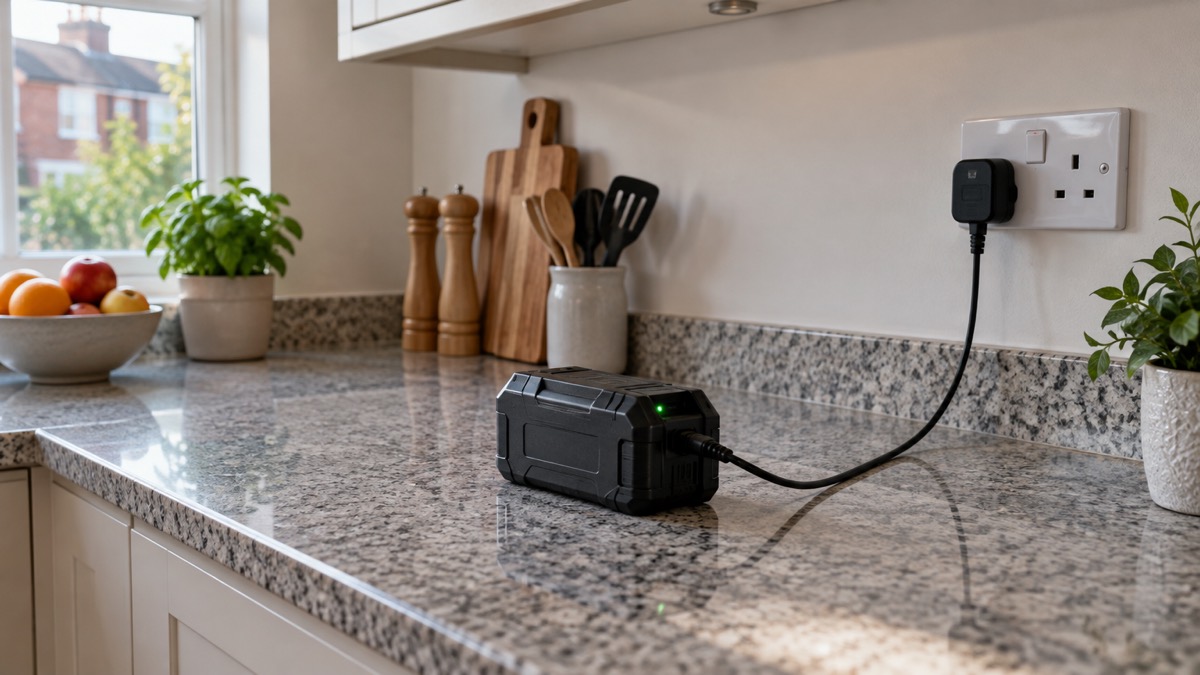
The reasoning behind each point is practical. Charging somewhere visible means you notice a problem early. A hard, flat, heat-resistant surface lets heat escape and will not feed a fire. Keeping batteries away from escape routes means a fire starting at the battery does not block your way out. And never covering a charging battery prevents the heat build-up that starts fires in the first place8.
For solar kit specifically, the same rules apply as for any rechargeable battery: always follow the manufacturer's instructions for using, charging, storing and disposing of rechargeable batteries8. Photonic Universe's own products should be charged and stored within the temperature range the maker states. If a battery swells, contact the manufacturer or a certified technician rather than continuing to use it9.
Support and warranty
Photonic Universe Ltd is registered in England and Wales, company number 07722726, with VAT number GB124672421 and a registered office at TMS House, Cray Avenue, Orpington, Kent, BR5 3QB1. That is the formal detail you need if you are writing to the company or checking who you are dealing with.
For support, the company's own site is the place to start, and having the right details ready speeds things up. When you register an appliance, you will typically be asked for the model name or number, the serial number and the purchase date12. Keep those to hand before you call or email about a fault.
Warranty cover varies by product and maker, so check the documentation that came with your item. Some makers extend cover only if you register. Ledlenser, for example, offers a warranty covering defects in manufacturing of up to 7 years on its P6R Core torch, with registration required for the extension13. That is one maker's terms for its own product, not a statement about Photonic Universe's cover, which you should confirm with the company for the item you own.
Registering electrical items is worth doing whatever you buy, because it is how manufacturers reach you if a safety recall is issued14. The same advice appears across fire services: register your electrical items with the manufacturer to be informed of any safety recalls15.
Safety notices and recalls
Product recalls are issued when an item already in people's homes is found to be unsafe. The Office for Product Safety and Standards issues recalls and alert notices on its website16, and checking there is the quickest way to find out whether something you own is affected.
Recent recalls show the range of what can be involved. A product recall was issued for Bull and Cygnus Fire Alarm Detection Systems, and Bull Products and Cygnus Group commenced a phased replacement programme to replace all affected NCUs, including units that have not exhibited failures17. Separately, A.Vogel Ltd recalled a batch of its Rapunzel Biosnacky seeds, with point of sale notices displayed in all retail stores selling the product and on its website18. Neither is solar equipment, but both illustrate the pattern: a recall names the product, says what to do, and the maker arranges the remedy.
For your own kit, the practical steps are:
- Register electrical items with the manufacturer so you are told about recalls14.
- Check the Office for Product Safety and Standards website for recall notices16.
- Beware of fake products, as they may not meet safety requirements19.
- If an item is recalled, follow the notice rather than trying to repair or source parts yourself17.
Sources (20)
- Caravans and motorhomes: solar power guidance, Photonic Universe, 2026
- Power cuts, UK Government Prepare campaign, 2026
- Lithium-ion batteries, South Wales Fire and Rescue Service, 2026
- Plug-in solar panels, London Fire Brigade, 2026
- Plug-in solar panels: safety advice for residents and homeowners, London Fire Brigade, 2026
- Battery safety, Tower Hamlets Council, 2026
- Vaping and e-cigarettes, London Fire Brigade, 2026
- Battery safety, Greater Manchester Fire and Rescue Service, 2026
- Batteries and chargers, London Fire Brigade, 2026
- SOLIX PS30 Portable Solar Panel, Anker SOLIX, 2026
- WeatherReady winter poster, Met Office, 2026
- Electrical safety | Scottish Fire and Rescue Service, Scottish Fire and Rescue Service
- P6R Core, Ledlenser, 2026
- Electrical fire safety leaflet, Greater Manchester Fire and Rescue Service, 2026
- Electrical safety at home, Greater Manchester Fire and Rescue Service, 2026
- Electrical items, London Fire Brigade, 2026
- Product recall: Bull and Cygnus Fire Alarm Detection System (FADS), Office for Product Safety and Standards, 2026
- A.Vogel Ltd recalls Rapunzel Biosnacky seeds, Food Standards Scotland, 2026
- Electrical safety, Lincolnshire County Council, 2026
- Product recall: Pom Power banks sold by TK Maxx, Office for Product Safety and Standards, 2026